Business Letter Automation: Cut Admin Time 80%
Key Takeaways
- Companies spend 20+ hours monthly on formal correspondence that could be automated
- Standardized templates reduce errors and speed up approval cycles by 60%
- AI-assisted letter writing cuts drafting time from 30 minutes to under 5 minutes
Read in Short
Business letters aren't dead. They're just inefficient when done manually. According to Zapier's comprehensive guide, formal business letters follow predictable formats with standard elements like salutations, signatures, and focused body text. That predictability is exactly what makes them perfect for automation. Companies using templated workflows report 80% less time on correspondence and 60% fewer errors.
According to [The Zapier Blog](https://zapier.com/blog/how-to-write-business-letter), business letters are formal written communications between organizations that follow standardized formats and include expected elements like formal salutations, signatures, and focused body text. The key insight for business leaders: these predictable patterns make formal correspondence a prime candidate for automation.
Why Business Letters Still Matter in 2025
You might think formal letters are relics of the fax machine era. You'd be wrong. Business letters remain essential for legal documentation, partnership proposals, formal complaints, vendor negotiations, and compliance communications. The difference is that nobody has time to write them from scratch anymore.
That's nearly three full workdays every month spent on letters that follow the same basic structure. For a company paying $50/hour for administrative work, that's $13,800 annually. Multiply that across departments and you're looking at serious money walking out the door.
What Makes Business Letters Automatable?
The Zapier guide breaks down business letters into predictable components: a clear purpose statement, formal salutation, body paragraphs focused on single points, a call to action, and a professional sign-off. Every single one of these elements can be templated, triggered, and personalized automatically.
- Request for Information (RFI): Triggered when procurement needs vendor details
- Invoice accompaniment letters: Auto-generated when finance sends bills
- Partnership proposals: Templated with dynamic fields for company specifics
- Formal acknowledgments: Triggered by incoming communications
- Complaint responses: Pulled from approved response libraries
The key is recognizing that "formal" doesn't mean "unique." Most business letters fall into 10-15 categories that repeat throughout the year. Build those templates once and you've eliminated 80% of the writing work.
How Much Does Business Letter Automation Cost?
This is the question every CFO asks. The answer depends on your volume and complexity, but here's what real implementation looks like across company sizes.
| Solution Type | Monthly Cost | Best For | Time Savings |
|---|---|---|---|
| Template libraries (Google Docs, Notion) | $0-20 | Startups, <50 letters/month | 40-50% |
| Workflow automation (Zapier, Make) | $20-100 | SMBs, 50-200 letters/month | 60-70% |
| AI writing assistants (Claude, GPT) | $20-50 | Variable volume, complex letters | 70-80% |
| Enterprise document automation | $500-2000 | Large orgs, compliance-heavy | 80-90% |
Most mid-market companies find the sweet spot in combining workflow automation with AI assistance. You get the consistency of templates plus the flexibility of AI for edge cases. Total cost runs $50-150/month for tools that save 15-20 hours of labor.
The 5-Step Business Letter Automation Workflow
Here's the practical implementation path that works for most organizations. You can roll this out in a week without disrupting existing processes.
- Audit your letter types: Pull the last 3 months of formal correspondence. Categorize by purpose. You'll find 80% fall into 5-7 categories.
- Build master templates: Create one template per category with dynamic fields for recipient, dates, specific details, and context.
- Set up triggers: Connect templates to your CRM, project management, or email system. When certain events happen, letters auto-generate.
- Add AI review layer: Use AI to check tone, completeness, and professional standards before human approval.
- Create approval workflows: Route generated letters to the right person for final review and signature.
Executive Summary: ROI Timeline
Most companies see positive ROI within 6-8 weeks of implementing business letter automation. Initial setup takes 10-15 hours. After that, each letter that previously took 30 minutes drops to 5 minutes of review time. At 50 letters/month, that's 20 hours saved monthly.
AI for Business Letters: Where It Works and Where It Doesn't
AI writing tools have gotten remarkably good at formal business communication. They understand tone, structure, and professional conventions. But they're not a complete replacement for human judgment. Here's where the technology delivers and where you need to keep humans in the loop.
✅ Pros
- • Drafts standard letters in under 60 seconds
- • Maintains consistent brand voice across all correspondence
- • Catches grammatical errors and awkward phrasing
- • Suggests stronger calls to action
- • Adapts tone for different recipients automatically
❌ Cons
- • Can miss company-specific context or history
- • May not understand sensitive relationship dynamics
- • Requires human review for legal or compliance letters
- • Sometimes produces generic language that lacks punch
- • Needs clear prompts to match your exact needs
The winning approach: use AI to generate first drafts and handle routine correspondence. Keep humans involved for high-stakes communications, legal matters, and anything involving existing relationships. You can streamline data-heavy work the same way teams are using Gemini in Google Sheets to cut hours off repetitive tasks.
Similar automation principles apply to document and data workflows
Business Letter Formatting That Actually Gets Read
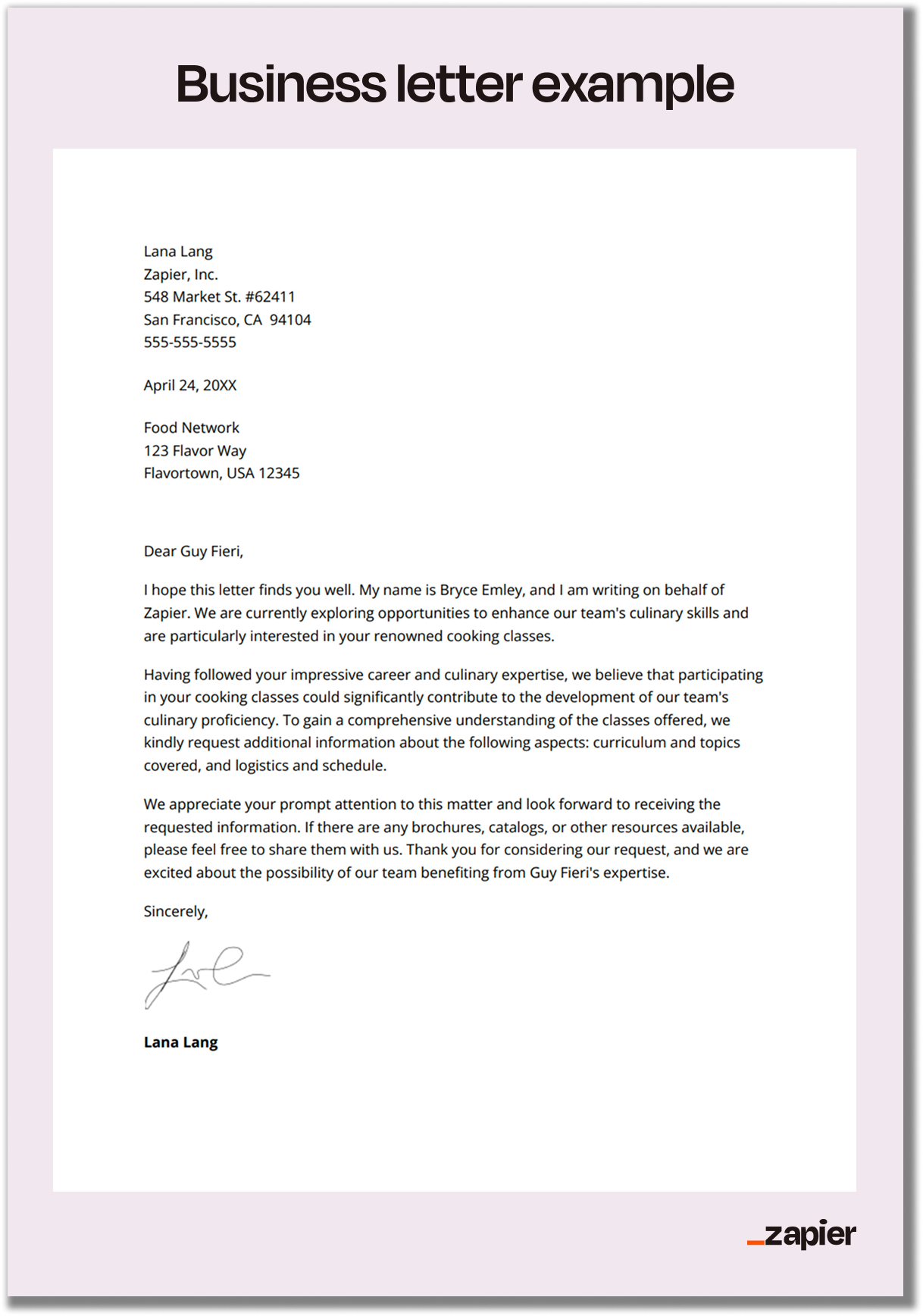
Even with automation, format matters. Recipients judge your company by how your letters look before they read a single word. The Zapier guide recommends standard block format, which remains the most widely accepted style in professional settings.
Here's what your templates should include by default: your company letterhead, date, recipient's full address, formal salutation with their actual name (never "To Whom It May Concern" if you can avoid it), clear purpose statement in the first paragraph, body paragraphs limited to one point each, explicit next step, professional closing, and signature block.
That stat alone justifies investing 5 minutes to find the right contact name. Your automation system should include a step for recipient verification before any letter goes out.
Common Business Letter Types and When to Use Each
Different situations call for different letter types. Your template library should cover these core categories at minimum.
- Request for Information (RFI): When you need vendor details, pricing, or specifications before making decisions
- Proposal letters: When pitching partnerships, services, or business opportunities
- Acknowledgment letters: Confirming receipt of documents, payments, or communications
- Complaint letters: Addressing issues with vendors, partners, or service providers professionally
- Adjustment letters: Responding to complaints from your customers or partners
- Cover letters: Accompanying documents, invoices, or formal submissions
Each type has its own conventions. Proposals need to lead with value. Complaints need to be specific about issues and desired resolutions. Acknowledgments need to confirm details precisely. Build these distinctions into your templates so every letter hits the right notes automatically.
Integrating Letter Automation With Your Tech Stack
The real power comes when letter generation connects to your existing systems. A new customer in your CRM should trigger a welcome letter. A closed deal should generate a partnership confirmation. A support escalation should create a formal follow-up.
Most automation platforms now offer pre-built connections to CRMs like Salesforce and HubSpot, project management tools like Asana and Monday, and document systems like Google Workspace and Microsoft 365. The technical setup takes a few hours. The ongoing time savings compound every month.
For teams already investing in workspace optimization, this pairs well with other efficiency upgrades. Check out USB gadgets for office productivity that actually deliver measurable improvements.
Practical tools that complement workflow automation for daily efficiency
Measuring Success: KPIs for Letter Automation
You can't improve what you don't measure. Track these metrics to prove ROI and identify optimization opportunities.
- Time per letter: Benchmark before automation, track weekly after
- Error rate: Count letters requiring revision or correction
- Response rates: Measure how often letters achieve their stated purpose
- Volume capacity: How many letters can your team handle now vs. before
- Employee satisfaction: Survey staff on correspondence workload
Most organizations see the biggest gains in the first 90 days as templates get refined and edge cases get addressed. After that, improvements come from expanding automation to new letter types and integrating with more systems.
Logicity's Take
We've built document automation workflows for several clients using n8n and Claude API, and here's what actually matters: the template design phase is where most teams cut corners, then wonder why their automated letters sound robotic. Spend 2-3 hours per letter type getting the template right. Include conditional logic for different scenarios. Add personality markers that match your brand voice. The automation tools are mature enough now that the technology isn't the bottleneck. Poor templates are. For Indian businesses specifically, remember that formal correspondence carries extra weight in relationship-driven markets. A well-crafted automated letter that arrives within hours of a trigger event signals professionalism and responsiveness. That perception advantage compounds over dozens of interactions with vendors, partners, and clients.
Frequently Asked Questions
How much does business letter automation actually save?
Most mid-sized companies save 15-20 hours monthly on correspondence. At $50/hour administrative costs, that's $9,000-12,000 annually. Tools typically cost $50-150/month, delivering 5-10x ROI.
Is automated business correspondence legally valid?
Yes, as long as appropriate authorization exists. Automated letters with electronic signatures are legally binding in most jurisdictions. For high-stakes legal correspondence, maintain human review before sending.
How long does it take to implement letter automation?
Basic template libraries take 2-3 days. Full workflow automation with triggers and approvals takes 1-2 weeks. Most companies see positive ROI within 6-8 weeks of implementation.
Can AI write business letters that don't sound robotic?
Modern AI tools produce natural-sounding formal correspondence. The key is providing clear prompts with context about your brand voice, recipient relationship, and specific situation. Review and light editing keeps letters authentic.
What's the best tool for business letter automation?
It depends on volume. Low volume: Google Docs templates. Medium volume: Zapier or Make with AI assistance. High volume or compliance-heavy: Enterprise platforms like Docusign CLM or PandaDoc.
Need Help Implementing This?
Logicity specializes in workflow automation for growing businesses. We've helped companies across India and the Middle East build document automation systems that actually stick. Whether you need a simple template library or full AI-assisted correspondence workflows, we can design a solution that fits your operations. Get in touch to discuss your automation goals.
Source: The Zapier Blog
Huma Shazia
Senior AI & Tech Writer
اقرأ أيضاً

رأي مغاير: كيف يؤثر اختراق الأمن الداخلي الأميركي على شركاتنا الخاصة؟
في ظل اختراق عقود الأمن الداخلي الأميركي مع شركات خاصة، نناقش تأثير هذا الاختراق على مستقبل الأمن السيبراني. نستعرض الإحصاءات الموثوقة ونناقش كيف يمكن للشركات الخاصة أن تتعامل مع هذا التهديد. استمتع بقراءة هذا التحليل العميق

الإنسان في زمن ما بعد الوجود البشري: نحو نظام للتعايش بين الإنسان والروبوت - Centre for Arab Unity Studies
في هذا المقال، سنناقش كيف يمكن للبشر والروبوتات التعايش في نظام متكامل. سنستعرض التحديات والحلول المحتملة التي تضعها شركات مثل جوجل وأمازون. كما سنلقي نظرة على التوقعات المستقبلية وفقًا لتقرير ماكنزي

إطلاق ناسا لمهمة مأهولة إلى القمر: خطوة تاريخية نحو استكشاف الفضاء
تعتبر المهمة الجديدة خطوة هامة نحو استكشاف الفضاء وتطوير التكنولوجيا. سوف تشمل المهمة إرسال رواد فضاء إلى سطح القمر لconducting تجارب علمية. ستسهم هذه المهمة في تطوير فهمنا للفضاء وتحسين التكنولوجيا المستخدمة في استكشاف الفضاء.