Key Takeaways
This free Mac app reveals the truth about your mystery USB-C cables | AI Tech Daily
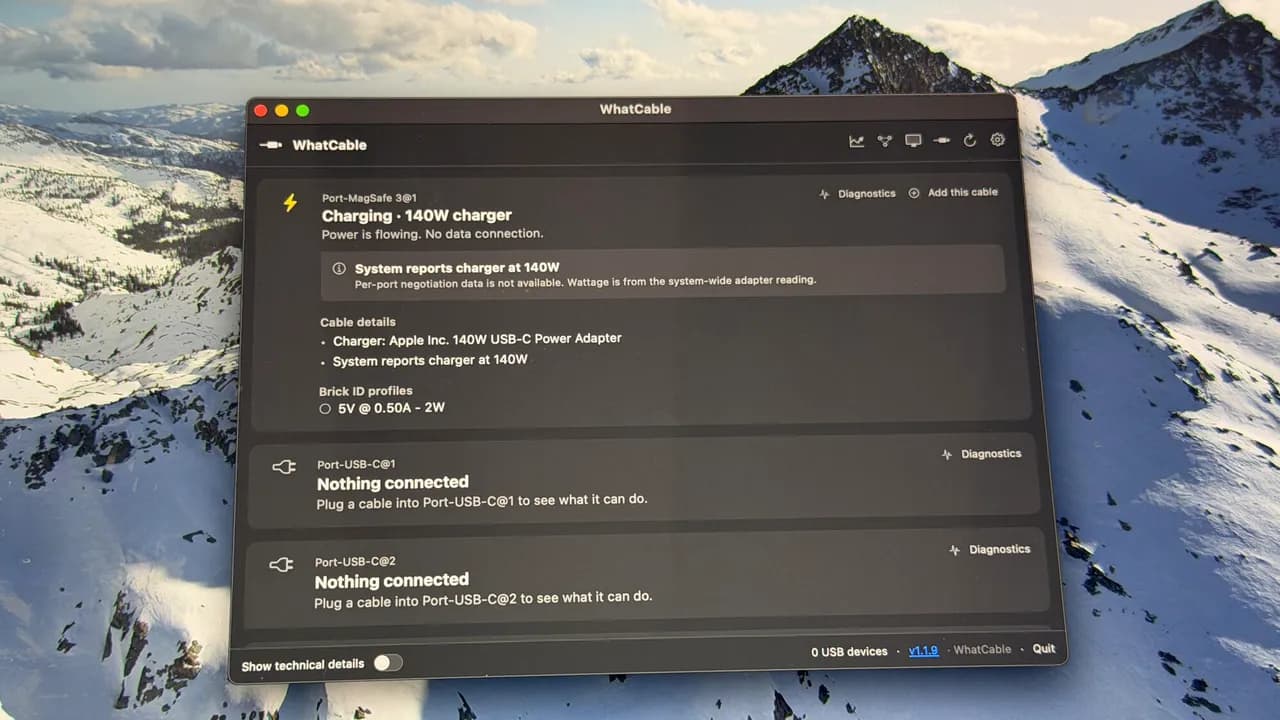
- WhatCable is a free, open-source Mac app that reads USB-C cable specifications directly from the cable's electronic markers
- Testing revealed several cables falsely claiming higher power delivery or data transfer speeds than they actually support
- The app requires Apple Silicon (M1 or later) and macOS 14 Sonoma, with no analytics or tracking
A free Mac app called WhatCable exposes a dirty secret in your cable drawer: many USB-C cables lie about their specs. Adrian Kingsley-Hughes at ZDNET tested his collection and found several cables that claimed high-speed data transfer or fast charging but delivered neither.
The core problem is that every USB-C cable looks identical. A $5 charge-only cable from a phone box is physically indistinguishable from a $159 Thunderbolt 4 cable rated for 40 Gbps and 100W. Until now, the only way to know what you had was specialized hardware testers or trial and error. WhatCable reads the electronic markers embedded in the cable itself and reports the truth.
How WhatCable reads your cables
WhatCable is an open-source app from Quill Labs that runs on any Apple Silicon Mac (M1 through M5) with macOS 14 Sonoma or later. Download it from whatcable.uk, unzip, and run. If you prefer Homebrew, one terminal command handles the install.
Plug a USB-C cable into your Mac and the app reads its specs immediately, even if nothing is connected to the other end. For full details, such as actual negotiated power delivery, you need an active device like a charger or dock on the far side.
The app identifies USB version (2.0, 3.0, 3.1, 4.0, or Thunderbolt), maximum data transfer speed, and power delivery rating. It also diagnoses charging slowdowns, intermittent dock connections, and slow external drives.
Why this matters for your hardware
The gap between USB-C cable tiers is enormous. A basic USB 2.0 cable maxes out at 480 Mbps. A USB4 or Thunderbolt 4 cable hits 40 Gbps, 83 times faster. Both have the same connector. The 2024 EU mandate requiring USB-C on all portable electronics has only increased the number of mediocre cables floating around.
Power delivery varies just as wildly. Older cables support 60W or less. USB-C PD 3.1 cables handle up to 240W. Using the wrong cable means your MacBook Pro charges at a crawl, or your high-end monitor flickers because it can't negotiate enough bandwidth.
Privacy and pricing
WhatCable takes an unusual stance on privacy. No analytics, no tracking, nothing about your cables leaves your Mac. The app does check GitHub for updates, and you can optionally contribute diagnostic data to the community database. But the default is silent.
The free version handles most use cases. A Pro version costs £9.99 and unlocks advanced diagnostics. Kingsley-Hughes noted the app can also read MagSafe port details on MacBooks, a feature not mentioned in the official documentation.
What the tests revealed
Kingsley-Hughes found cables in his collection that claimed 100W and 40 Gbps but were actually USB 2.0 with basic charging. Others negotiated lower power than advertised. The app's value is immediate: you can finally purge the liars from your drawer and label the good ones.
For IT teams managing dozens of workstations or docks, this saves real debugging time. A slow dock connection might be a faulty dock, a bad port, or, often, a cheap cable someone grabbed from a box.
Logicity's Take
WhatCable fills a gap that hardware testers like the $30-50 USB-C cable testers from brands like Plugable or Cable Matters currently occupy. Those testers work with any computer; WhatCable is Mac-only but free and more detailed. For teams using [Notion](https://logicity.in/r/notion) or [ClickUp](https://logicity.in/r/clickup) to track IT assets, the app pairs well with a simple inventory sheet. Test each cable once, label it, log the specs. The £9.99 Pro version is worth it if you're managing more than a handful of workstations. Otherwise, the free tier handles everything most users need.
Disclosure
Some links in this post are affiliate links — Logicity earns a commission if you sign up, at no extra cost to you. We only link products we have used or actively recommend.
Frequently Asked Questions
Does WhatCable work on Intel Macs?
No. The app requires Apple Silicon, meaning M1, M2, M3, M4, or M5 chips. Intel Macs are not supported.
Can WhatCable test cables without a device attached?
It can identify the cable and read basic specs. For full diagnostics like negotiated power delivery, you need a charger or dock connected to the other end.
Is WhatCable open source?
Yes. The source code is available, and the app is free to use. A paid Pro version with advanced features costs £9.99.
Why do USB-C cables vary so much in capability?
USB-C is a connector standard, not a performance standard. The same physical plug can carry USB 2.0 at 480 Mbps or Thunderbolt 4 at 40 Gbps depending on the wiring and chips inside.
Need Help Implementing This?
If your team is struggling with USB-C compatibility across workstations, docks, and peripherals, reach out. We help IT teams audit hardware, document standards, and build procurement guidelines that prevent the cheap-cable trap.
Source: Latest news
Manaal Khan
Tech & Innovation Writer
Produced with AI assistance and reviewed by the Logicity editorial team. Learn more in our Editorial Policy.




