Key Takeaways
Microsoft is Testing Windows 11 AI PC Troubleshooting! (Copilot Insights)
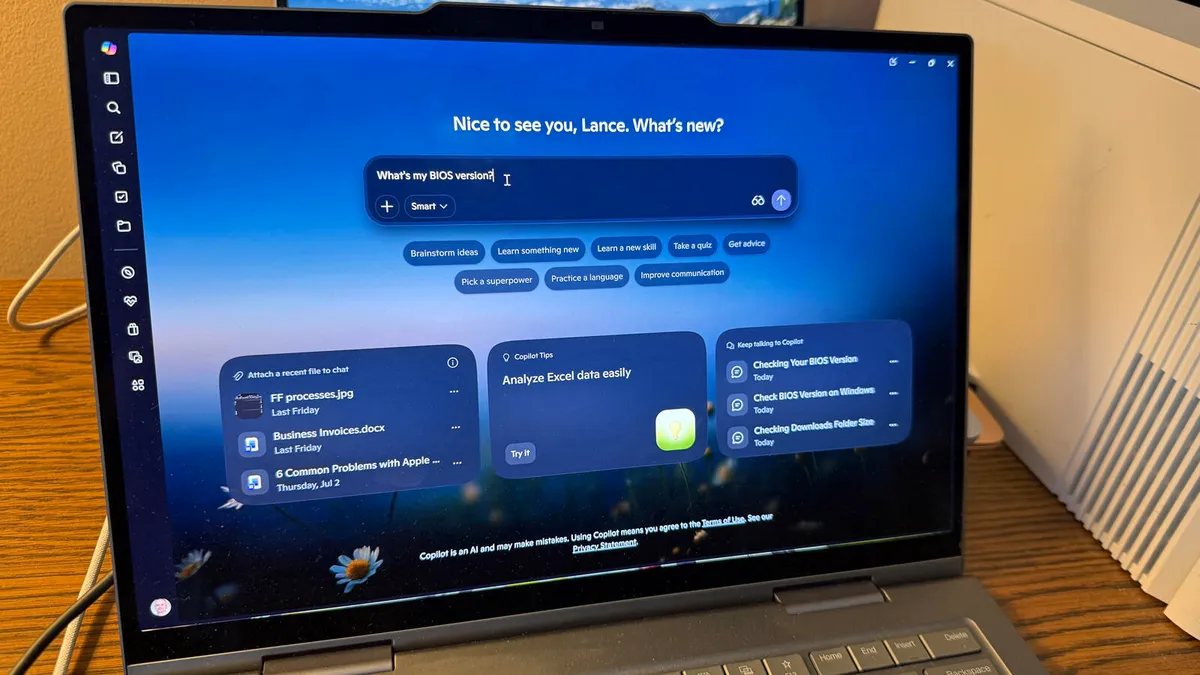
- Microsoft's Copilot Windows app now includes PC Insights, a skill that analyzes your system to answer questions about hardware, software, and settings
- Users can ask about battery health, BIOS version, CPU usage, storage space, and printer status without digging through Settings menus
- Copilot can identify problems but cannot fix issues or make system changes on its own
Microsoft is rolling out a new Copilot feature called PC Insights that lets the AI assistant answer questions about your Windows system by directly analyzing your hardware, software, and settings. Ask about your battery health, BIOS version, or whether you have enough storage for a large game, and Copilot pulls the information without you navigating through Settings menus.
The feature, now arriving in the Copilot Windows app, represents Microsoft's clearest move yet toward making its AI useful for everyday PC maintenance. Rather than serving as a glorified search bar or chatbot, Copilot can now access local system data to give specific, contextual answers.
What can you ask PC Insights?
Microsoft lists several example queries: "How is my battery health?" "What's my BIOS version?" "What's my current CPU usage?" "What network adapters does my PC have?" "Do I have enough storage for a large game or app?" "Is my printer online?"
These are the exact questions that typically send users hunting through Device Manager, System Information, or various Settings submenus. The premise is simple: ask in plain language, get a direct answer.
When you pose a question, Copilot requests permission to access the relevant system resources. You can grant access for a single request, allow it for all similar requests, or deny it for the session. A session ends when you close the app or restart your computer. Microsoft states that Copilot won't store your personal files or use them to train AI models, and you can revoke permissions anytime through privacy settings.
Why this matters for troubleshooting
IT professionals and advanced users already know where to find system information. But they also know it takes time. Checking CPU usage means opening Task Manager. Verifying BIOS version requires System Information or a command line. Diagnosing printer connectivity involves multiple steps. PC Insights compresses these tasks into a conversational query.
For less technical users, the value is more fundamental. Many people struggle to locate basic system details, especially when troubleshooting a problem they don't fully understand. An AI that can surface this information on request lowers the barrier to self-service support.
That said, Copilot's capabilities stop at information gathering. According to Microsoft, the AI will answer questions about your system, clarify technical information, and explain what's happening on your PC. It cannot fix issues, make system changes, or automatically run troubleshooting steps. Once Copilot identifies a potential problem, you're on your own to resolve it.
The limitations are significant
This read-only design is both a safety feature and a constraint. Microsoft likely doesn't want Copilot accidentally deleting files or changing settings based on a misunderstood prompt. But it also means PC Insights is diagnostic, not remedial. You can learn that your storage is nearly full; you cannot ask Copilot to clear temporary files.
The gap between knowing a problem exists and fixing it is where most users get stuck. If Copilot tells you your BIOS is outdated, you still need to know how to update it safely. If it reports a network adapter issue, you're left to figure out drivers or hardware failures yourself. The AI becomes a more convenient version of system utilities you already have, not a replacement for technical expertise.
Rolling out gradually
PC Insights is arriving through a phased rollout, which means not everyone has access yet. ZDNet's Lance Whitney reports that the feature hasn't appeared on his main Windows 11 laptop or two virtual machines as of mid-July 2026. If you don't see it, expect to wait.
You'll need the Copilot Windows app installed. This is the standalone application, separate from the Copilot integration in Edge or the Bing sidebar. The feature appears to be Windows 11 focused, though Microsoft hasn't explicitly excluded Windows 10.
Logicity's Take
PC Insights is a sensible addition, but it's incremental rather than transformative. Microsoft is training users to interact with their operating system through natural language, a long-term play that pays off once Copilot can actually take action. For IT teams, the real value would be fleet-wide diagnostics: imagine querying Copilot about common issues across managed devices. That's not here yet. For now, this competes with tools like Speccy, HWiNFO, or even Windows' own built-in utilities. The AI wrapper makes access easier, but the underlying capability is unchanged.
What this signals about Microsoft's AI strategy
Microsoft has positioned Copilot as the interface layer for everything from Office documents to code generation. Adding local system awareness suggests the company sees personal computing as part of that same fabric. Your PC becomes another data source Copilot can query, alongside your emails, calendar, and files.
The privacy model matters here. Microsoft emphasizes that Copilot doesn't store personal files or use them for training. If users believe that, they'll grant more permissions over time. If they don't, PC Insights becomes another feature people disable.
Frequently Asked Questions
How do I get Copilot PC Insights on Windows?
Download the Copilot Windows app from the Microsoft Store. PC Insights is rolling out gradually, so you may need to wait for the feature to appear.
Can Copilot fix Windows problems automatically?
No. PC Insights can answer questions about your system and identify potential issues, but it cannot make changes, run troubleshooting steps, or fix problems on its own.
Does Copilot PC Insights store my personal data?
Microsoft states that Copilot does not store personal files or use them to train AI models. You can revoke permissions at any time through Copilot's privacy settings.
What questions can I ask PC Insights?
You can ask about battery health, BIOS version, CPU usage, network adapters, storage space, printer status, and other system-level information.
Microsoft's broader AI strategy and pricing considerations for enterprise users
Need Help Implementing This?
If you're evaluating AI tools for your organization's IT operations or need help integrating Microsoft Copilot into your workflows, contact our team for implementation guidance.
Source: Latest news
Manaal Khan
Tech & Innovation Writer
Produced with AI assistance and reviewed by the Logicity editorial team. Learn more in our Editorial Policy.




