Key Takeaways
- Popup Widget creates on-demand widgets that appear only when tapped, keeping home screens minimal
- Edge Gestures enables system-wide widget access from any app via custom gestures
- Custom launchers like Smart Launcher and Niagara include built-in widget summoning without extra apps
Android widgets have been around since 2008, making them older than most enterprise mobility strategies. Google neglected them for nearly a decade before reviving them in Android 12's 2021 update. The timing was curious: Apple had just introduced home screen widgets in iOS 14, and suddenly Google remembered it had a head start.
For IT leaders managing Android device fleets or looking to improve their own mobile workflows, widgets remain underused. Most people stick to weather, calendar, and clock widgets. That misses the point. The real value comes from widgets that surface information and actions without forcing app context-switches. Here are five techniques that push Android widgets beyond their default behavior.
On-demand widgets that hide until you need them
Widget clutter defeats the purpose. If your home screen looks like a dashboard, you spend more time scanning than acting. An app called Popup Widget solves this by disguising widgets as regular icons. Tap the icon, and the widget loads as an overlay. Dismiss it, and your screen stays clean.

The setup is straightforward. Install Popup Widget (costs $2, no subscriptions), choose which widget you want to trigger, customize the icon and placement, then add the shortcut to your home screen. You can even stack multiple widgets behind a single icon. Tap once, and both your inbox and calendar appear together.

For enterprise users, this means keeping sensitive information widgets like email previews or task lists hidden until deliberately accessed. The screen behind dims when the widget loads, focusing attention on the content.
Universal widget access from any app
Home screen widgets require leaving your current context. If you're deep in a document and need to check a task list, you switch apps, lose focus, maybe get distracted. A better approach: summon widgets from anywhere with a gesture.
Edge Gestures works with Popup Widget to make this happen. Configure a swipe gesture from the screen edge, and your chosen widget appears as an overlay, regardless of what app you're in. No home screen trip required.
Edge Gestures requires accessibility service permissions and the ability to display over other apps. These sound alarming, but they're necessary for the function. The app doesn't request network access or other concerning permissions. It's been available for years with consistently positive reviews.
The practical benefit: a field technician can swipe to check a parts inventory widget while on a video call. A manager can pull up a task widget while reviewing a report. Context stays intact.
Floating widgets that persist across apps
Some widgets need to stay visible, not just accessible. Think of a timer running while you work, or a quick-notes pad for jotting things down during a call. Android doesn't offer this natively, but third-party solutions exist.
Floating widgets act like picture-in-picture for any widget. They hover over your current app, resizable and repositionable. Close them when done. The technique works best for widgets that update in real time or that you reference frequently during specific workflows.
Stacked widgets in custom launchers
If you're willing to replace Android's default launcher, options expand considerably. Smart Launcher and Niagara Launcher both include built-in widget stacking and on-demand summoning. No extra apps needed.
Smart Launcher lets you place multiple widgets in a single grid cell. Swipe between them, or tap to expand. Niagara takes a different approach, embedding widgets inline with your app list in a scrollable feed. Both launchers work on any Android device without manufacturer restrictions.
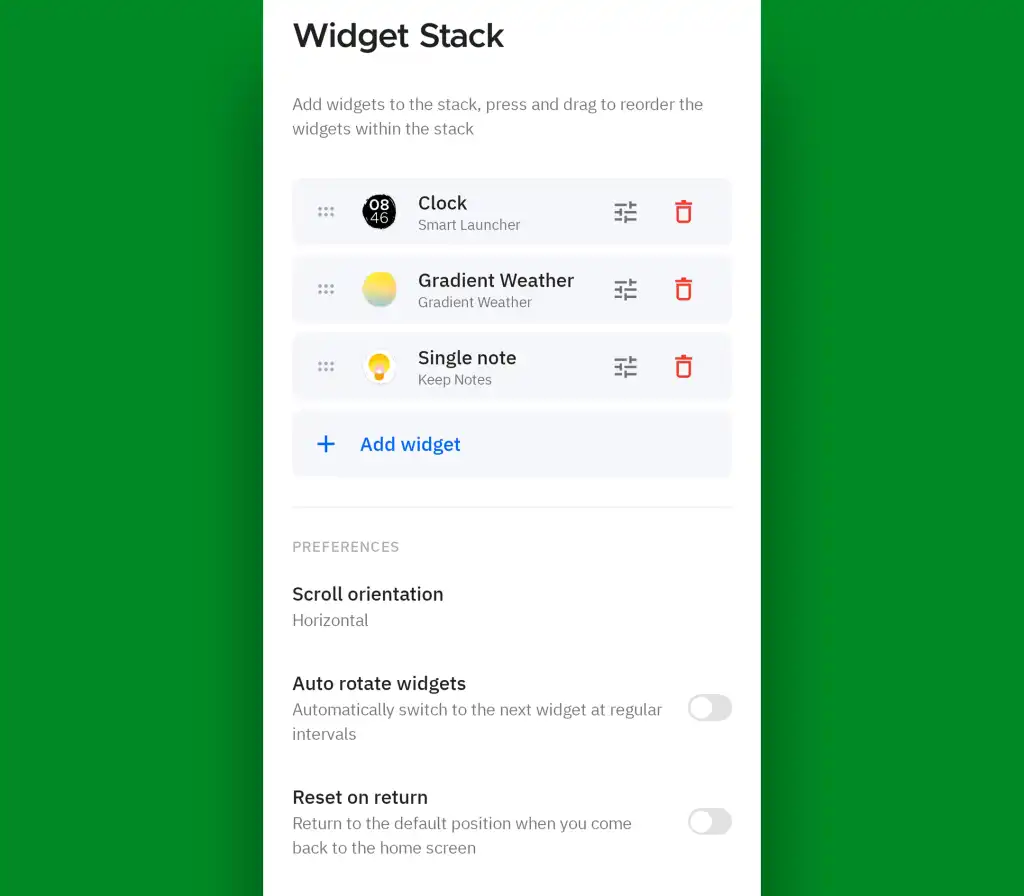
For personal devices, these launchers offer flexibility that stock Android lacks. For corporate-managed devices, check your MDM policies. Some enterprise environments lock launcher changes; others allow approved alternatives.
Why widgets still matter for enterprise mobility
The argument for widgets is simple: they reduce taps. Each tap represents a context switch, a decision point, an opportunity for distraction. Widgets that surface the right information at the right moment keep users focused on tasks rather than navigation.
Google's Material You design language, introduced in Android 12, made widgets visually consistent with system themes. This addressed one of the long-standing complaints: widgets used to look like they came from different operating systems. Now they blend with device aesthetics, making them less visually intrusive.
Android holds over 70% of the global mobile OS market, with more than 3 billion active devices. Most enterprise mobility discussions focus on MDM, security, and app deployment. Optimizing how employees interact with their devices gets less attention, but it affects daily productivity in ways that accumulate.
Logicity's Take
Widget optimization falls into a category IT often ignores: user experience on managed devices. The tools mentioned here (Popup Widget at $2, Edge Gestures, Smart Launcher with free and premium tiers around $5) cost almost nothing compared to MDM licensing. For organizations with field workers or employees who live in their phones, standardizing a widget configuration as part of device provisioning could measurably reduce task-switching overhead. The challenge is governance: accessibility services and overlay permissions raise security questions that IT security teams will want to review before deployment.
Frequently Asked Questions
Do Android widgets drain battery?
It depends on the widget. Widgets that refresh frequently or fetch network data can impact battery life. Static widgets or those updating on user interaction have minimal impact. Most modern widgets are optimized better than they were in early Android versions.
Can enterprise MDM solutions control which widgets employees use?
Most MDM platforms can restrict app installation, which indirectly controls widget availability since widgets come from installed apps. Direct widget-level management is less common but available in some enterprise mobility suites.
Do these widget enhancement apps work on Samsung and other manufacturer skins?
Popup Widget and Edge Gestures work across most Android devices regardless of manufacturer customization. Some features may interact differently with manufacturer-specific gesture systems, so testing on your specific devices is recommended.
When did Google revive Android widgets?
Google significantly updated the widget system in Android 12, released in October 2021. This update introduced the Material You design language, which brought visual consistency and new APIs to widgets after years of neglect.
Are there security risks with apps that use accessibility services?
Accessibility services have broad system access by design. Apps using them can monitor screen content and inject inputs. Only install such apps from trusted developers with established track records and transparent permission usage.
Need Help Implementing This?
If you're evaluating how widget workflows could fit into your organization's mobile device strategy, Logicity can connect you with enterprise mobility consultants. Contact us for recommendations tailored to your MDM environment and device fleet.
Source: Computerworld
Huma Shazia
Senior AI & Tech Writer
Produced with AI assistance and reviewed by the Logicity editorial team. Learn more in our Editorial Policy.