Open Camera: A Manual Alternative to Pixel's Stock App
Key Takeaways
- Open Camera provides manual controls for ISO, shutter speed, and focus that Pixel's stock app lacks
- The app produces less processed, more natural-looking images without heavy computational photography
- With 100 million+ downloads, Open Camera is free, open-source, and requires no internet permissions
Why Pixel's Stock Camera App Falls Short for Enthusiasts
Pixel phones have earned a reputation for photography. The stock camera app delivers impressive point-and-shoot results with minimal effort. But that simplicity comes at a cost: Google's camera offers almost no manual control.
Samsung, Nothing, and Chinese brands like Vivo have shipped far more capable camera apps. They let users adjust exposure, tweak colors in real time, and override automatic processing. Google's app remains stubbornly basic.
The bigger issue is processing. Pixel's computational photography can be aggressive. Shadows get lifted. Details get sharpened. HDR flattens contrast that photographers might want to preserve. For anyone who owns a dedicated camera and understands exposure, the results can feel overcooked.
Enter Open Camera: Manual Control Without the Bloat
Open Camera is a free, open-source camera app that's been quietly serving Android users for years. Created by developer Mark Harman, the app has crossed 100 million downloads on the Google Play Store.
“It seemed to me that something as fundamental as a camera app should also be free.”
— Mark Harman, Developer of Open Camera
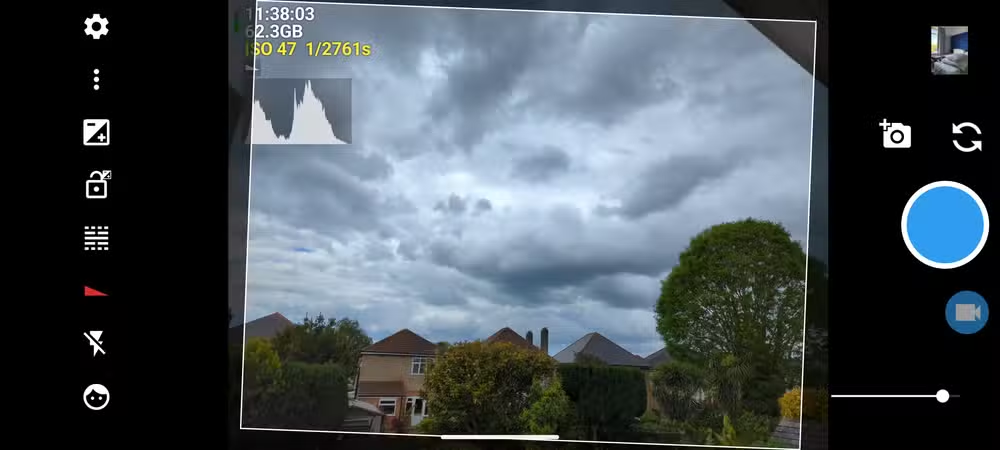
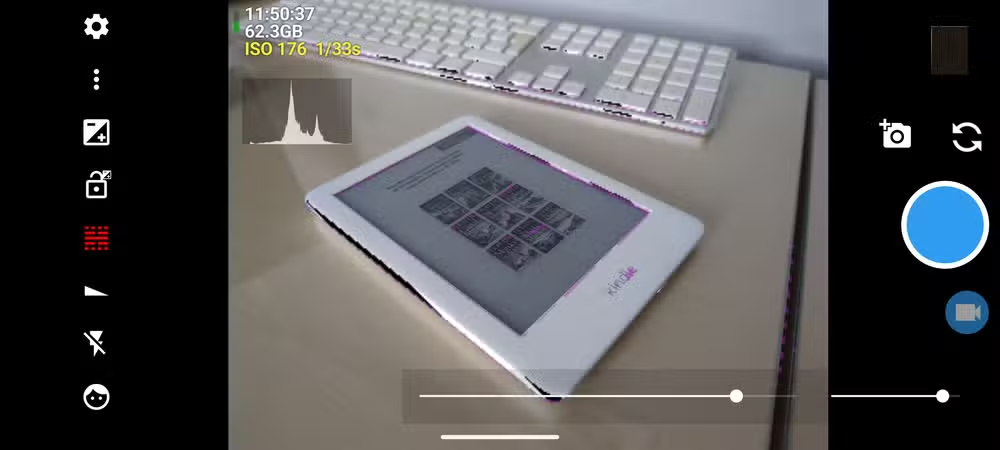
The app takes an old-fashioned approach to mobile photography. Instead of relying on AI to guess what you want, it gives you the controls to decide. Manual ISO, shutter speed, focus peaking, and RAW (DNG) capture are all available. The entire codebase runs about 62,000 lines, keeping it lean.
Less Processing, More Natural Results
The trade-off is straightforward. Open Camera photos are softer and show less artificial detail because the app relies far less on computational photography. In low-light conditions, the Pixel's stock app often produces better results. Its night mode is hard to beat without heavy processing.
But in contrasty scenes, Open Camera shines. The app preserves shadows instead of having HDR flatten everything. For photographers who want to edit their images later, this gives more flexibility. What the Pixel app removes, you can't add back.
On Pixel hardware, the app performs well. Shutter lag is close to zero. The interface responds quickly. It doesn't feel like a compromise, just a different tool for different situations.
Privacy and Control Without Internet Permissions
Open Camera requires no internet permissions. For privacy-conscious users, particularly those running GrapheneOS or degoogled Pixel devices, this makes it the default recommendation. The app does exactly what a camera should do: take photos and save them locally.
Reddit communities on r/Android, r/GrapheneOS, and r/degoogle frequently recommend Open Camera as the gold standard for manual control. Some users find the interface dated or utilitarian. But for videographers needing manual audio gain control or photographers wanting to override aggressive processing, it remains the go-to choice.
RAW Capture for Serious Editing
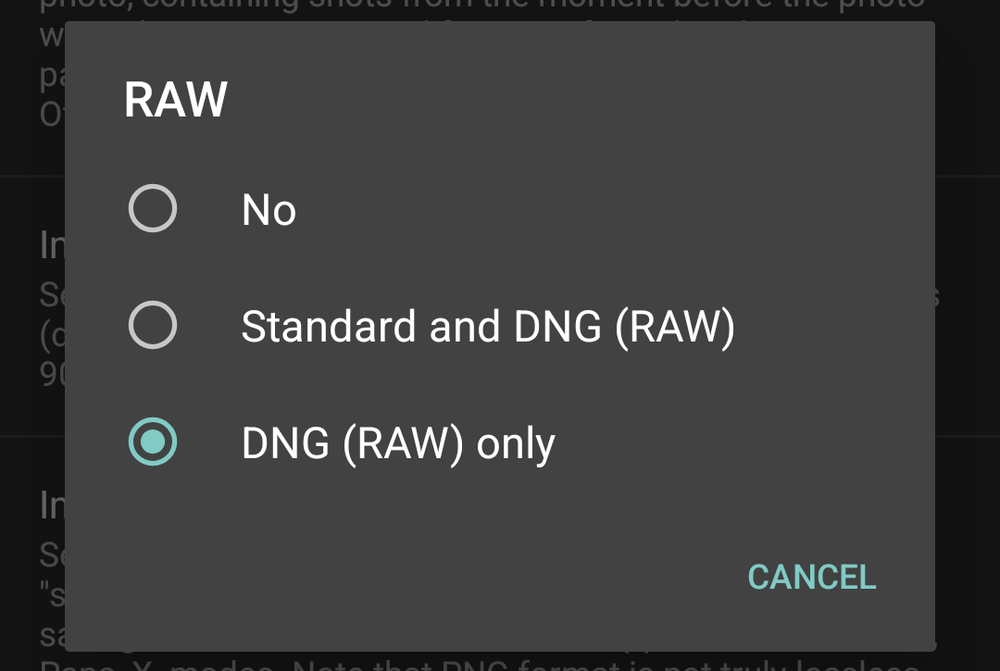
Open Camera supports RAW (DNG) capture through Android's Camera2 API. This means you can capture unprocessed sensor data and edit it in Lightroom, Snapseed, or any other RAW editor. The Pixel's stock app does offer RAW in some modes, but Open Camera makes it a first-class feature.
Harman is transparent about limitations. The app can't be tested on every Android device, and results vary by hardware.
“Note that it's not possible for me to test Open Camera on every Android device out there... Please test before using Open Camera to photo/video your wedding etc :)”
— Mark Harman, Developer of Open Camera
When to Use Which App
The best approach is keeping both apps installed. Use the Pixel's stock camera for quick snapshots, low-light scenes, and anything where you want Google's processing to do the heavy lifting. Switch to Open Camera when you want manual control, natural-looking images, or RAW files for later editing.
✅ Pros
- • Full manual controls for ISO, shutter speed, and focus
- • RAW (DNG) capture for professional editing workflows
- • No internet permissions required, respects privacy
- • Free and open-source with no ads
- • Preserves shadows and contrast that HDR would flatten
❌ Cons
- • Low-light performance falls behind Pixel's computational photography
- • Interface is functional but dated
- • No AI-powered features like Magic Eraser or Best Take
- • Requires more knowledge to get good results
How to Get Started
- Download Open Camera from the Google Play Store or F-Droid
- Grant camera and storage permissions
- Open Settings and enable RAW capture if you want DNG files
- Experiment with manual ISO and shutter speed in good lighting first
- Use focus peaking to nail manual focus on your subject
The learning curve is real. If you've never shot in manual mode, expect some trial and error. But once you understand the basics, you'll have a tool that Google's stock app simply doesn't offer.
Another look at switching from default tools to capable alternatives
Logicity's Take
Frequently Asked Questions
Does Open Camera work on all Android phones?
Open Camera works on most Android devices that support the Camera2 API. However, results vary by hardware. The developer recommends testing before important events.
Is Open Camera better than Google Camera?
It depends on your needs. Google Camera excels at point-and-shoot and low-light photography with AI processing. Open Camera is better for manual control, RAW capture, and natural-looking images with less processing.
Can Open Camera shoot RAW photos?
Yes. Open Camera supports RAW (DNG) capture on devices with Camera2 API support. This gives photographers unprocessed sensor data for editing in apps like Lightroom.
Is Open Camera safe to use?
Open Camera is open-source and requires no internet permissions. It's frequently recommended by privacy-focused communities running GrapheneOS and degoogled devices.
Does Open Camera have a night mode?
Open Camera has manual exposure controls but lacks the computational night mode found in Google Camera. Low-light performance relies on your manual settings rather than AI processing.
Need Help Implementing This?
Source: How-To Geek
Manaal Khan
Tech & Innovation Writer
اقرأ أيضاً

رأي مغاير: كيف يؤثر اختراق الأمن الداخلي الأميركي على شركاتنا الخاصة؟
في ظل اختراق عقود الأمن الداخلي الأميركي مع شركات خاصة، نناقش تأثير هذا الاختراق على مستقبل الأمن السيبراني. نستعرض الإحصاءات الموثوقة ونناقش كيف يمكن للشركات الخاصة أن تتعامل مع هذا التهديد. استمتع بقراءة هذا التحليل العميق

الإنسان في زمن ما بعد الوجود البشري: نحو نظام للتعايش بين الإنسان والروبوت - Centre for Arab Unity Studies
في هذا المقال، سنناقش كيف يمكن للبشر والروبوتات التعايش في نظام متكامل. سنستعرض التحديات والحلول المحتملة التي تضعها شركات مثل جوجل وأمازون. كما سنلقي نظرة على التوقعات المستقبلية وفقًا لتقرير ماكنزي

إطلاق ناسا لمهمة مأهولة إلى القمر: خطوة تاريخية نحو استكشاف الفضاء
تعتبر المهمة الجديدة خطوة هامة نحو استكشاف الفضاء وتطوير التكنولوجيا. سوف تشمل المهمة إرسال رواد فضاء إلى سطح القمر لconducting تجارب علمية. ستسهم هذه المهمة في تطوير فهمنا للفضاء وتحسين التكنولوجيا المستخدمة في استكشاف الفضاء.