Microsoft Fixes BitLocker Recovery Bug, But Only for Windows 11
Key Takeaways
- Microsoft fixed the BitLocker recovery bug only for Windows 11 25H2 systems via the KB5089549 update
- Windows 10 and Windows Server users must wait for a future patch and apply Group Policy workarounds
- The bug affects enterprise systems with specific TPM validation settings, not typical personal devices
Microsoft has patched a bug that forced some Windows 11 systems into BitLocker recovery mode after installing the April 2026 security updates. The fix, however, only covers Windows 11 version 25H2. Windows 10 and Windows Server users are still waiting.
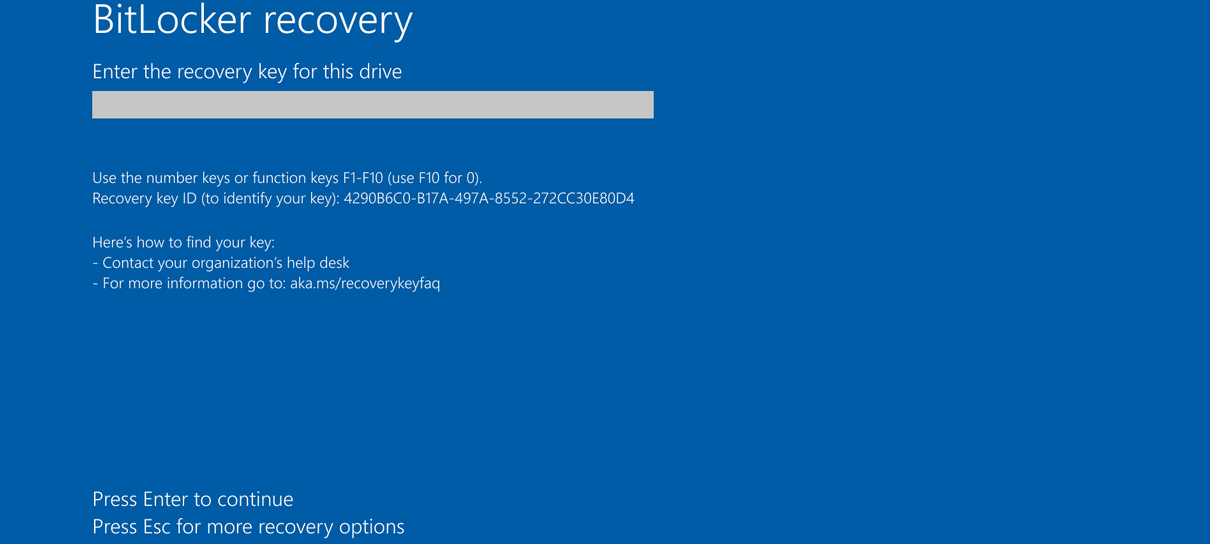
The problem surfaced after the April 2026 security update (KB5083769) rolled out. Systems with certain Trusted Platform Module (TPM) validation settings, including invalid PCR7 configurations, began prompting users for their BitLocker recovery key on first reboot. For enterprise IT teams managing fleets of encrypted devices, this meant scrambling to retrieve recovery keys or roll back updates.
What Caused the BitLocker Recovery Prompt
BitLocker encrypts storage drives to protect data if a device is lost or stolen. It relies on TPM to verify that boot files haven't been tampered with. When the April update modified boot files on systems with specific Group Policy configurations, BitLocker interpreted the change as a potential security threat and locked users out.
Microsoft acknowledged the issue on April 14, noting it affects devices with an "unrecommended" BitLocker Group Policy configuration. The company clarified that personal devices are unlikely to be impacted since the affected settings are typically found only on enterprise systems managed by IT teams.
“Some devices with an unrecommended BitLocker Group Policy configuration might be required to enter their BitLocker recovery key on the first restart after installing this update.”
— Microsoft
The Fix: Windows 11 25H2 Only
On May 13, Microsoft announced that the KB5089549 cumulative update resolves the issue for Windows 11 25H2. The update addresses the problem where devices enter BitLocker Recovery after updating boot files on systems with certain TPM validation settings.
Windows 10 and Windows Server users are not as fortunate. Microsoft says a permanent resolution for these platforms is "planned for a future update," with no specific timeline provided.
Workaround for Windows 10 and Server Admins
Until Microsoft releases patches for Windows 10 and Windows Server, IT administrators have a workaround. Microsoft recommends two steps before deploying the April 2026 updates:
- Remove the "Configure TPM platform validation profile for native UEFI firmware configurations" Group Policy setting
- Ensure BitLocker bindings use the PCR7 profile by following Microsoft's documentation
For organizations that have already deployed the update and are seeing recovery prompts, the recovery key stored in Active Directory or Azure AD will be required to unlock affected devices.
A Recurring Problem
This is not the first time Windows updates have triggered unexpected BitLocker recovery prompts. Microsoft has dealt with similar issues repeatedly over the past several years.
The pattern suggests a tension between security updates that modify boot components and BitLocker's verification mechanisms. Each incident affects enterprise environments most heavily, since consumer devices rarely use the Group Policy configurations that trigger these bugs.
May 2026 Patch Tuesday Context
The BitLocker fix arrived alongside Microsoft's May 2026 Patch Tuesday release, which addresses 120 vulnerabilities. Seventeen of those are rated "critical." IT teams juggling the BitLocker workaround still need to prioritize these security patches, creating a challenging update cycle for enterprises running mixed Windows environments.
Logicity's Take
Related BitLocker security coverage
Recent Microsoft security news
Frequently Asked Questions
Which Windows versions are affected by the BitLocker recovery bug?
The bug affects Windows 10, Windows 11, and Windows Server devices with specific TPM validation Group Policy settings. However, personal devices are unlikely to be impacted since these configurations are typically used only in enterprise environments.
How do I fix the BitLocker recovery prompt after the April 2026 update?
If you're on Windows 11 25H2, install the KB5089549 update. For Windows 10 and Windows Server, you'll need to enter your BitLocker recovery key and apply the Group Policy workaround until Microsoft releases a permanent fix.
Where can I find my BitLocker recovery key?
For enterprise devices, the recovery key is typically stored in Active Directory or Azure AD. Personal users can find it in their Microsoft account at account.microsoft.com/devices/recoverykey.
When will Microsoft fix this for Windows 10?
Microsoft has not provided a specific date. The company says a permanent resolution for Windows 10 and Windows Server is planned for a future update.
Can I prevent this issue before installing updates?
Yes. Microsoft recommends removing the "Configure TPM platform validation profile for native UEFI firmware configurations" Group Policy setting before deploying the April 2026 updates.
Need Help Implementing This?
Source: BleepingComputer
Huma Shazia
Senior AI & Tech Writer
اقرأ أيضاً

رأي مغاير: كيف يؤثر اختراق الأمن الداخلي الأميركي على شركاتنا الخاصة؟
في ظل اختراق عقود الأمن الداخلي الأميركي مع شركات خاصة، نناقش تأثير هذا الاختراق على مستقبل الأمن السيبراني. نستعرض الإحصاءات الموثوقة ونناقش كيف يمكن للشركات الخاصة أن تتعامل مع هذا التهديد. استمتع بقراءة هذا التحليل العميق

الإنسان في زمن ما بعد الوجود البشري: نحو نظام للتعايش بين الإنسان والروبوت - Centre for Arab Unity Studies
في هذا المقال، سنناقش كيف يمكن للبشر والروبوتات التعايش في نظام متكامل. سنستعرض التحديات والحلول المحتملة التي تضعها شركات مثل جوجل وأمازون. كما سنلقي نظرة على التوقعات المستقبلية وفقًا لتقرير ماكنزي

إطلاق ناسا لمهمة مأهولة إلى القمر: خطوة تاريخية نحو استكشاف الفضاء
تعتبر المهمة الجديدة خطوة هامة نحو استكشاف الفضاء وتطوير التكنولوجيا. سوف تشمل المهمة إرسال رواد فضاء إلى سطح القمر لconducting تجارب علمية. ستسهم هذه المهمة في تطوير فهمنا للفضاء وتحسين التكنولوجيا المستخدمة في استكشاف الفضاء.