Kdenlive: The Free Video Editor That Rivals Adobe Premiere
Key Takeaways
- Kdenlive runs on both Linux and Windows with no licensing fees
- The editor handled large files and stacked effects without crashing during stress testing
- Most interface elements are intuitive for users familiar with professional editing software
Adobe Premiere costs $22.99 per month. Over three years, that's $827.64. For hobbyists, small creators, or anyone editing videos occasionally, that math stings. Nick Lewis, an editor at How-To Geek, found a workaround he now installs on every PC he owns: Kdenlive, a free and open-source video editor.
What Kdenlive Actually Needed to Do
Lewis wasn't chasing a perfect 1:1 Premiere clone. His requirements were practical: the app must work on both Linux and Windows, and it must provide most of the features Premiere does. Not all. Most. 'It didn't need to be perfect, just close enough,' he wrote.
This is a useful frame for anyone evaluating software. The question isn't whether an alternative matches every feature. It's whether it matches the features you actually use.
The Stress Test
Lewis spent about two hours testing Kdenlive on an older laptop. During normal editing, the software didn't experience any major hiccups or hang. That's noteworthy for video editing software, which tends to punish underpowered hardware.
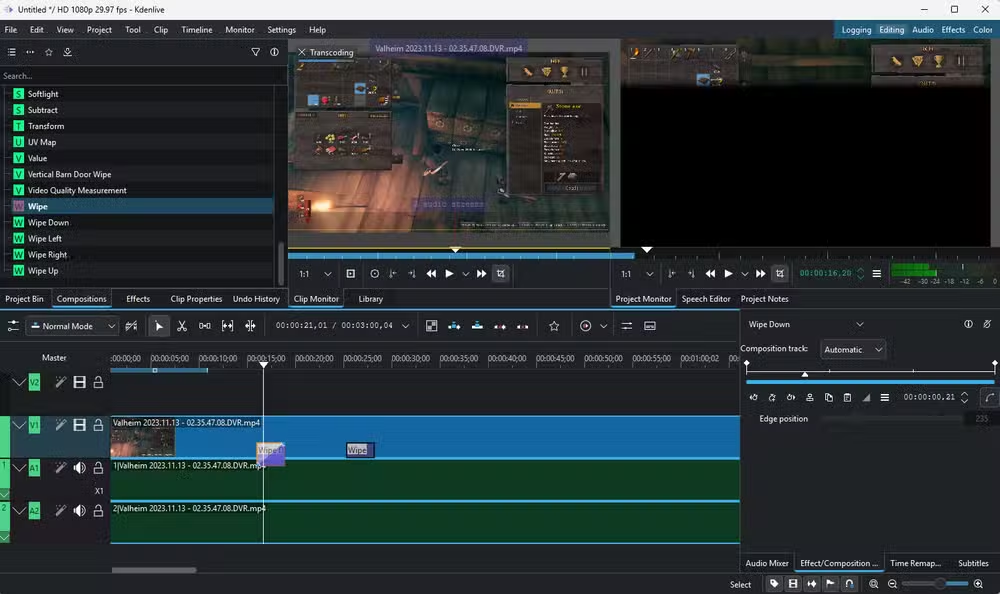
Then he tried to break it. He loaded ridiculously large files, stacked and layered effects in absurd ways, and generally pushed the software past reasonable use cases. The result: no crashes. His laptop would have complained loudly if it could speak, Lewis noted, but Kdenlive kept running.
Interface and Learning Curve
Kdenlive's user interface earned praise for being 'extremely intuitive.' If you've used any professional video editor before, the layout will feel familiar. Timeline at the bottom, preview window up top, effects and tools accessible from panels.
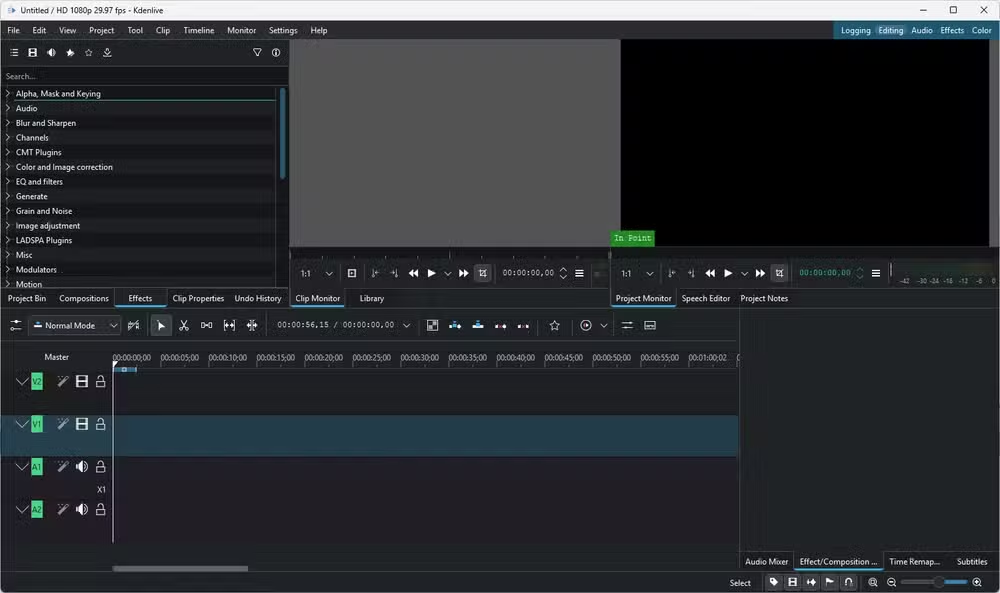
This matters because switching editing software usually means relearning muscle memory. An intuitive interface reduces that friction.
Cross-Platform Flexibility
Lewis runs both Windows and Linux machines. He uses Ubuntu, Raspberry Pi OS, and Proxmox for various projects including game servers and a Jellyfin media server. For someone who moves between operating systems, a video editor that works identically on both is valuable.
Kdenlive delivers here. The same software, same interface, same project files work across platforms. No need to maintain separate workflows or convert projects when switching machines.
✅ Pros
- • Free with no subscription fees or feature limitations
- • Runs on Windows, Linux, and macOS
- • Stable under stress with large files and layered effects
- • Intuitive interface for users familiar with video editing
❌ Cons
- • Not a complete 1:1 feature match with Premiere
- • Less ecosystem integration than Adobe's suite
- • Smaller community for tutorials and support compared to Premiere
When Kdenlive Makes Sense
Kdenlive fits best for creators who need professional-grade editing without professional-grade costs. That includes YouTubers, hobbyists, small businesses creating marketing content, and anyone who edits video occasionally rather than daily.
If your workflow depends on tight integration with After Effects, Photoshop, or other Adobe tools, switching gets harder. But if you're primarily editing video and exporting finished files, Kdenlive handles that workflow well.
Another free tool that solves a common tech problem
The Bigger Picture on Open-Source Alternatives
Kdenlive is part of a broader trend. Open-source alternatives to paid software have matured. GIMP handles Photoshop-level editing. LibreOffice replaces Microsoft Office for most users. Blender rivals Maya for 3D work. These aren't compromises anymore. They're viable choices.
The common complaint that open-source tools 'lack features' often misses the point. Most users don't use most features. If an alternative covers 80% of what you need and costs $0, the missing 20% might not matter.
Logicity's Take
Frequently Asked Questions
Is Kdenlive really free?
Yes. Kdenlive is open-source software released under the GPL license. There are no subscription fees, no premium tiers, and no feature restrictions.
Can Kdenlive open Premiere project files?
No. Kdenlive uses its own project format. You would need to export your Premiere footage and re-edit in Kdenlive rather than importing existing projects directly.
What operating systems does Kdenlive support?
Kdenlive runs on Windows, Linux, and macOS. Project files are compatible across all three platforms.
Is Kdenlive good for professional work?
It handles professional editing tasks capably, including timeline editing, effects, color correction, and audio mixing. Whether it fits professional workflows depends on your specific needs and whether you require Adobe ecosystem integration.
Need Help Implementing This?
Source: How-To Geek
Huma Shazia
Senior AI & Tech Writer
اقرأ أيضاً

رأي مغاير: كيف يؤثر اختراق الأمن الداخلي الأميركي على شركاتنا الخاصة؟
في ظل اختراق عقود الأمن الداخلي الأميركي مع شركات خاصة، نناقش تأثير هذا الاختراق على مستقبل الأمن السيبراني. نستعرض الإحصاءات الموثوقة ونناقش كيف يمكن للشركات الخاصة أن تتعامل مع هذا التهديد. استمتع بقراءة هذا التحليل العميق

الإنسان في زمن ما بعد الوجود البشري: نحو نظام للتعايش بين الإنسان والروبوت - Centre for Arab Unity Studies
في هذا المقال، سنناقش كيف يمكن للبشر والروبوتات التعايش في نظام متكامل. سنستعرض التحديات والحلول المحتملة التي تضعها شركات مثل جوجل وأمازون. كما سنلقي نظرة على التوقعات المستقبلية وفقًا لتقرير ماكنزي

إطلاق ناسا لمهمة مأهولة إلى القمر: خطوة تاريخية نحو استكشاف الفضاء
تعتبر المهمة الجديدة خطوة هامة نحو استكشاف الفضاء وتطوير التكنولوجيا. سوف تشمل المهمة إرسال رواد فضاء إلى سطح القمر لconducting تجارب علمية. ستسهم هذه المهمة في تطوير فهمنا للفضاء وتحسين التكنولوجيا المستخدمة في استكشاف الفضاء.