iPhone Notification Database Exposed: How FBI Retrieved Deleted Signal Messages and How to Protect Yourself
Key Takeaways
- Your iPhone stores notification contents in a hidden database that can be accessed even after you delete apps
- The FBI used this loophole to retrieve Signal messages from a defendant's device
- Disabling notification previews prevents message contents from being saved to this database
- You can hide previews globally or for specific apps on iPhone, Mac, and other devices
Read in Short
The FBI accessed deleted Signal messages through an iPhone's push notification database, not the app itself. Your phone stores notification contents in a hidden database that persists even after app deletion. The fix? Turn off notification previews so only "You have a new message" gets stored instead of actual message contents.
So here's something that probably kept a few privacy enthusiasts up at night. Last week, news broke that the FBI managed to access a defendant's deleted Signal messages on their iPhone. The twist? The person had completely removed Signal from their device. Gone. Deleted. Except... not really.
The FBI didn't crack Signal's encryption or find some backdoor into the app. They did something way simpler and honestly more unsettling. They pulled the messages from the device's push notification database. Yeah, that's a thing that exists, and most people have absolutely no idea it's sitting there on their phone.
Wait, What's a Push Notification Database?
Your iPhone, Mac, and probably your Android device too all maintain databases of notifications that have been displayed on your screen. Think about it from Apple's perspective. The system needs to track notifications for features like notification history, syncing across devices, and managing what's been read or dismissed.
But here's the kicker. According to a 2018 blog post from the Objective See Foundation, anything displayed as a notification in macOS Notification Center gets recorded by the operating system. That includes the actual text content of those notifications. And it looks like iOS works similarly.
“In short, anything that gets displayed as a notification (yes, including 'disappearing' Signal messages) in the macOS Notification Center, is recorded by the OS.”
— Objective See Foundation
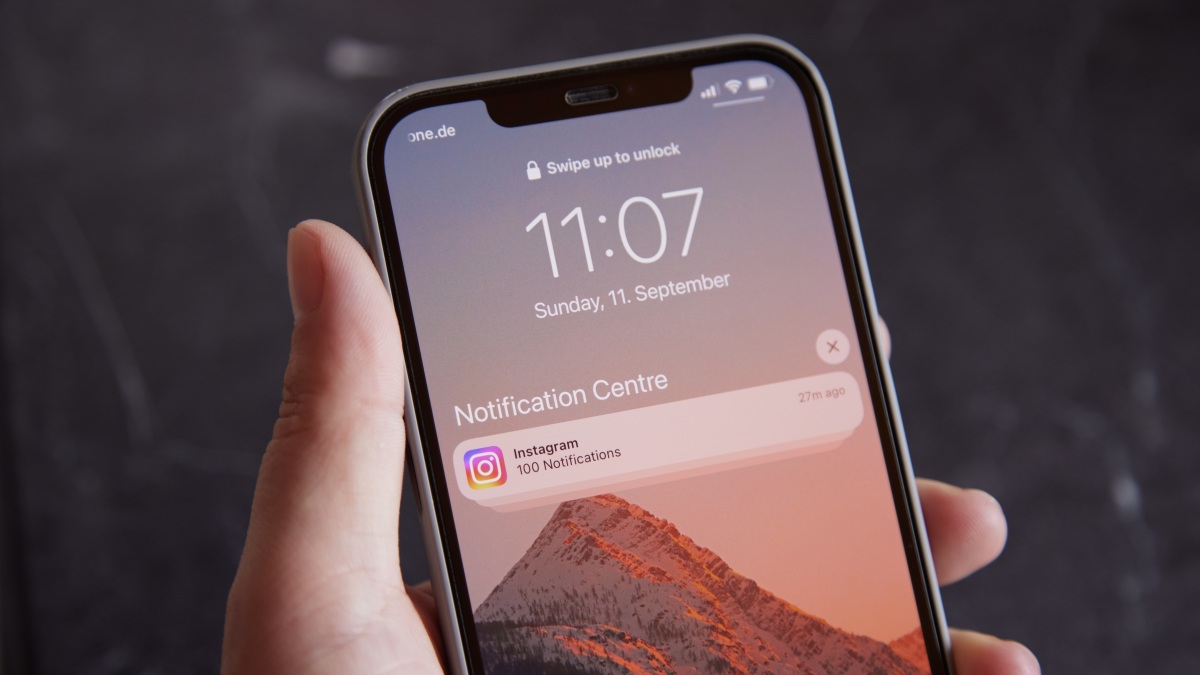
So when you get a Signal message and your phone shows a preview saying "Hey, here's that password you asked for," that text isn't just flashing on your screen and vanishing. It's being logged. And apparently, law enforcement knows exactly where to look for it.
The Core Problem
Even if you delete an app, disable it, or use "disappearing messages," the notification database may retain copies of message previews that were displayed on your lock screen or notification center.
How to Actually Protect Yourself
The nuclear option is turning off notifications entirely. No notifications, no database entries. But let's be real, that's not happening for most people. You need to know when important stuff comes through.
The practical solution? Stop your device from showing message contents in notifications. Instead of seeing "John: The launch codes are 12345," you'll just see "You have a new message." Boring? Yes. Private? Much more so.
Protect Your iPhone Notifications
- Open Settings on your iPhone
- Tap Notifications
- Select Show Previews at the top
- Choose Never to hide all preview content globally
- Alternatively, scroll down and tap individual apps to disable previews only for sensitive apps like Signal, WhatsApp, or email
I'd recommend at minimum doing this for any messaging apps, email, banking apps, and anything else where you wouldn't want notification contents logged permanently.
Another privacy and security tweak that balances convenience with protection
Secure Your Mac Notifications
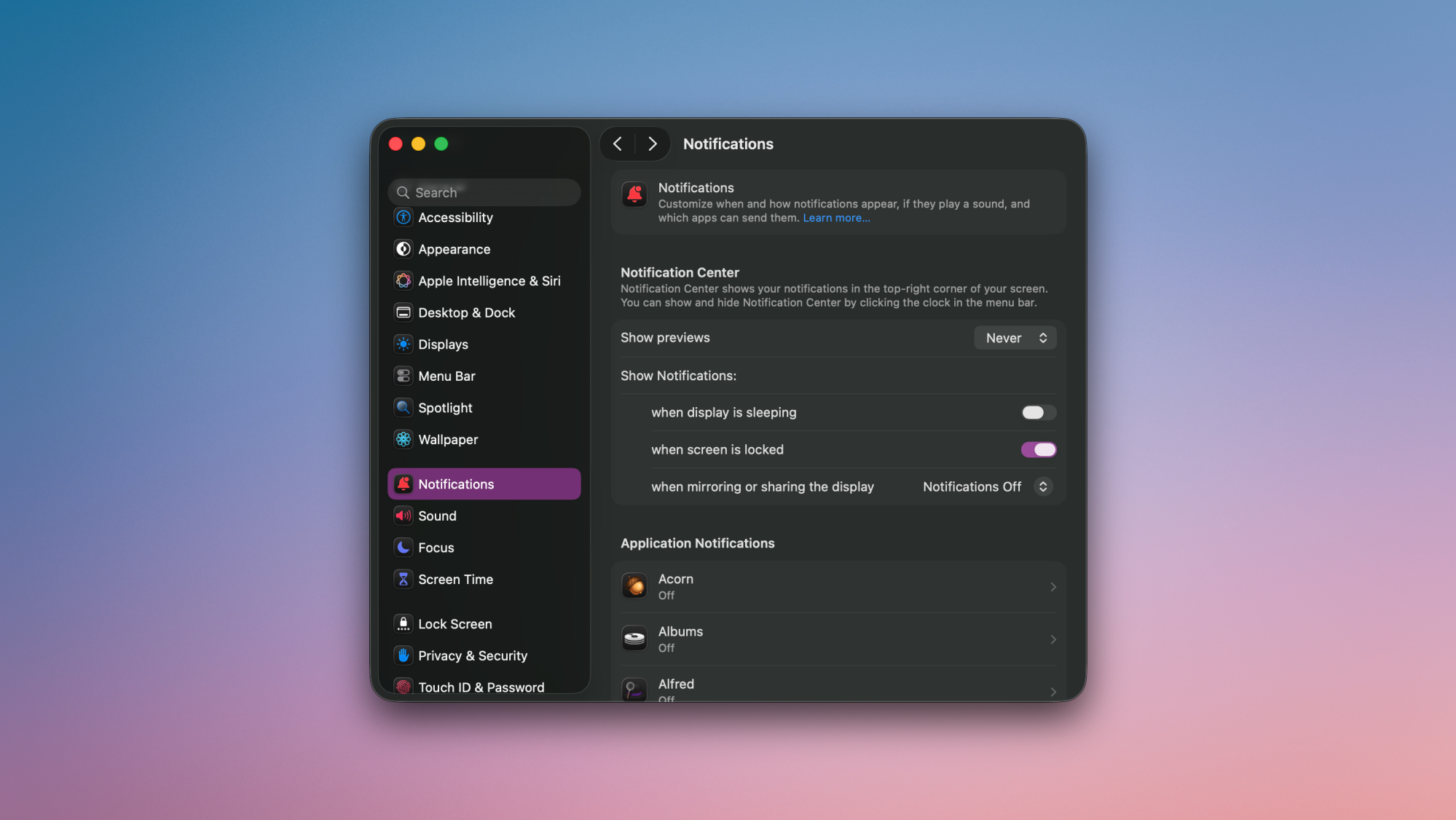
- Open System Settings on your Mac
- Click Notifications in the sidebar
- Find the Show previews dropdown menu
- Select Never for global protection
- Or click individual apps below to customize which ones hide preview content
The Mac settings work pretty much identically to iPhone. You can go all-in on privacy or cherry-pick the apps that handle your most sensitive info.
What We Still Don't Know
Here's the frustrating part. Nobody outside of Apple seems to know exactly how this notification database works. Does clearing your notifications delete them from the database? How long does data persist? Can you manually wipe this database without a full factory reset?
These questions don't have clear answers yet. The Objective See research is from 2018, and Apple hasn't exactly published documentation explaining how forensic investigators can pull your messages from notification logs.
- It's unclear if clearing notifications removes them from the database
- We don't know the exact retention period for logged notifications
- Factory reset likely clears it, but that's extreme for most users
- Other platforms like Android probably have similar mechanisms
The Bigger Picture on Encrypted Messaging
This whole situation is a good reminder that end-to-end encryption has limits. Signal, WhatsApp, iMessage with encryption enabled, they all protect your messages in transit. Nobody can intercept them between your phone and your friend's phone.
But once that message lands on your device and gets displayed? All bets are off. The notification system sits outside the encrypted bubble. Your phone's screenshot function sits outside the encrypted bubble. The person you're texting could literally just take a photo of their screen.
End-to-End Encryption Doesn't Mean End-to-End Privacy
Encrypted apps protect messages during transmission, but device-level features like notification previews, screenshots, and backup systems can still expose your content. True privacy requires securing both the app AND your device settings.
So if you're actually trying to communicate sensitive information, disabling notification previews should be step one. It's not paranoid. Apparently it's just good security hygiene now that we know exactly how this database can be exploited.
Should You Panic?
Look, unless you're actively under federal investigation, this probably isn't going to affect your daily life. The FBI needed physical access to the device or a backup to pull this off. They didn't hack in remotely.
But the principle matters. Most of us carry phones that log way more than we realize. And the gap between "technically possible" and "actively being used against people" just got a lot smaller. Taking five minutes to disable notification previews on your sensitive apps seems like a reasonable trade-off.
Your notifications will be slightly less convenient. You'll have to actually open apps to see message contents. But you'll also have one less hidden database full of your private conversations sitting on your device, waiting for someone to discover it.
Frequently Asked Questions
Does this affect Android phones too?
Probably. Android has similar notification management systems, though the specifics of how notification data is stored haven't been confirmed. Disabling notification previews on Android is still a good precaution.
Will this stop all forensic access to my messages?
No. If someone has physical access to your unlocked device, they can see your messages directly. This specifically addresses the notification database vulnerability.
Do I need to disable previews for all apps?
Not necessarily. Focus on messaging apps, email, banking apps, and anything else where notification content could be sensitive. Weather app notifications are probably fine.
Does using disappearing messages in Signal help?
The messages still appear as notifications before they disappear, so they can still be logged. Disable previews to prevent the content from being recorded in the first place.
Source: Lifehacker
Huma Shazia
Senior AI & Tech Writer
اقرأ أيضاً

رأي مغاير: كيف يؤثر اختراق الأمن الداخلي الأميركي على شركاتنا الخاصة؟
في ظل اختراق عقود الأمن الداخلي الأميركي مع شركات خاصة، نناقش تأثير هذا الاختراق على مستقبل الأمن السيبراني. نستعرض الإحصاءات الموثوقة ونناقش كيف يمكن للشركات الخاصة أن تتعامل مع هذا التهديد. استمتع بقراءة هذا التحليل العميق

الإنسان في زمن ما بعد الوجود البشري: نحو نظام للتعايش بين الإنسان والروبوت - Centre for Arab Unity Studies
في هذا المقال، سنناقش كيف يمكن للبشر والروبوتات التعايش في نظام متكامل. سنستعرض التحديات والحلول المحتملة التي تضعها شركات مثل جوجل وأمازون. كما سنلقي نظرة على التوقعات المستقبلية وفقًا لتقرير ماكنزي

إطلاق ناسا لمهمة مأهولة إلى القمر: خطوة تاريخية نحو استكشاف الفضاء
تعتبر المهمة الجديدة خطوة هامة نحو استكشاف الفضاء وتطوير التكنولوجيا. سوف تشمل المهمة إرسال رواد فضاء إلى سطح القمر لconducting تجارب علمية. ستسهم هذه المهمة في تطوير فهمنا للفضاء وتحسين التكنولوجيا المستخدمة في استكشاف الفضاء.