How Claude Artifacts Turns AI Chat Into a Workspace
Key Takeaways
- Artifacts appear automatically when Claude generates content over 15 lines or complex enough to stand alone
- Users created over 10 million Artifacts in the feature's first 60 days
- You can download, share, or iterate on Artifacts without losing them in chat history
What Are Claude Artifacts?
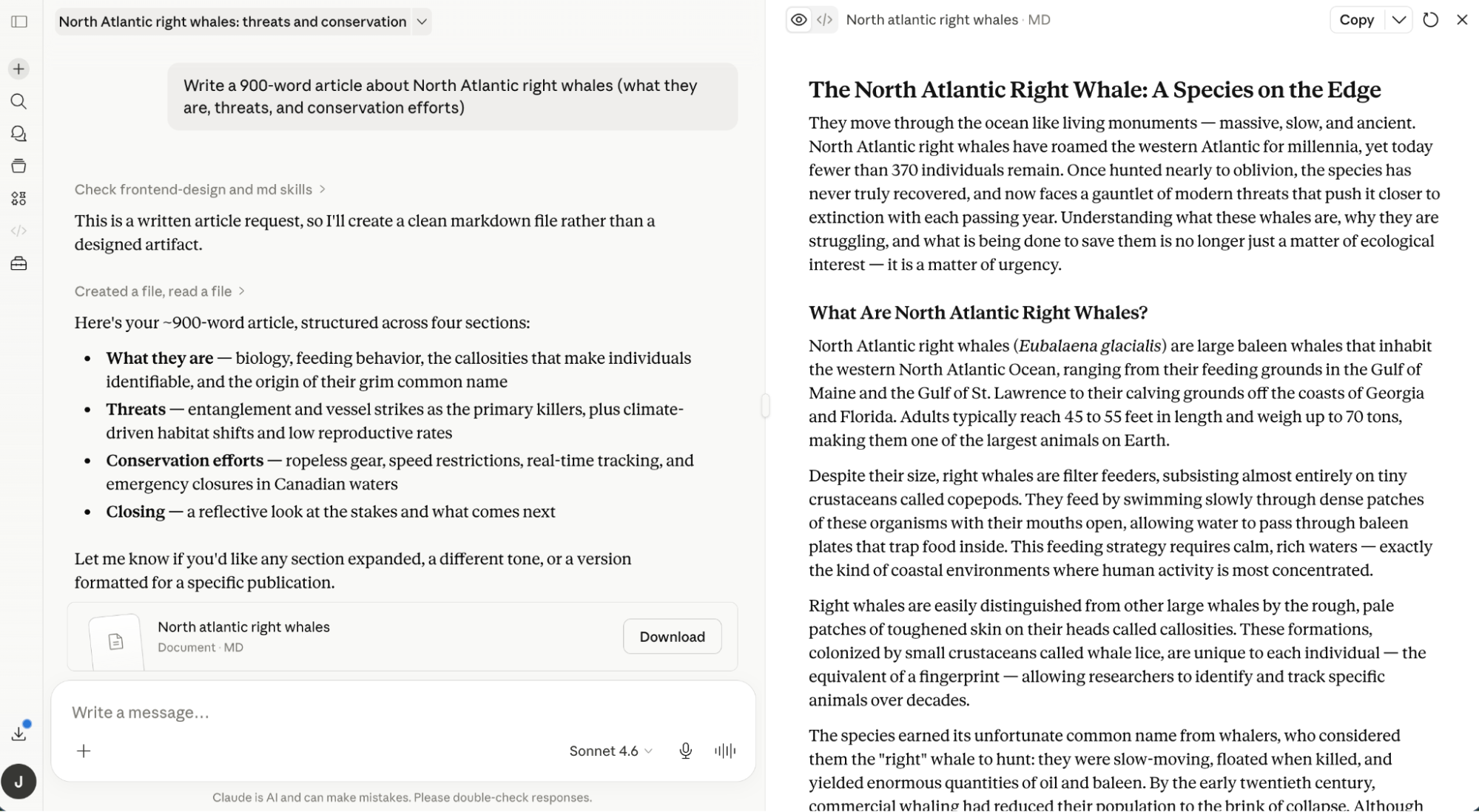
Claude Artifacts are standalone outputs that appear in a dedicated panel beside your main chat window. When you ask Claude to write code, draft an article, or create a diagram, the result shows up in this separate space instead of getting buried in the conversation.
The concept sounds simple. It is. But it solves a real problem. Anyone who's asked an AI to generate a code snippet knows the frustration of scrolling back through a long chat to find it. Artifacts keep that content visible and editable while you continue the conversation.
“Artifacts transform Claude from a chatbot into a collaborative development environment, allowing you to see, edit, and use the content you build.”
— Dario Amodei, CEO of Anthropic
Anthropic launched Artifacts alongside Claude 3.5 Sonnet in June 2024. Within 60 days, users created over 10 million Artifacts. That adoption rate suggests the feature hit a nerve.
How to Create and Use Artifacts
You don't need to do anything special. Claude automatically generates an Artifact when your request produces content that meets certain criteria. Anthropic defines "substantial" content as:
- Over 15 lines of text or code
- Complex enough to stand on its own
- Something you'll likely want to edit, iterate on, or reuse
If Claude doesn't create an Artifact automatically, you can prompt it directly. Phrases like "create an artifact" or "show this in the artifact panel" work fine.
Getting Started
- Go to claude.ai and log in or sign up (it's free)
- Start a conversation and prompt Claude as you normally would
- Claude will detect when to generate an Artifact, or you can ask explicitly
- The Artifact appears in a panel next to your chat
What You Can Do With an Artifact
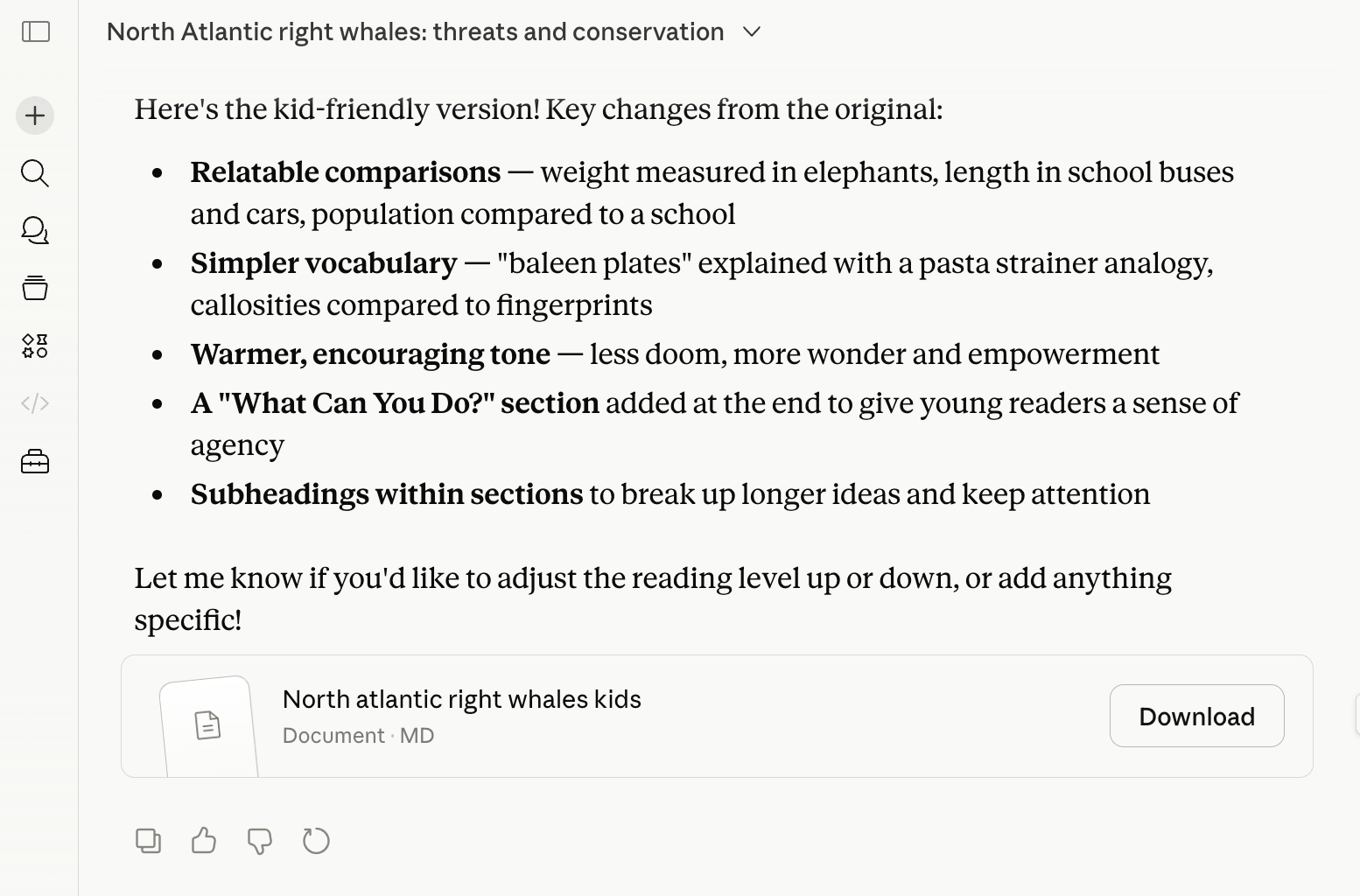
Once an Artifact appears, you have several options from the interface:
- Enter a new prompt to modify it
- Like or dislike the response
- Generate a new version with the same prompt
- Download it as Markdown
- Copy the content
- Save it as a PDF
- Publish and share a link
The iteration workflow is where Artifacts shine. You can tell Claude to "make the headline punchier" or "refactor this function to use async/await" and watch the Artifact update in place. No scrolling. No copy-pasting between windows.
Types of Artifacts Claude Can Generate
Artifacts aren't limited to text. Claude can render several content types in the panel:
- Code snippets in any language
- Interactive web components (HTML, CSS, JavaScript)
- Diagrams and flowcharts
- Long-form documents
- SVG graphics
- React components
The interactive components are particularly interesting. Ask Claude to build a calculator, a simple game, or a dashboard mockup, and it renders a working version in the Artifact panel. You can click buttons, enter data, and test functionality without leaving the chat.
Why Developers Are Paying Attention
On Hacker News and Reddit's r/ClaudeAI, the conversation around Artifacts centers on what some call "vibe coding." Users without deep programming backgrounds are building functional prototypes through natural language prompts. Experienced developers use it to speed up UI iteration.
The community has posted examples of interactive games, dashboard prototypes, and working web apps created in seconds. The common thread: Artifacts make the output immediately usable rather than something you copy into another environment.
Some estimates suggest a 60% increase in developer efficiency for UI prototyping when using Artifacts compared to standard chat interfaces. That number comes from workflow comparisons, not formal studies, but it tracks with user reports.
Artifacts vs. Traditional Chat Output
The core difference is persistence. In a standard AI chat, every response scrolls past as you continue the conversation. Code gets lost. Documents disappear into the thread. You end up copying content into external files constantly.
Artifacts stay put. They remain visible in the side panel while you refine your prompts. This sounds minor until you've spent 20 minutes iterating on a complex piece of code and realize you can see every version without scrolling.
“The shift to 'Artifacts' marks the death of the 'wall of text' in AI conversations; it's about persistence, not just presence.”
— Industry Analyst, TechTrend Reports
If you're evaluating AI coding tools, this comparison covers the leading IDE options
Limitations to Know
Artifacts aren't available to everyone. If you're on a Team or Enterprise account, your admin may have disabled the feature. Some users report Artifacts not appearing when they expect them to, which usually means the content didn't meet Claude's "substantial" threshold.
The feature also has boundaries around complexity. While Claude can render interactive web components, it can't run backend code or make external API calls from within an Artifact. What you see is client-side only.
What's Next: Live Artifacts and MCP Integration
Anthropic has evolved the feature into "Live Artifacts," which integrate with external tools via the Model Context Protocol (MCP). This allows Artifacts to perform real-time tasks beyond static rendering, connecting to databases, APIs, and other services.
For teams already using Claude in their workflows, this expansion means Artifacts can move from prototyping tool to something closer to a lightweight development environment.
Logicity's Take
Frequently Asked Questions
Frequently Asked Questions
Are Claude Artifacts free to use?
Yes. Artifacts are available on Claude's free tier at claude.ai. You just need to create an account.
Why isn't Claude generating an Artifact for my request?
Claude only creates Artifacts for content over 15 lines or complex enough to stand alone. You can also prompt it directly by saying "create an artifact."
Can I share Artifacts with others?
Yes. You can publish an Artifact and share a link directly from the panel interface.
Do Artifacts work on mobile?
Artifacts are available on claude.ai through mobile browsers, though the side panel experience works best on larger screens.
What's the difference between Artifacts and ChatGPT's code interpreter?
Artifacts focus on rendering and persisting content in a side panel for iteration. ChatGPT's code interpreter executes Python code and handles file uploads. Different tools for different workflows.
Need Help Implementing This?
Source: The Zapier Blog
Huma Shazia
Senior AI & Tech Writer
اقرأ أيضاً

رأي مغاير: كيف يؤثر اختراق الأمن الداخلي الأميركي على شركاتنا الخاصة؟
في ظل اختراق عقود الأمن الداخلي الأميركي مع شركات خاصة، نناقش تأثير هذا الاختراق على مستقبل الأمن السيبراني. نستعرض الإحصاءات الموثوقة ونناقش كيف يمكن للشركات الخاصة أن تتعامل مع هذا التهديد. استمتع بقراءة هذا التحليل العميق

الإنسان في زمن ما بعد الوجود البشري: نحو نظام للتعايش بين الإنسان والروبوت - Centre for Arab Unity Studies
في هذا المقال، سنناقش كيف يمكن للبشر والروبوتات التعايش في نظام متكامل. سنستعرض التحديات والحلول المحتملة التي تضعها شركات مثل جوجل وأمازون. كما سنلقي نظرة على التوقعات المستقبلية وفقًا لتقرير ماكنزي

إطلاق ناسا لمهمة مأهولة إلى القمر: خطوة تاريخية نحو استكشاف الفضاء
تعتبر المهمة الجديدة خطوة هامة نحو استكشاف الفضاء وتطوير التكنولوجيا. سوف تشمل المهمة إرسال رواد فضاء إلى سطح القمر لconducting تجارب علمية. ستسهم هذه المهمة في تطوير فهمنا للفضاء وتحسين التكنولوجيا المستخدمة في استكشاف الفضاء.