Gigabyte X870 Aorus Elite WiFi7 drops to $249 at Newegg
Key Takeaways
- The Gigabyte X870 Aorus Elite WiFi7 is discounted to $249.99, saving $70 off the regular $319.99 price
- The board supports AMD Ryzen 9000, 8000, and 7000 processors with a 16+2+2 phase VRM
- Features include Wi-Fi 7, USB4, PCIe 5.0 storage, and DDR5 speeds up to 8200 MT/s
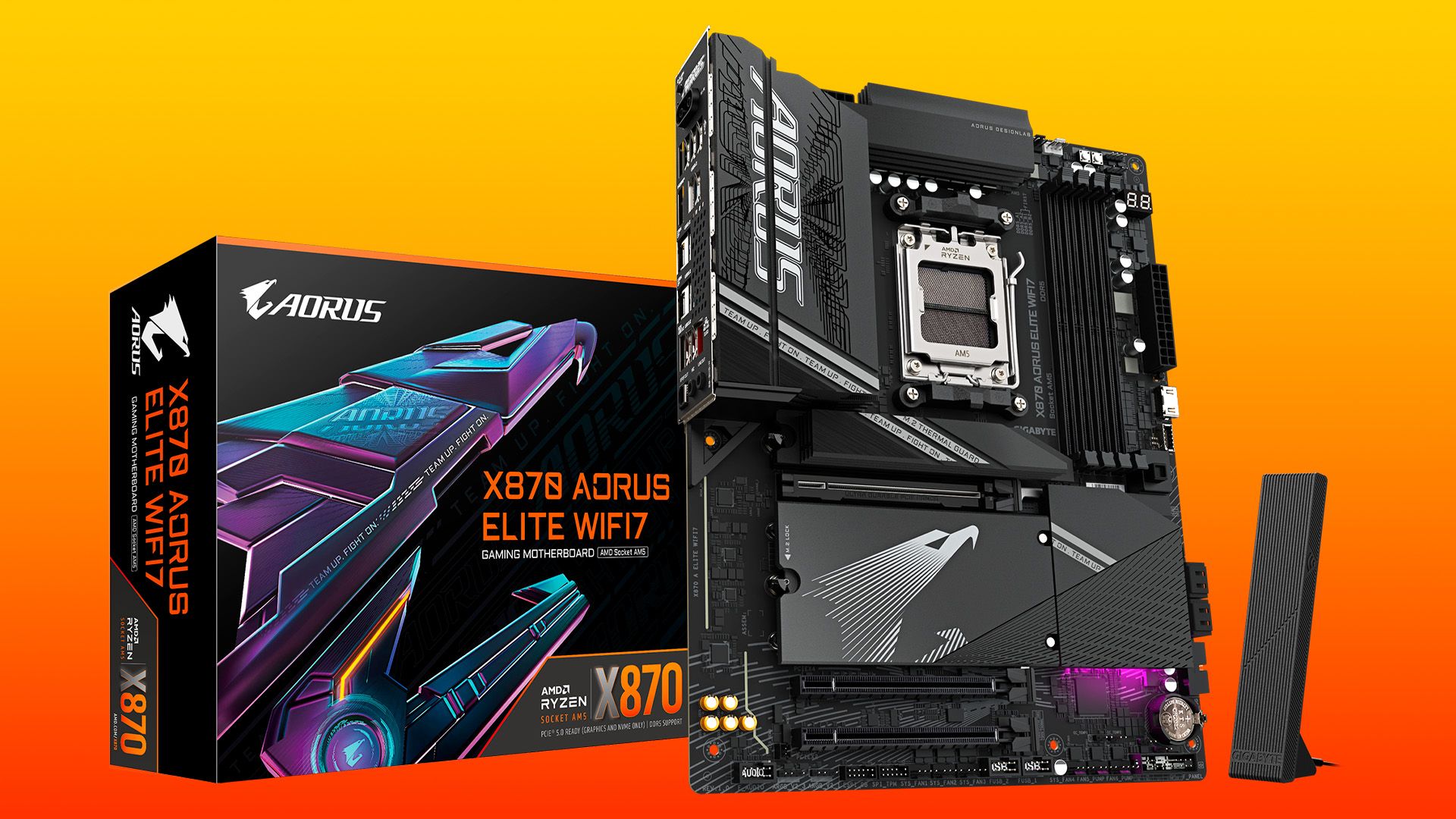
Gigabyte's X870 Aorus Elite WiFi7 motherboard has dropped to $249.99 at Newegg, down $70 from its usual $319.99 price. The deal puts one of AMD's newest AM5 platform boards at a competitive price point for builders targeting Ryzen 9000-series systems with modern connectivity.
The X870 chipset arrived alongside AMD's Zen 5 processors, mandating standards that were optional on earlier X670E boards. That means USB4 and Wi-Fi 7 come standard here, not as premium add-ons. For anyone building a new AM5 system today, the X870 boards represent the cleanest path to a future-proof foundation.
What makes the X870 Aorus Elite WiFi7 worth considering?
The board's 16+2+2 phase power delivery handles everything from entry-level Ryzen chips to flagship parts like the Ryzen 9 9950X without thermal throttling concerns. Gigabyte designed the VRM to sustain heavy sustained loads, which matters for productivity workloads and extended gaming sessions alike.
Memory support extends to DDR5-8200, with both AMD EXPO and Intel XMP profiles configurable from the BIOS. The maximum capacity sits at 256GB across four DIMM slots. Community feedback on Reddit's r/buildapc and r/AMD forums highlights the improved memory trace layout on X870 boards as a tangible benefit for hitting higher DDR5 frequencies reliably.
Storage options reflect current standards. One M.2 slot runs at PCIe 5.0 x4 for the fastest NVMe drives, while three additional M.2 ports operate at either PCIe 5.0 x4 or PCIe 4.0 x4 depending on the installed processor. Four SATA III ports remain for traditional drives, with RAID 0, 1, and 10 configurations available.
How does connectivity compare to older AM5 boards?
The X870 chipset's mandatory USB4 inclusion is the clearest upgrade over X670E. This delivers 40 Gbps throughput for external storage, docks, and displays through a single cable. Wi-Fi 7 support adds theoretical speeds up to 46 Gbps in optimal conditions, though real-world benefits depend heavily on router capabilities and network congestion.
Bluetooth 5.4 handles wireless peripherals and audio devices. The primary PCIe 5.0 x16 slot serves graphics cards, while two additional expansion slots (PCIe 4.0 x4 and PCIe 3.0 x2) accommodate capture cards, sound cards, or additional storage controllers.
“The Gigabyte X870 Aorus Elite WiFi7 bridges the gap between enthusiast-grade features and mainstream pricing, offering USB4 and PCIe 5.0 without the extreme premium typically associated with top-tier boards.”
— Tech Analyst, Industry Hardware Reviewer
Is $249 a good price for this board?
At $249, the Aorus Elite WiFi7 sits below several competing X870 options while matching or exceeding their feature sets. The standard price of $319.99 positioned it as a mid-tier choice; the current discount pushes it into budget-friendly territory without sacrificing the connectivity standards that define the X870 platform.
Reddit discussions frequently cite Gigabyte's EZ-Latch mechanisms as a practical convenience. These tool-less features simplify M.2 drive installation and GPU mounting, a small quality-of-life improvement that reduces build friction. The VRM design receives consistent praise for handling high-wattage Ryzen 9 chips without requiring exotic cooling solutions.
One consideration: X870 does not deliver massive raw performance gains over existing X670E boards for most users. The primary value proposition centers on standardized USB4, improved memory routing, and guaranteed Wi-Fi 7 support. If you already own a capable X670E board, upgrading makes limited sense. For new builds, X870 represents the current baseline.
Which CPUs pair best with this motherboard?
Gigabyte lists compatibility with AMD's Ryzen 9000, 8000, and 7000 series processors. The sweet spot likely falls around the Ryzen 7 9700X or Ryzen 9 9900X for gaming builds. The 16+2+2 phase VRM handles the flagship Ryzen 9 9950X without issues, making it viable for workstation use cases too.
Pairing an older Ryzen 7000-series chip saves money on the CPU while still accessing the board's modern connectivity features. A Ryzen 7 7800X3D, for instance, remains AMD's gaming champion and runs perfectly on this platform.
The X870's PCIe 5.0 M.2 slot can accommodate high-speed drives like this 8TB flagship
Frequently Asked Questions
Does the Gigabyte X870 Aorus Elite WiFi7 support Ryzen 9000 processors?
Yes, the board supports AMD Ryzen 9000, 8000, and 7000 series processors on the AM5 socket, with a VRM capable of handling flagship chips.
What is the maximum RAM speed supported?
The board supports DDR5 memory from 4400 MT/s to 8200 MT/s, with both AMD EXPO and Intel XMP profile support.
Does this motherboard have USB4?
Yes, USB4 is a mandatory feature of the X870 chipset, providing 40 Gbps throughput for compatible devices.
How many M.2 slots does the X870 Aorus Elite WiFi7 have?
The board has four M.2 slots: one runs at PCIe 5.0 x4, while the other three operate at either PCIe 5.0 x4 or PCIe 4.0 x4 depending on the CPU installed.
Is this a good motherboard for gaming?
Yes, the board's PCIe 5.0 x16 graphics slot, robust VRM, and high-speed memory support make it well-suited for gaming builds at various budgets.
Logicity's Take
The $249 price point makes this board worth considering over budget X670E alternatives, especially for new builders who would otherwise need to hunt for USB4 add-in cards or Wi-Fi 7 adapters separately. The real question is timing: AMD's next-gen AM5 chipset refresh may bring further price drops to current X870 inventory. If you need a board now, this deal delivers solid value. If you can wait six months, the math might shift.
Need Help Implementing This?
Building your first AMD system or planning a component upgrade? Reach out to Logicity's team for hardware recommendations tailored to your workload, budget, and timeline. Drop us a note at hello@logicity.in.
Source: Latest from Tom's Hardware
Manaal Khan
Tech & Innovation Writer
اقرأ أيضاً

رأي مغاير: كيف يؤثر اختراق الأمن الداخلي الأميركي على شركاتنا الخاصة؟
في ظل اختراق عقود الأمن الداخلي الأميركي مع شركات خاصة، نناقش تأثير هذا الاختراق على مستقبل الأمن السيبراني. نستعرض الإحصاءات الموثوقة ونناقش كيف يمكن للشركات الخاصة أن تتعامل مع هذا التهديد. استمتع بقراءة هذا التحليل العميق

الإنسان في زمن ما بعد الوجود البشري: نحو نظام للتعايش بين الإنسان والروبوت - Centre for Arab Unity Studies
في هذا المقال، سنناقش كيف يمكن للبشر والروبوتات التعايش في نظام متكامل. سنستعرض التحديات والحلول المحتملة التي تضعها شركات مثل جوجل وأمازون. كما سنلقي نظرة على التوقعات المستقبلية وفقًا لتقرير ماكنزي

إطلاق ناسا لمهمة مأهولة إلى القمر: خطوة تاريخية نحو استكشاف الفضاء
تعتبر المهمة الجديدة خطوة هامة نحو استكشاف الفضاء وتطوير التكنولوجيا. سوف تشمل المهمة إرسال رواد فضاء إلى سطح القمر لconducting تجارب علمية. ستسهم هذه المهمة في تطوير فهمنا للفضاء وتحسين التكنولوجيا المستخدمة في استكشاف الفضاء.