Excel's Ribbon Is a Trap: What Beginners Should Focus On
Key Takeaways
- Most Excel users only need about 10% of the software's features
- The Developer, Power Pivot, and Automate tabs are safe to ignore as a beginner
- Treating Excel as a simple grid for storing and manipulating data removes the intimidation factor
Microsoft Excel has a learning curve problem. Not because the basics are hard, but because the software buries those basics under decades of accumulated features designed for accountants, engineers, data scientists, and everyone in between.
The result: beginners stare at a ribbon packed with options they'll never touch, feeling overwhelmed before they've entered their first row of data.
Here's a better approach. Stop trying to learn everything. Start by learning what to ignore.
The 10% Rule
Most people use about 10% of Excel's actual capabilities. That's not a criticism. It's the reality of software that tries to serve everyone from small business owners tracking inventory to quantitative analysts building financial models.
The problem is that beginners often feel pressured to learn the other 90% immediately. They open Excel, see 3D maps and complex macros and esoteric statistical functions, and assume they need to understand all of it before they can be productive.
That's a recipe for burnout. It's also unnecessary.

What to Ignore (For Now)
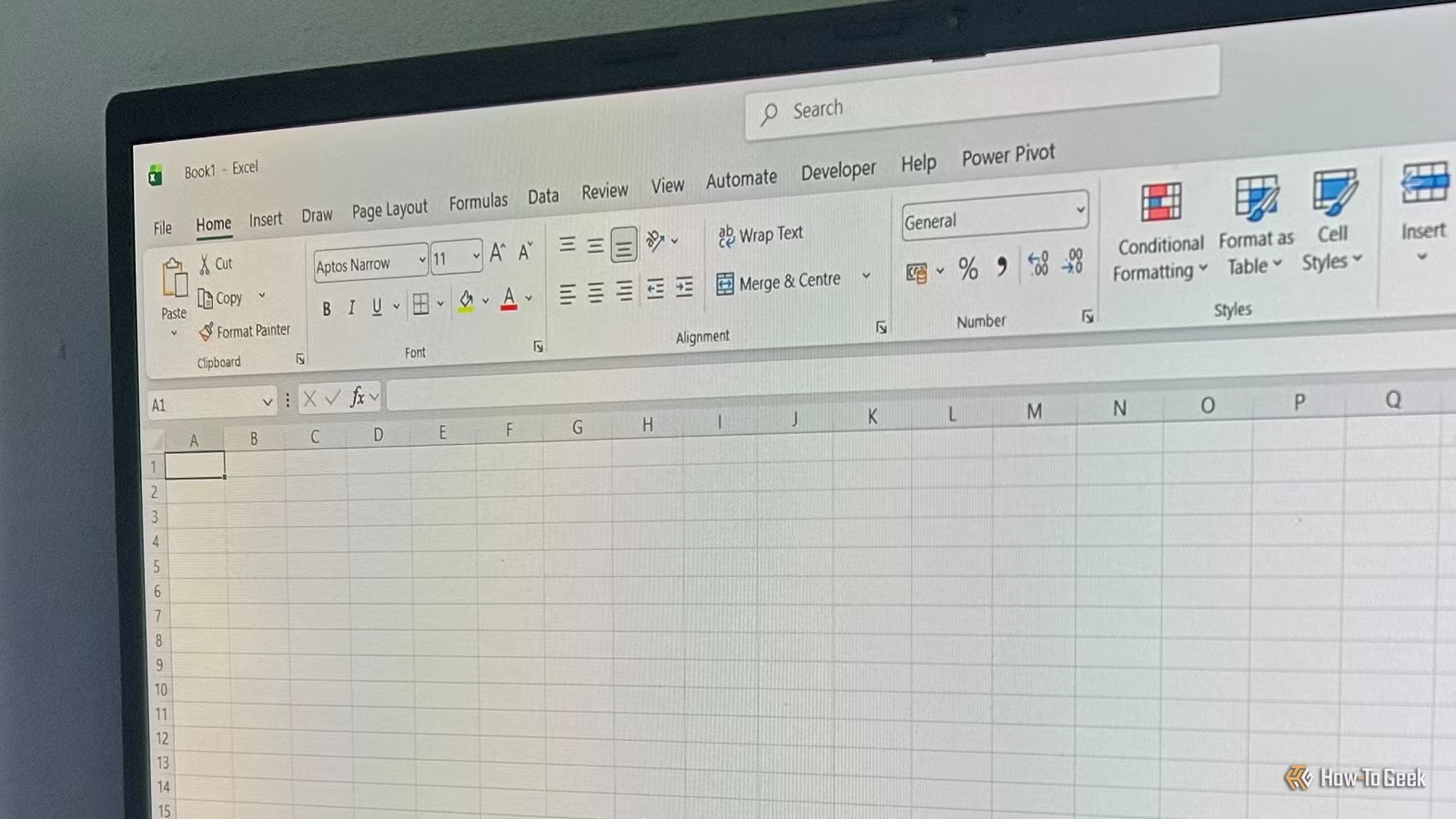
The key is categorizing the interface and deliberately ignoring the specialized zones. These tabs are for automation and data modeling workflows that the vast majority of users won't ever touch:
- Developer tab: for macros and VBA programming
- Power Pivot tab: for advanced data modeling
- Automate tab: for workflow automation
Even the Data tab, while useful for sorting, contains tools like What-If Analysis that can wait until you're much further along. Treating these specialist zones as background noise removes the friction of the learning curve.
Once you strip away the specialized features, Excel becomes something simpler: a grid for storing and manipulating data. That's it. That's the core skill.
What to Master First
Instead of trying to learn every button on the ribbon, focus on the fundamentals that make spreadsheets useful:
- Entering and formatting data in cells
- Basic formulas: SUM, AVERAGE, COUNT
- Sorting and filtering your data
- Simple formatting to make information readable
- Saving and sharing your work
These five skills cover most of what people actually do in Excel day to day. Master them first. Everything else is optional until you hit a specific problem that requires a specific tool.
Logicity's Take
The Mindset Shift
The real skill isn't memorizing every Excel function. It's recognizing that most features exist for someone else's workflow. Your job is to find the 10% that matters for your work and ignore the rest.
This isn't about limiting yourself. Once you're comfortable with the basics, you can explore advanced features as specific needs arise. But starting with the basics, really mastering them, gives you a foundation that makes everything else easier to learn later.
The ribbon isn't a menu of things you need to know. It's a toolbox where most tools aren't for you. That's fine. Use what you need. Skip the rest.
Practice these fundamentals with hands-on projects
Frequently Asked Questions
What percentage of Excel features do most people actually use?
About 10%. Most users only need basic data entry, simple formulas, sorting, and formatting for their day-to-day work.
Which Excel tabs should beginners ignore?
The Developer, Power Pivot, and Automate tabs are safe to ignore. These contain specialized tools for automation and data modeling that most users never need.
What are the most important Excel skills for beginners?
Focus on data entry, basic formulas (SUM, AVERAGE, COUNT), sorting and filtering, simple formatting, and saving your work. These cover most everyday Excel tasks.
Is the Data tab useful for Excel beginners?
Partially. The sorting features are useful, but tools like What-If Analysis can wait until you're more experienced.
Need Help Implementing This?
Source: How-To Geek
Huma Shazia
Senior AI & Tech Writer
اقرأ أيضاً

رأي مغاير: كيف يؤثر اختراق الأمن الداخلي الأميركي على شركاتنا الخاصة؟
في ظل اختراق عقود الأمن الداخلي الأميركي مع شركات خاصة، نناقش تأثير هذا الاختراق على مستقبل الأمن السيبراني. نستعرض الإحصاءات الموثوقة ونناقش كيف يمكن للشركات الخاصة أن تتعامل مع هذا التهديد. استمتع بقراءة هذا التحليل العميق

الإنسان في زمن ما بعد الوجود البشري: نحو نظام للتعايش بين الإنسان والروبوت - Centre for Arab Unity Studies
في هذا المقال، سنناقش كيف يمكن للبشر والروبوتات التعايش في نظام متكامل. سنستعرض التحديات والحلول المحتملة التي تضعها شركات مثل جوجل وأمازون. كما سنلقي نظرة على التوقعات المستقبلية وفقًا لتقرير ماكنزي

إطلاق ناسا لمهمة مأهولة إلى القمر: خطوة تاريخية نحو استكشاف الفضاء
تعتبر المهمة الجديدة خطوة هامة نحو استكشاف الفضاء وتطوير التكنولوجيا. سوف تشمل المهمة إرسال رواد فضاء إلى سطح القمر لconducting تجارب علمية. ستسهم هذه المهمة في تطوير فهمنا للفضاء وتحسين التكنولوجيا المستخدمة في استكشاف الفضاء.