Cloudflare Tunnels: Free Static IP Alternative for Home Servers
Key Takeaways
- Cloudflare Tunnels bypass static IP requirements, CGNAT, and complex network setups entirely
- Setup takes about five minutes and includes automatic HTTPS certificates
- The service is completely free and works even on mixed satellite, DSL, or LTE connections
The Static IP Problem Self-Hosters Know Too Well
If you've ever tried to put your home server on a real domain, you've hit the same wall. A domain points to an IP address. The entire DNS system assumes that IP is stable and publicly reachable. Home internet connections rarely meet either requirement.
Most residential ISPs hand out dynamic IPs that change whenever you reboot your router or reconnect. You can pay your ISP for a static IP, but that defeats the point of running free infrastructure. Dynamic DNS services exist to catch those IP changes and broadcast them, but that means running yet another server and dealing with propagation delays.
Then there's carrier-grade NAT. If your internet comes through LTE or certain fiber providers, you don't even have a public IP to broadcast. You're sharing one address with dozens of other customers. No amount of port forwarding helps when you're buried three layers deep in someone else's network.
How Cloudflare Tunnels Sidestep the Whole Mess
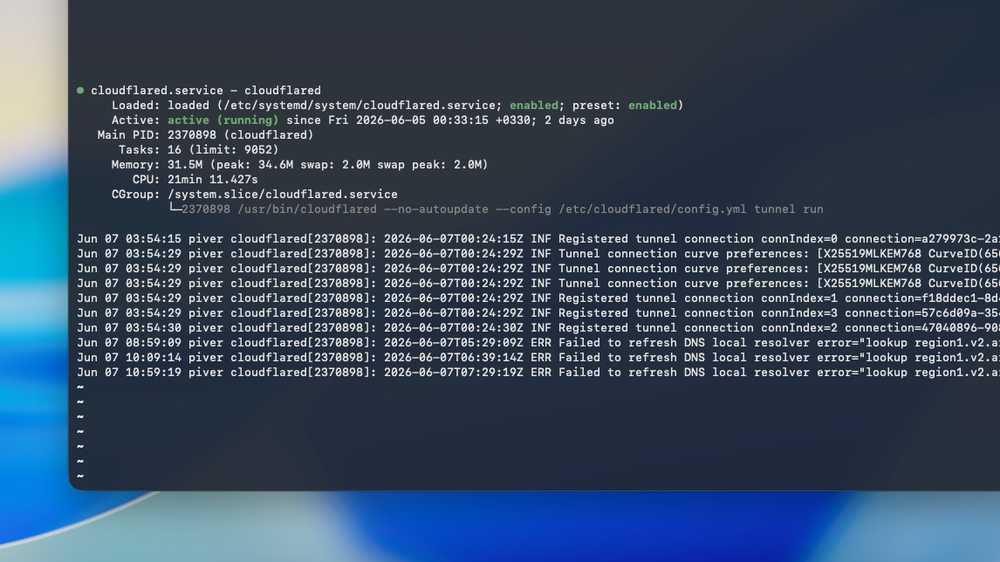
Cloudflare Tunnels flip the model. Instead of exposing your server to the internet and hoping traffic finds it, your server reaches out to Cloudflare. The tunnel runs as a small daemon on your machine, maintaining a persistent connection to Cloudflare's edge network. Traffic to your domain routes through Cloudflare, down that tunnel, and to your local service.
Your ISP never needs to know. Your IP can change hourly. You can be behind CGNAT, running off a mobile hotspot, or using some Frankenstein stack of satellite, DSL, and LTE. As long as your server can make outbound connections, the tunnel works.
HTTPS Comes Free
HTTPS isn't optional anymore. Modern browsers complain loudly about unencrypted connections. Many applications and APIs refuse to work without TLS. Getting a certificate for a home server used to mean Let's Encrypt renewals, DNS challenges, and hoping nothing broke while you slept.
Cloudflare handles certificates automatically. Traffic between visitors and Cloudflare is encrypted. Traffic from Cloudflare to your server goes through the tunnel, which is also encrypted. You don't configure anything. No certificate files, no cron jobs, no renewal failures at 3 AM.
What Setup Actually Looks Like
The original MakeUseOf article claims five minutes. That's accurate if you already own a domain and have it pointed at Cloudflare's nameservers. You install the cloudflared daemon, authenticate with your Cloudflare account, create a tunnel, and configure which local ports map to which subdomains.
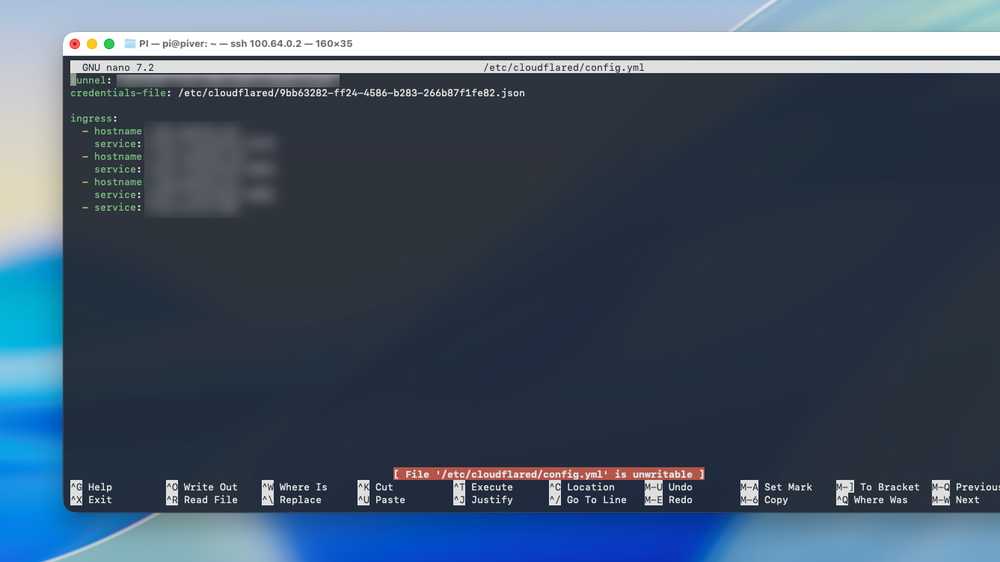
The config file is straightforward. You specify the tunnel ID, your credentials file location, and then list your ingress rules. Each rule maps a hostname to a local service. Point photos.yourdomain.com to localhost:8080. Point git.yourdomain.com to localhost:3000. The daemon handles the rest.
The Tradeoffs Worth Knowing
✅ Pros
- • Completely free, even for multiple subdomains
- • Bypasses CGNAT, dynamic IPs, and complex network stacks
- • Automatic HTTPS with zero certificate management
- • No port forwarding or firewall changes needed
- • Works on any connection that allows outbound traffic
❌ Cons
- • All traffic routes through Cloudflare's servers
- • Adds latency compared to direct connections
- • Cloudflare can inspect unencrypted traffic between their edge and your server
- • You're dependent on Cloudflare's infrastructure and policies
- • Requires a domain you own (cost varies)
The privacy tradeoff deserves attention. Cloudflare terminates TLS at their edge, which means they can technically see your traffic before re-encrypting it to your server. For a personal photo gallery or a Jellyfin instance, this probably doesn't matter. For sensitive applications, think carefully about what you're routing through someone else's infrastructure.
When This Beats Traditional Approaches
Tailscale and similar mesh VPNs are excellent for personal access. You install the client on your devices, and they can reach your home server from anywhere. But they require client software. You can't give a friend a URL they can open in any browser.
Cloudflare Tunnels shine when you want public access to something. A personal blog. A portfolio site. A self-hosted Bitwarden instance you want to reach from any device. A game server your friends can join without installing VPN clients.
The two approaches work well together. Use Tailscale for admin access and sensitive tools. Use Cloudflare Tunnels for anything you'd otherwise pay for hosting.
More ways to optimize your home setup
The Bottom Line for Self-Hosters
This isn't a new product. Cloudflare Tunnels (formerly Argo Tunnel) have existed for years. But awareness among hobbyist self-hosters remains low. Many people, like the MakeUseOf author, spend months assuming public access requires renting a VPS or paying for static IP.
If you're running services at home and want to put them on a real domain, Cloudflare Tunnels remove the infrastructure barrier entirely. The only cost is the domain itself.
Logicity's Take
Frequently Asked Questions
Is Cloudflare Tunnels really free?
Yes. The tunnel service itself costs nothing. You need a domain pointed at Cloudflare's nameservers, which requires either buying a domain or using one you already own.
Does Cloudflare Tunnels work behind CGNAT?
Yes. Since your server initiates the outbound connection to Cloudflare, CGNAT doesn't matter. You don't need any port forwarding or public IP.
Can Cloudflare see my traffic?
Cloudflare terminates TLS at their edge, so they can technically inspect unencrypted content. For most personal services this is acceptable, but sensitive applications may warrant a different approach.
How does this compare to Tailscale?
Tailscale requires client software and is best for private access. Cloudflare Tunnels provide public URLs anyone can reach in a browser. Many self-hosters use both.
What happens if Cloudflare goes down?
Your services become unreachable since all traffic routes through Cloudflare's infrastructure. For hobby projects this is rarely a concern, but mission-critical services may need redundancy.
Need Help Implementing This?
Source: MakeUseOf
Huma Shazia
Senior AI & Tech Writer
اقرأ أيضاً

رأي مغاير: كيف يؤثر اختراق الأمن الداخلي الأميركي على شركاتنا الخاصة؟
في ظل اختراق عقود الأمن الداخلي الأميركي مع شركات خاصة، نناقش تأثير هذا الاختراق على مستقبل الأمن السيبراني. نستعرض الإحصاءات الموثوقة ونناقش كيف يمكن للشركات الخاصة أن تتعامل مع هذا التهديد. استمتع بقراءة هذا التحليل العميق

الإنسان في زمن ما بعد الوجود البشري: نحو نظام للتعايش بين الإنسان والروبوت - Centre for Arab Unity Studies
في هذا المقال، سنناقش كيف يمكن للبشر والروبوتات التعايش في نظام متكامل. سنستعرض التحديات والحلول المحتملة التي تضعها شركات مثل جوجل وأمازون. كما سنلقي نظرة على التوقعات المستقبلية وفقًا لتقرير ماكنزي

إطلاق ناسا لمهمة مأهولة إلى القمر: خطوة تاريخية نحو استكشاف الفضاء
تعتبر المهمة الجديدة خطوة هامة نحو استكشاف الفضاء وتطوير التكنولوجيا. سوف تشمل المهمة إرسال رواد فضاء إلى سطح القمر لconducting تجارب علمية. ستسهم هذه المهمة في تطوير فهمنا للفضاء وتحسين التكنولوجيا المستخدمة في استكشاف الفضاء.