Android Auto's hidden parking toggle saves minutes per trip
Key Takeaways
- Android Auto displays a 'Save parking' toggle on the welcome screen after navigation ends, but it's easy to miss
- iPhone users get automatic parking detection by default, while Android requires a manual tap
- The feature has existed since late 2023, yet many daily users have never noticed it
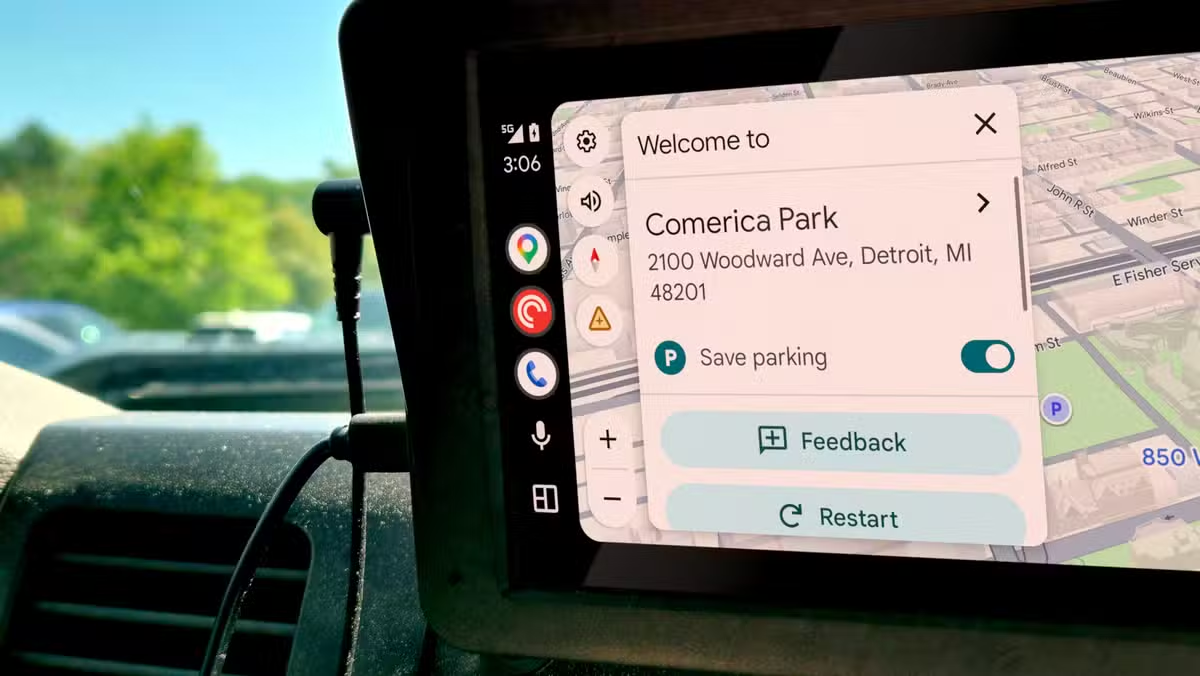
Android Auto has a one-tap parking saver that appears every time you finish a Google Maps route. The toggle sits on the "Welcome to" screen after you arrive at a destination, and tapping it logs your car's location so you can find it later in Maps on your phone. The catch: it's so subtle that many drivers never notice it.
Joe Fedewa, Managing Editor at How-To Geek, recently wrote about discovering this feature months after it first appeared on his screen. He estimates the button showed up hundreds of times before he actually saw it. That tracks with Reddit threads on r/AndroidAuto, where users report stumbling across the toggle only after weeks of daily commutes.
Where to find Android Auto's save parking button
When you reach your destination using Google Maps navigation on Android Auto, a card appears with the location name and a simple "Save parking" toggle. Tap it. That's the entire process. Your parking spot then appears when you open the search bar in Google Maps on your phone, letting you navigate back to your car.
The alternative is slower. Without the toggle, you'd open Google Maps on your phone, tap the blue location dot, swipe through a menu, and select "Save parking" manually. That's four or five steps versus one. In a busy parking garage or unfamiliar neighborhood, those extra seconds add friction that most people won't bother with.
Why iPhone users get a better version
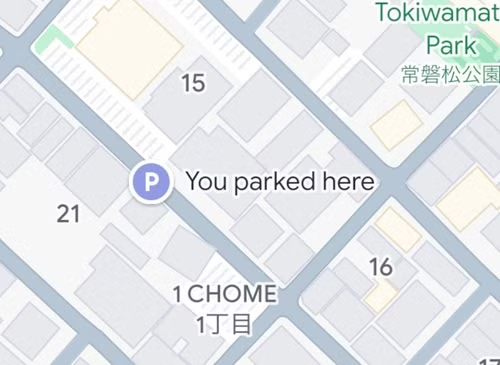
Here's the strange part: Google Maps on iPhone automatically saves parking locations. No tap required. When an iPhone connects to a car via USB, Bluetooth, or CarPlay, Maps detects when the vehicle stops and logs the position. The saved location stays active for 48 hours or until Maps notices you're driving again. This became the default for all iPhone users late last year.
Android users don't get this automatic behavior. They must tap the toggle manually every time, assuming they notice it exists. Google hasn't explained the discrepancy. Android Auto serves over 200 million monthly active users as of 2024, so the gap affects a substantial audience.

Making matters worse, Google Assistant used to handle parking saves over a decade ago. A simple voice command would log your location. That feature no longer works reliably, and Gemini, Google's newer assistant, can't replicate it. The Android Auto toggle is currently the fastest option for Android users.
The visibility problem
The toggle appears at a moment when most drivers aren't looking at their screen. You've arrived. You're checking your parking job, reaching for your phone, unclicking your seatbelt. The "Welcome to" card flashes briefly, and then you're gone. Fedewa argues the feature should be enabled by default, and r/AndroidAuto users have made the same point repeatedly.

This is a design pattern that keeps repeating in Google's products. Useful features exist, but they're buried or presented at the wrong time. Power users eventually find them. Everyone else assumes the feature doesn't exist.

How to make parking saves automatic on Android
You can't, at least not natively. Google hasn't brought the iPhone's automatic detection to Android or Android Auto. Third-party apps like Tasker can simulate this with Bluetooth triggers, but that requires significant setup and won't integrate cleanly with Google Maps. For now, the manual toggle remains the best option.
If you use Android Auto regularly, train yourself to glance at the screen when you arrive. One tap, and your parking location is saved. It's a small habit that solves a recurring annoyance.
Another example of seemingly simple tech hiding frustrating complexity
Logicity's Take
Google's decision to give iPhone users automatic parking detection while requiring Android users to tap a toggle is hard to justify. Android Auto is Google's own platform, running on Google's own OS, with tight Maps integration. The technical barriers are minimal. This looks like a prioritization choice, and it's a puzzling one given that Android Auto's 200 million users represent Google's core mobile audience. Expect this to change eventually, but the fact that it hasn't after two years suggests parking features aren't high on the roadmap.
Frequently Asked Questions
Where is the save parking button in Android Auto?
It appears on the 'Welcome to' card that displays after you complete a Google Maps navigation route. Tap 'Save parking' before exiting your car.
Does Android Auto automatically save my parking location?
No. Unlike the iPhone version of Google Maps, Android Auto requires a manual tap to save your parking spot each time.
How long does Google Maps keep my saved parking location?
Google Maps retains the saved parking location for 48 hours or until it detects that you've started driving again.
Can Google Assistant save my parking location?
This feature worked over a decade ago but no longer functions reliably. Gemini, Google's newer assistant, also cannot save parking locations.
How do I find my saved parking location in Google Maps?
Open Google Maps on your phone and tap the search bar. Your saved parking location should appear as a suggestion.
Need Help Implementing This?
Building automotive software integrations or in-vehicle UX that actually gets used? Our team covers the latest in connected car platforms and can connect you with experts who've shipped production Android Auto features. Reach out at hello@logicity.in.
Source: How-To Geek
Manaal Khan
Tech & Innovation Writer
اقرأ أيضاً

رأي مغاير: كيف يؤثر اختراق الأمن الداخلي الأميركي على شركاتنا الخاصة؟
في ظل اختراق عقود الأمن الداخلي الأميركي مع شركات خاصة، نناقش تأثير هذا الاختراق على مستقبل الأمن السيبراني. نستعرض الإحصاءات الموثوقة ونناقش كيف يمكن للشركات الخاصة أن تتعامل مع هذا التهديد. استمتع بقراءة هذا التحليل العميق

الإنسان في زمن ما بعد الوجود البشري: نحو نظام للتعايش بين الإنسان والروبوت - Centre for Arab Unity Studies
في هذا المقال، سنناقش كيف يمكن للبشر والروبوتات التعايش في نظام متكامل. سنستعرض التحديات والحلول المحتملة التي تضعها شركات مثل جوجل وأمازون. كما سنلقي نظرة على التوقعات المستقبلية وفقًا لتقرير ماكنزي

إطلاق ناسا لمهمة مأهولة إلى القمر: خطوة تاريخية نحو استكشاف الفضاء
تعتبر المهمة الجديدة خطوة هامة نحو استكشاف الفضاء وتطوير التكنولوجيا. سوف تشمل المهمة إرسال رواد فضاء إلى سطح القمر لconducting تجارب علمية. ستسهم هذه المهمة في تطوير فهمنا للفضاء وتحسين التكنولوجيا المستخدمة في استكشاف الفضاء.