AI Automation Suggester: Let AI Design Your Home Assistant Rules
Key Takeaways
- AI Automation Suggester analyzes your existing devices, entities, and automations to suggest new ones
- It generates ready-to-paste YAML code you can edit and deploy immediately
- Supports cloud AI providers like OpenAI, Anthropic, Google, and Groq, plus local options like Ollama
The Automation Paralysis Problem
Home Assistant is powerful. Maybe too powerful. You can automate almost anything, from turning on lights when you walk into a room to adjusting your thermostat based on weather forecasts and your calendar. The problem is figuring out what to automate next.
Most Home Assistant users hit a wall after setting up the obvious automations. Lights on at sunset. Motion-activated bathroom fans. Maybe a good morning routine. Then you stare at your dashboard wondering what else you should build. A new HACS integration called AI Automation Suggester aims to solve this by having AI analyze your setup and propose automations you might not have considered.
How AI Automation Suggester Works
The integration scans your Home Assistant instance. It looks at your devices, entities, areas, and existing automations. Then it sends this information to an AI model of your choice, which analyzes the current state of your home, identifies gaps or potential improvements, and returns suggestions for new automations.
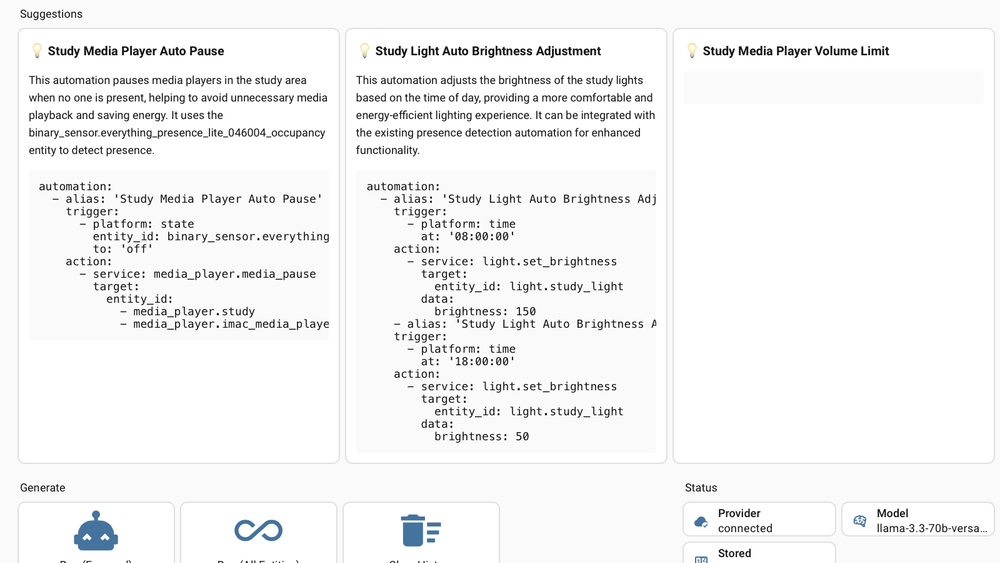
The suggestions are not just vague ideas. The tool generates ready-to-paste YAML code for each automation. You can copy it directly into your automations.yaml file, or use it as a starting point and edit it to match your preferences.
For example, if you have a motion sensor in your garage and smart lights but no automation connecting them, the suggester might propose turning on the garage lights when motion is detected and turning them off after five minutes of inactivity. If you have a temperature sensor and a fan, it might suggest turning on the fan when the temperature exceeds a threshold.
Supported AI Providers
The integration supports multiple AI backends. Cloud options include OpenAI, Azure OpenAI, Anthropic, Google, Groq, and OpenRouter. For users who prefer keeping everything local, it works with Ollama and LocalAI.

Cloud providers may charge API fees or impose rate limits on free tiers. According to How-To Geek's testing, Groq's free tier worked reasonably well for generating suggestions. If you run a capable local machine, Ollama avoids API costs entirely and keeps your home data off external servers.
Installation
Installing AI Automation Suggester requires HACS (Home Assistant Community Store) already set up on your system. Search for "AI Automation Suggester" in HACS, download it, and restart Home Assistant.
After restart, go to Settings > Devices & services and click Add integration. Search for the suggester and configure your preferred AI provider. You will need API credentials for cloud services, or a running Ollama instance for local inference.
Practical Considerations
- The quality of suggestions depends on your chosen AI model. Larger models generally produce more nuanced ideas.
- Cloud API calls add up. If you generate suggestions frequently, costs can accumulate on paid tiers.
- The generated YAML is a starting point. Review and test automations before deploying them.
- Your home data, including device names, areas, and existing automation logic, gets sent to the AI provider. Privacy-conscious users should consider local options.
✅ Pros
- • Generates specific, ready-to-use automation YAML
- • Supports both cloud and local AI providers
- • Analyzes your actual setup rather than suggesting generic ideas
- • Free integration with free-tier AI options available
❌ Cons
- • Requires HACS, which adds another dependency
- • Cloud providers may incur API costs
- • Sends home configuration data to external AI services
- • Suggestion quality varies by AI model
Who Should Use This
This integration suits Home Assistant users who have moved past the basics and want ideas for what to automate next. It is particularly useful for people with large or complex setups where interactions between devices are not obvious.
If you are new to Home Assistant, start with manual automations to understand how triggers, conditions, and actions work. The generated YAML will make more sense once you know the structure.
Logicity's Take
Another creative way to use AI tools for practical automation
Frequently Asked Questions
Is AI Automation Suggester free to use?
The integration itself is free. However, cloud AI providers may charge API fees or limit free tier usage. Local options like Ollama avoid external costs.
Does the integration require internet access?
Only for cloud AI providers. If you run Ollama or LocalAI on your local network, it works entirely offline.
Can the generated automations break my Home Assistant setup?
The tool generates YAML suggestions. It does not automatically deploy them. You must manually review and add any automations, so you control what actually runs.
What information gets sent to the AI provider?
The integration sends data about your devices, entities, areas, and existing automations. If privacy is a concern, use a local AI option like Ollama.
Need Help Implementing This?
Source: How-To Geek
Huma Shazia
Senior AI & Tech Writer
اقرأ أيضاً

رأي مغاير: كيف يؤثر اختراق الأمن الداخلي الأميركي على شركاتنا الخاصة؟
في ظل اختراق عقود الأمن الداخلي الأميركي مع شركات خاصة، نناقش تأثير هذا الاختراق على مستقبل الأمن السيبراني. نستعرض الإحصاءات الموثوقة ونناقش كيف يمكن للشركات الخاصة أن تتعامل مع هذا التهديد. استمتع بقراءة هذا التحليل العميق

الإنسان في زمن ما بعد الوجود البشري: نحو نظام للتعايش بين الإنسان والروبوت - Centre for Arab Unity Studies
في هذا المقال، سنناقش كيف يمكن للبشر والروبوتات التعايش في نظام متكامل. سنستعرض التحديات والحلول المحتملة التي تضعها شركات مثل جوجل وأمازون. كما سنلقي نظرة على التوقعات المستقبلية وفقًا لتقرير ماكنزي

إطلاق ناسا لمهمة مأهولة إلى القمر: خطوة تاريخية نحو استكشاف الفضاء
تعتبر المهمة الجديدة خطوة هامة نحو استكشاف الفضاء وتطوير التكنولوجيا. سوف تشمل المهمة إرسال رواد فضاء إلى سطح القمر لconducting تجارب علمية. ستسهم هذه المهمة في تطوير فهمنا للفضاء وتحسين التكنولوجيا المستخدمة في استكشاف الفضاء.