4 Free AI Tools That Work Offline and Keep Your Data Private
Key Takeaways
- Handy provides accurate speech-to-text transcription using local AI models like Parakeet and Whisper
- Rembg removes image backgrounds using CPU or GPU processing without uploading photos anywhere
- 81% of U.S. consumers are concerned about how AI systems access their personal data
Every time you upload a document to ChatGPT, feed an image to a cloud-based editor, or dictate notes through an online service, that data travels to someone else's servers. For personal photos or casual tasks, that trade-off might be acceptable. For medical records, legal documents, proprietary code, or confidential business data, it's a different calculation entirely.
The good news: a growing ecosystem of open-source AI tools runs completely offline. They use your computer's processing power instead of remote servers. Your files never leave your machine.
That statistic explains why the "Local-First AI" movement has gained momentum. Users want the productivity benefits of generative AI without the risk of their data being used to train third-party models or ending up in unknown hands.
“The cloud is not a place; it's someone else's computer. In the AI era, running locally isn't just about privacy—it's about sovereignty over your own intelligence.”
— Dr. Sarah Chen, Lead Researcher at AI Privacy Initiative
Handy: Speech-to-Text That Never Phones Home
Handy is a free, open-source speech-to-text tool that uses local AI models for transcription. Click any text field on your operating system, hold a keyboard shortcut, and start dictating. The app transcribes your speech while automatically discarding filler words and silences.
During setup, you choose an AI model. Options include Parakeet, Whisper, and Moonshine. The developer recommends Parakeet, which handles technical terms well. Once the model downloads, you can start transcribing immediately.
The default setup uses push-to-talk: press space+option to start talking, release to transcribe. You can change the keyboard shortcut or disable push-to-talk entirely.
Here's the backstory: the developer built Handy after breaking a finger and discovering that most dictation tools require subscriptions or credit top-ups, some costing as much as $100 a month. Handy uses the same AI models as these commercial utilities but costs nothing.
Handy works on macOS, Linux, and Windows.
Rembg: Background Removal Without Uploads
Rembg is one of the more popular projects in the local AI space. It uses AI running on your CPU or GPU to intelligently remove backgrounds from photos. Drop one or more images, and it outputs cleaned versions with transparent backgrounds.
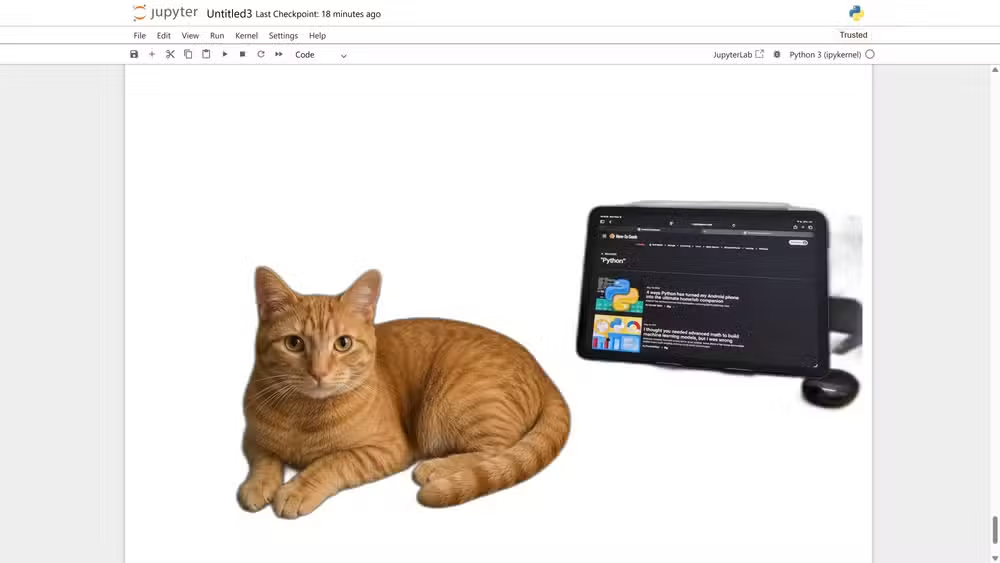
For anyone handling product photos, headshots, or images containing sensitive subjects, this matters. Cloud-based background removal services process your images on their servers. Rembg processes them on your machine. The images never leave your hard drive.
Why This Matters for Businesses
The corporate angle is significant. According to research, 48% of organizations admit that employees have input sensitive or private company information into generative AI applications. Another 15% of employees regularly share company data with unauthorized "Shadow AI" tools, often without IT oversight.
“We are seeing a mass exodus from cloud-based AI in the enterprise sector specifically because the risk of proprietary data leakage to training sets outweighs the convenience of hosted APIs.”
— Marcus Thorne, Cybersecurity Analyst at TechWatch
Local AI tools eliminate this risk category entirely. If the data never leaves the device, it can't leak to external servers or end up in someone else's training data.
More on security vulnerabilities affecting your data
The Hardware Question
Running AI locally requires processing power. Speech-to-text tools like Handy work reasonably well on most modern laptops. Image processing with Rembg benefits from a dedicated GPU but can run on CPU.
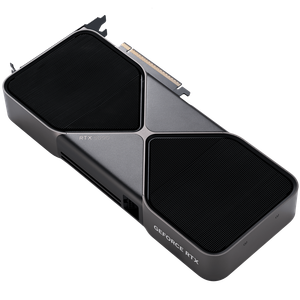
For larger language models, the requirements scale up. The r/LocalLLaMA community on Reddit serves as a central hub for troubleshooting these setups, with extensive discussions on which models run well on which hardware configurations.
The trade-off is straightforward: local AI is slower than cloud AI on most consumer hardware, but your data stays yours.
Getting Started
Both Handy and Rembg are available through their respective project pages. Installation typically involves downloading the application and letting it fetch the AI model on first run. After that initial download, everything runs offline.
For those wanting to explore further, tools like Ollama let you run full large language models locally. Fireship's overview demonstrates how simple the setup process has become.
The privacy implications of AI interactions
Logicity's Take
Frequently Asked Questions
Do local AI tools work without an internet connection?
Yes, after the initial model download. Once the AI model is on your computer, these tools run entirely offline with no network access required.
Are local AI tools as accurate as cloud-based alternatives?
They use the same underlying models in many cases. Handy uses Whisper and Parakeet, which power commercial transcription services. Quality is comparable, though processing speed depends on your hardware.
What hardware do I need to run AI locally?
Basic speech-to-text works on most modern laptops. Image processing benefits from a dedicated GPU. Larger language models may require 16GB+ RAM and a capable graphics card for acceptable speeds.
Is local AI actually more secure than cloud AI?
For data privacy, yes. Your files never leave your device, so they can't be intercepted, stored on third-party servers, or used to train external models. Standard device security practices still apply.
Need Help Implementing This?
Source: How-To Geek
Manaal Khan
Tech & Innovation Writer
اقرأ أيضاً

رأي مغاير: كيف يؤثر اختراق الأمن الداخلي الأميركي على شركاتنا الخاصة؟
في ظل اختراق عقود الأمن الداخلي الأميركي مع شركات خاصة، نناقش تأثير هذا الاختراق على مستقبل الأمن السيبراني. نستعرض الإحصاءات الموثوقة ونناقش كيف يمكن للشركات الخاصة أن تتعامل مع هذا التهديد. استمتع بقراءة هذا التحليل العميق

الإنسان في زمن ما بعد الوجود البشري: نحو نظام للتعايش بين الإنسان والروبوت - Centre for Arab Unity Studies
في هذا المقال، سنناقش كيف يمكن للبشر والروبوتات التعايش في نظام متكامل. سنستعرض التحديات والحلول المحتملة التي تضعها شركات مثل جوجل وأمازون. كما سنلقي نظرة على التوقعات المستقبلية وفقًا لتقرير ماكنزي

إطلاق ناسا لمهمة مأهولة إلى القمر: خطوة تاريخية نحو استكشاف الفضاء
تعتبر المهمة الجديدة خطوة هامة نحو استكشاف الفضاء وتطوير التكنولوجيا. سوف تشمل المهمة إرسال رواد فضاء إلى سطح القمر لconducting تجارب علمية. ستسهم هذه المهمة في تطوير فهمنا للفضاء وتحسين التكنولوجيا المستخدمة في استكشاف الفضاء.