3 Vim Statusline Plugins That Replace the Boring Default
Key Takeaways
- Powerline offers the most features but requires Python and complex setup
- Lightline is the lightweight option with minimal dependencies
- Airline balances features and ease of installation for most users
The Vim statusline sits at the bottom of your editor, quietly displaying file info and cursor position. Most developers never touch it. The default works fine. But it also looks like it was designed in 1991, because it was.
You can customize the statusline yourself using Vim script and built-in variables. That takes time. These three plugins have already done the work. Each adds git integration, file type indicators, and better visual design. The differences come down to setup complexity, resource use, and how much you want to tweak.
Powerline: The Original, Now Grown Up
Powerline started as vim-powerline, a Vim script plugin. The current version has migrated to Python and expanded beyond Vim to support zsh, bash, and tmux. If you want a consistent look across your terminal and editor, this is the path.
Once installed, Powerline adds a statusline with a command indicator, git branch info, file name, file type, and standard ruler details. Configuration lives in ~/.config/powerline, with JSON files controlling themes, colorschemes, and behavior.
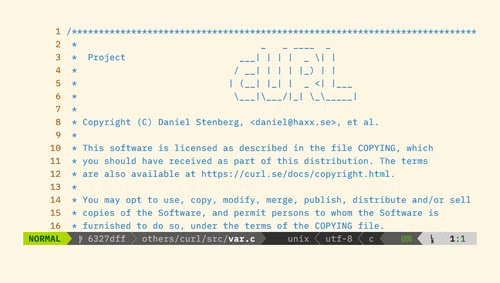
Themes control what information appears. Powerline calls each piece of info a "segment." Available segments include buffer number, CSV column name, file size, and more. You can even apply themes to the tab bar.
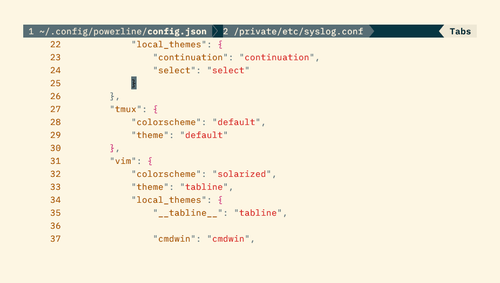
Colorschemes are limited, but Solarized is included. Changes to config files appear immediately on save, which makes testing quick.
The catch: installation is awkward. You need a version of Vim compiled with Python support. You also get shell prompt handling whether you want it or not. For the initial setup, you'll copy config files from your Python site-packages directory to ~/.config/powerline.
cp -r ~/Library/Python/3.9/lib/python/site-packages/powerline/config_files/ ~/.config/powerlineLightline: Minimal Dependencies, Fast Load
Lightline takes the opposite approach. It's written in pure Vim script with no external dependencies. If you want a better statusline without adding Python or other requirements, this is the plugin.
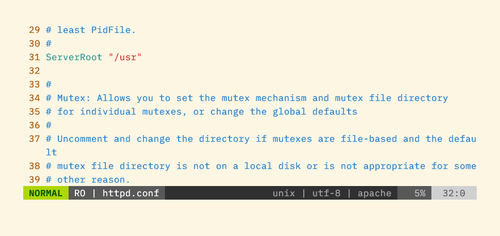
The feature set is smaller than Powerline. You get the core statusline improvements, file info, and mode indicators. But Lightline loads faster and won't conflict with other tools in your environment.
Configuration happens in your .vimrc rather than separate JSON files. This keeps everything in one place but means more Vim script if you want deep customization.
Airline: The Middle Ground
Airline sits between Powerline's feature depth and Lightline's simplicity. It's written in Vim script, so no Python dependency. But it supports integrations with dozens of other plugins out of the box.
If you use fugitive for git, ale for linting, or nerdtree for file browsing, Airline will detect and display info from them automatically. The ecosystem support makes it the practical choice for developers with established Vim setups.
Themes are plentiful. Airline ships with dozens, and the community has created more. Switching themes requires one line in your .vimrc.
Choosing the Right Plugin
The decision depends on your environment and priorities.
- Pick Powerline if you want the same look in Vim, bash, zsh, and tmux. Accept the Python dependency and setup time.
- Pick Lightline if you want minimal overhead, fast load times, and no external dependencies.
- Pick Airline if you use multiple Vim plugins and want automatic integration with them.
| Feature | Powerline | Lightline | Airline |
|---|---|---|---|
| Language | Python | Vim script | Vim script |
| External deps | Python 3.x | None | None |
| Shell support | Yes (bash, zsh, tmux) | No | No |
| Plugin integrations | Limited | Manual | Automatic (40+) |
| Theme count | Few | Several | Dozens |
| Setup complexity | High | Low | Medium |
All three require a patched font for the angled separators to display correctly. Nerd Fonts or Powerline-patched fonts work. Without them, you'll see garbled characters where the fancy arrows should be.
Logicity's Take
If you enjoy customizing dev tools, these hardware projects offer similar hands-on tinkering.
Frequently Asked Questions
Do I need a special font for Vim statusline plugins?
Yes. Powerline, Lightline, and Airline use special characters for angled separators. Install a Nerd Font or Powerline-patched font to display them correctly.
Which Vim statusline plugin is fastest?
Lightline is the lightest. It's pure Vim script with no external dependencies, resulting in faster load times than Powerline or Airline.
Can I use Powerline in bash and Vim together?
Yes. Powerline supports Vim, bash, zsh, and tmux with a unified look. This is its main advantage over Lightline and Airline.
Does Airline work with other Vim plugins?
Yes. Airline automatically integrates with over 40 plugins including fugitive, ale, nerdtree, and coc.nvim.
Need Help Implementing This?
Source: How-To Geek
Huma Shazia
Senior AI & Tech Writer
اقرأ أيضاً

رأي مغاير: كيف يؤثر اختراق الأمن الداخلي الأميركي على شركاتنا الخاصة؟
في ظل اختراق عقود الأمن الداخلي الأميركي مع شركات خاصة، نناقش تأثير هذا الاختراق على مستقبل الأمن السيبراني. نستعرض الإحصاءات الموثوقة ونناقش كيف يمكن للشركات الخاصة أن تتعامل مع هذا التهديد. استمتع بقراءة هذا التحليل العميق

الإنسان في زمن ما بعد الوجود البشري: نحو نظام للتعايش بين الإنسان والروبوت - Centre for Arab Unity Studies
في هذا المقال، سنناقش كيف يمكن للبشر والروبوتات التعايش في نظام متكامل. سنستعرض التحديات والحلول المحتملة التي تضعها شركات مثل جوجل وأمازون. كما سنلقي نظرة على التوقعات المستقبلية وفقًا لتقرير ماكنزي

إطلاق ناسا لمهمة مأهولة إلى القمر: خطوة تاريخية نحو استكشاف الفضاء
تعتبر المهمة الجديدة خطوة هامة نحو استكشاف الفضاء وتطوير التكنولوجيا. سوف تشمل المهمة إرسال رواد فضاء إلى سطح القمر لconducting تجارب علمية. ستسهم هذه المهمة في تطوير فهمنا للفضاء وتحسين التكنولوجيا المستخدمة في استكشاف الفضاء.