3 Homelab Projects to Build This Weekend
Key Takeaways
- Home Assistant can aggregate energy data from smart plugs and utility APIs into one dashboard
- Self-hosted Pastebin alternatives keep your code snippets private and under your control
- A retro LAN party box lets you host classic multiplayer games on your local network
Weekend projects are the best part of running a homelab. You pick something small, finish it in a few hours, and end up with something genuinely useful. Here are three projects sized for a Saturday afternoon.
Track Your Home Energy Usage with Home Assistant
Energy monitoring smart plugs tell you how much one device uses. That's useful, but it's only part of the picture. The real value comes when you aggregate all your energy data in one place.
Home Assistant is the natural home for this. Once you have it running in your homelab, you can pull energy data from multiple sources: smart plugs, whole-home monitors, and sometimes even your utility company's API.
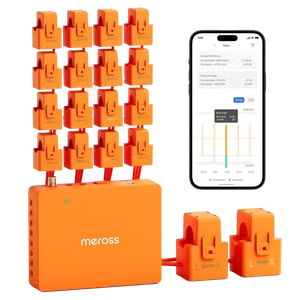
Some utilities let you scrape usage data directly. Others require you to gather it yourself with hardware. Either way, once the data flows into Home Assistant, you can build dashboards that show exactly where your electricity goes. Your refrigerator, your lights, your server rack. Everything gets a number.
Start with a single energy-monitoring smart plug on your most power-hungry device. Your homelab rack is a good candidate. Then expand from there. By the end of the weekend, you'll have the foundation for a complete home energy dashboard.
Host Your Own Pastebin Alternative
Pastebin is convenient until you paste something sensitive. API keys, internal configs, debugging output with customer data. Public paste services are a security incident waiting to happen.
Pastefy is a self-hosted alternative that keeps your snippets private. It supports syntax highlighting, paste expiration, and password protection. You can run it in Docker in about ten minutes.
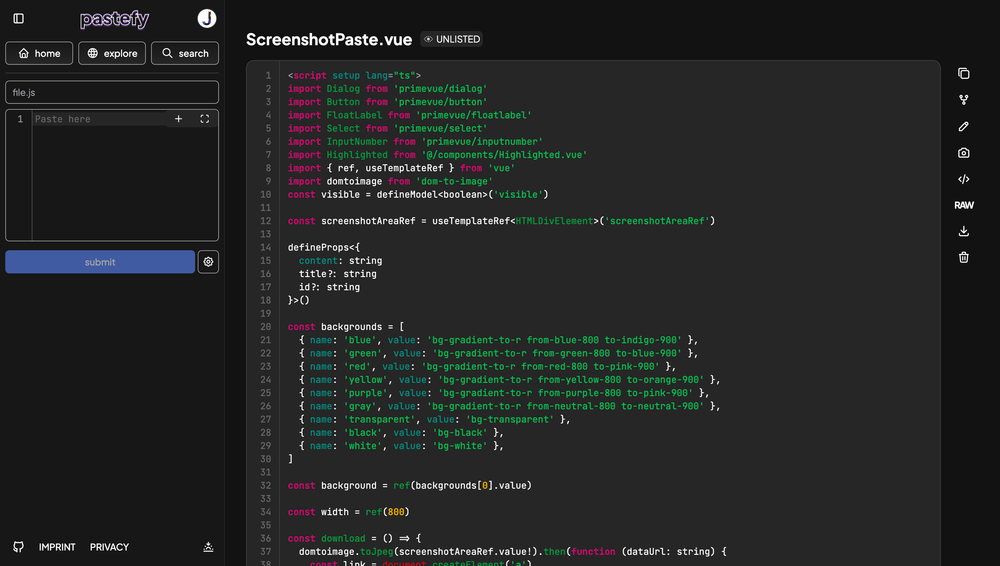
The setup is straightforward. Pull the Docker image, configure your environment variables, and point it at a database. PostgreSQL or MySQL both work. Add a reverse proxy with SSL, and you have a private paste service your whole team can use.
This is especially useful if you do any kind of pair programming or debugging over chat. Instead of pasting code into Slack where it disappears into search history forever, you send a link to your own server. You control the retention. You control who sees it.
Build a Retro LAN Party Box
Here's the fun one. A LAN party box is a small server that hosts multiplayer game servers for classic titles. Think Call of Duty 4, Quake, Counter-Strike 1.6, or Unreal Tournament. Games from the era when you actually owned the server.

A cheap mini PC is all you need. Something like a used Dell Optiplex or one of those AMD Ryzen mini boxes handles multiple game servers without breaking a sweat. Install your Linux distribution of choice, download the dedicated server binaries, and configure your maps and modes.
The result is zero-latency gaming on your local network. No internet connection required. No matchmaking servers deciding when to shut down. Bring it to a friend's house, plug it in, and you have an instant game night.
This project scales nicely too. Start with one game, add more as you find the server files. Most dedicated server software from this era is well documented and still maintained by fan communities.
Another hardware project for the technically curious
Pick One and Start
Each of these projects can be completed in a few hours. The energy monitoring setup pays dividends in understanding where your money goes. The Pastebin replacement solves a real security problem. The LAN party box is just fun.
The best homelab project is the one you actually finish. Pick whichever sounds most interesting and start this weekend.
Logicity's Take
Frequently Asked Questions
What hardware do I need to start a homelab?
Almost any old PC works. A used mini PC with 8GB RAM and an SSD can run Home Assistant, Docker containers, and game servers simultaneously. You don't need enterprise hardware to start.
Is Home Assistant hard to set up?
The basic installation takes about 30 minutes. Adding integrations and building dashboards is where the time goes, but that's the fun part.
Can I run these projects on a Raspberry Pi?
Home Assistant and Pastefy run fine on a Pi 4 or 5. Game servers depend on the game. Lighter titles work, but demanding ones need more CPU.
Do I need to know Linux for homelab projects?
It helps, but many tools now offer Docker images or graphical installers. You'll learn as you go.
How much does a basic homelab cost?
A used mini PC runs $100-200. A Raspberry Pi 5 is about $80 with accessories. Power costs depend on your hardware, but most small setups use under $5/month in electricity.
Need Help Implementing This?
Source: How-To Geek
Huma Shazia
Senior AI & Tech Writer
اقرأ أيضاً

رأي مغاير: كيف يؤثر اختراق الأمن الداخلي الأميركي على شركاتنا الخاصة؟
في ظل اختراق عقود الأمن الداخلي الأميركي مع شركات خاصة، نناقش تأثير هذا الاختراق على مستقبل الأمن السيبراني. نستعرض الإحصاءات الموثوقة ونناقش كيف يمكن للشركات الخاصة أن تتعامل مع هذا التهديد. استمتع بقراءة هذا التحليل العميق

الإنسان في زمن ما بعد الوجود البشري: نحو نظام للتعايش بين الإنسان والروبوت - Centre for Arab Unity Studies
في هذا المقال، سنناقش كيف يمكن للبشر والروبوتات التعايش في نظام متكامل. سنستعرض التحديات والحلول المحتملة التي تضعها شركات مثل جوجل وأمازون. كما سنلقي نظرة على التوقعات المستقبلية وفقًا لتقرير ماكنزي

إطلاق ناسا لمهمة مأهولة إلى القمر: خطوة تاريخية نحو استكشاف الفضاء
تعتبر المهمة الجديدة خطوة هامة نحو استكشاف الفضاء وتطوير التكنولوجيا. سوف تشمل المهمة إرسال رواد فضاء إلى سطح القمر لconducting تجارب علمية. ستسهم هذه المهمة في تطوير فهمنا للفضاء وتحسين التكنولوجيا المستخدمة في استكشاف الفضاء.