20 iOS 27 Features Apple Didn't Mention at WWDC 2026

Key Takeaways
- iOS 27 finally lets you set separate volume levels for ringtone, media, and alarms
- The Now Playing widget can now be dismissed from the Lock Screen with a swipe
- Extra-large widgets can fill your entire iPhone home screen
WWDC 2026 broke from Apple's usual playbook. Instead of the traditional iOS feature showcase, the keynote centered on Siri AI, the Google Gemini partnership, and stability improvements. The result? Many genuinely useful iOS 27 additions never made the stage. They ended up as footnotes on Apple's preview pages, waiting to be discovered.
Here are 20 features that slipped through the cracks. Some are small quality-of-life fixes. Others are changes users have requested for years.
Independent Volume Controls (Finally)
This one has been on wishlists for over a decade. iOS 27 lets you set distinct volume levels for your ringtone, media, and alarms. No more accidentally blasting music at full volume because you cranked up your alarm.
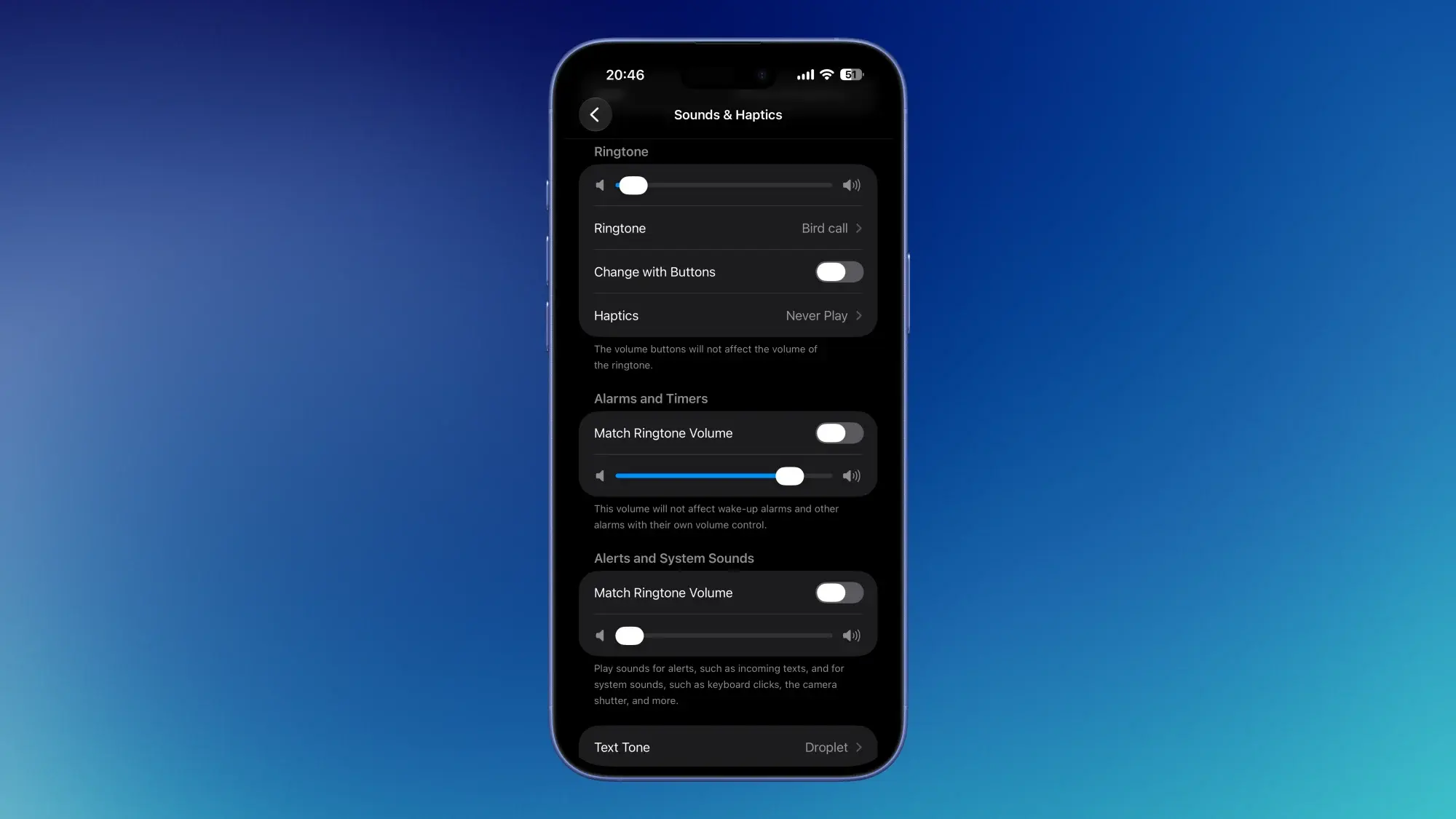
Head to Settings > Sounds & Haptics to find the new layout. By default, all three stay synced. Disable "Match Ringtone Volume" in the alarms section to control each independently.
Dismissible Now Playing Widget
The Lock Screen's Now Playing widget has always been persistent. If you're playing a podcast and want to check notifications without the album art taking up space, you were stuck. iOS 27 changes that.
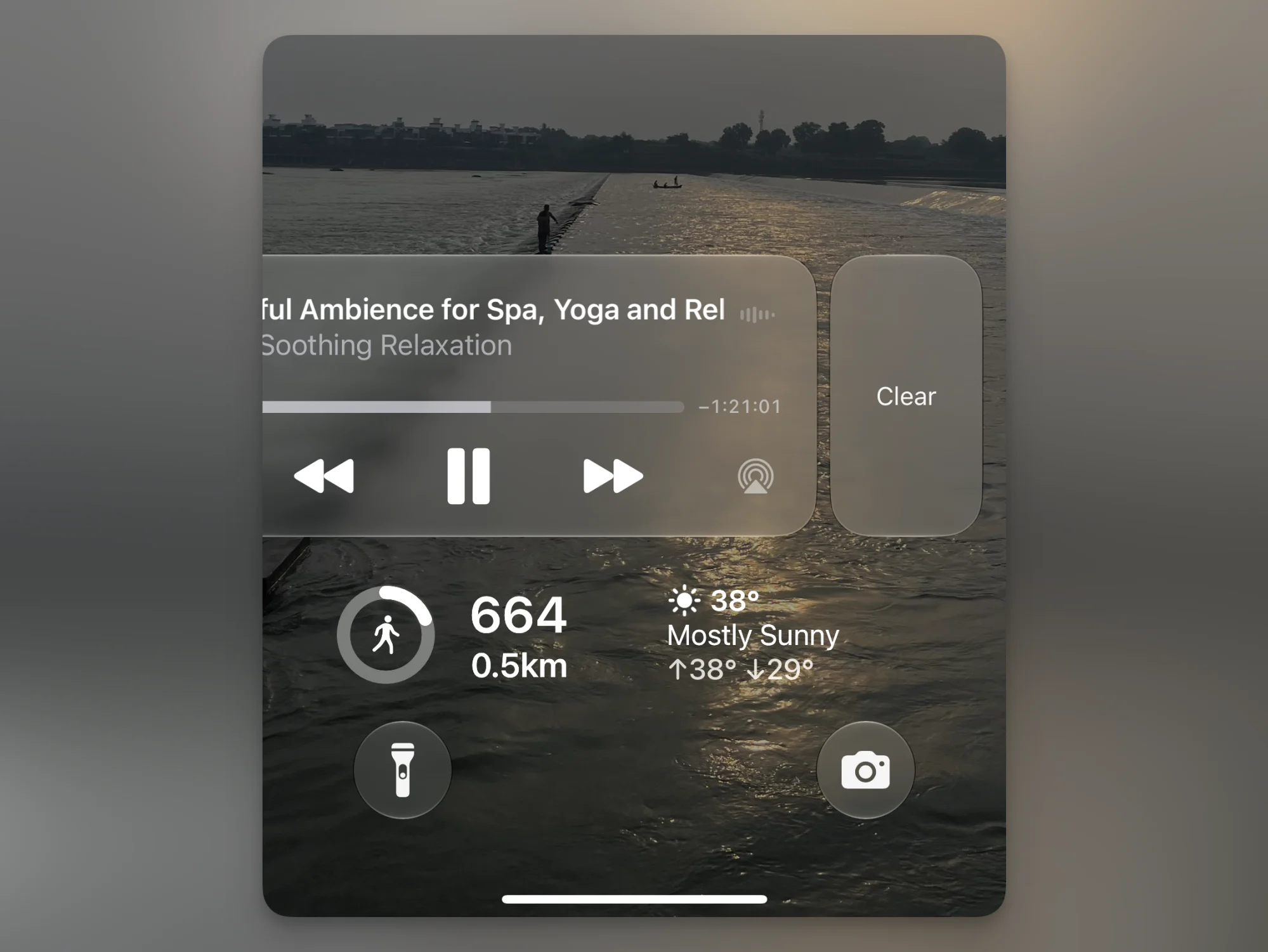
Swipe left on the widget to reveal a Clear button. Playback continues. You just control it from Control Center instead. To bring the widget back, switch audio sources.
QR Codes for Membership Passes
The Wallet app now includes a "Create a Pass" feature. You can convert physical membership cards or event tickets with barcodes into digital passes. Apple generates a QR code that works wherever your physical card would.
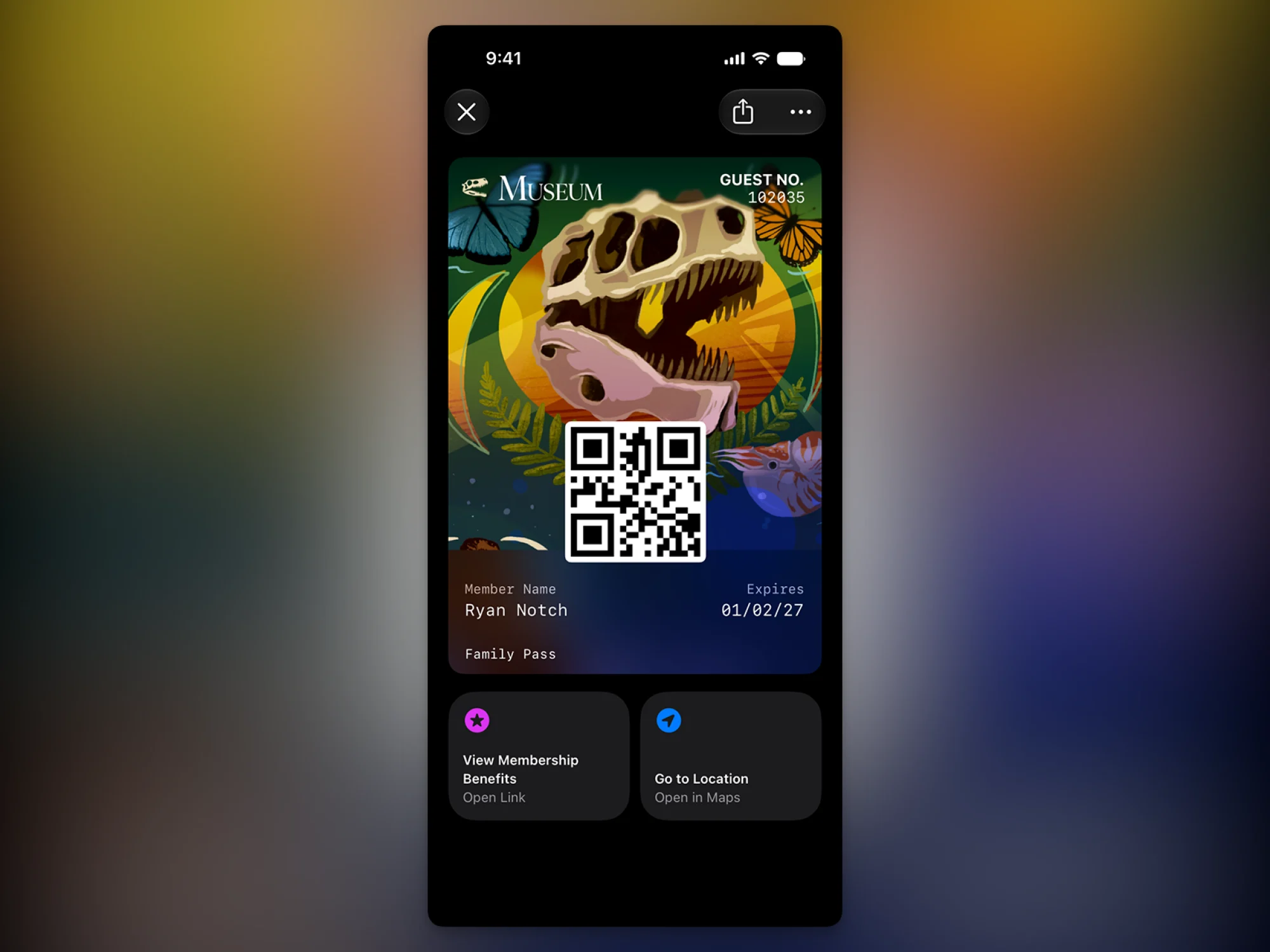
Once added, these passes sync to Apple Watch. No need to dig out a gym card or loyalty badge.
Video Podcasts on Mac and Apple TV
Apple TV and tvOS got almost no keynote time. But the Podcasts app on both Apple TV and Mac is finally adding video podcast support. iPhone and iPad have had this for a while. Now you can watch Joe Rogan or Lex Fridman on the big screen without AirPlaying from your phone.
Extra-Large Widgets
Apple introduced a new "Extra Large" widget size that takes up your entire Home Screen. Not every app supports it yet, but Calendar and Weather look great at this scale.
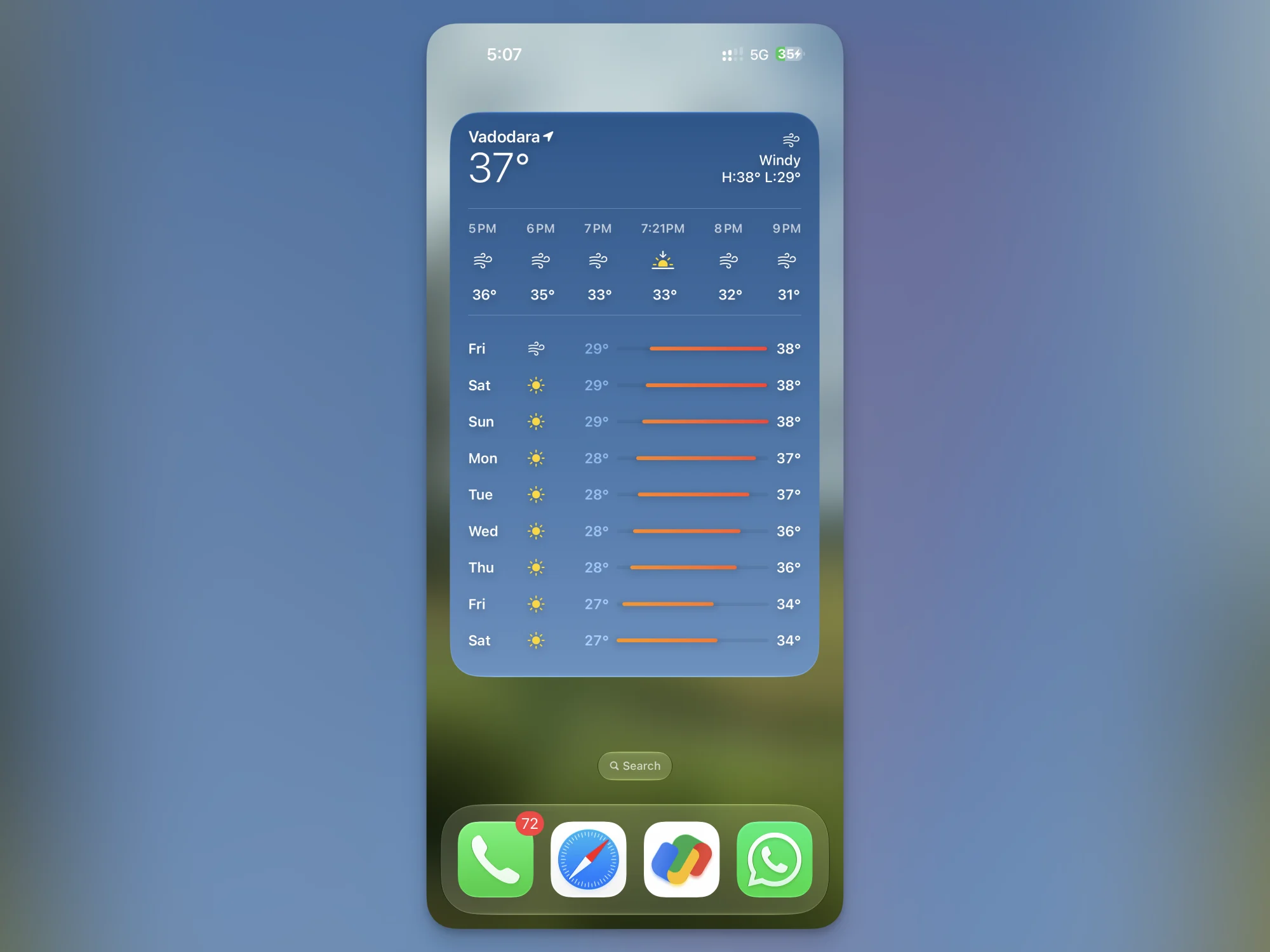
Developers can build for this size too. Expect third-party apps to roll out support over the coming months.
Save Video Frames as Photos
Stop screenshotting videos. iOS 27 adds a proper "Save Video Frame as Photo" option. Open a video, pause at the frame you want, go to Edit > Menu, and select the new option.
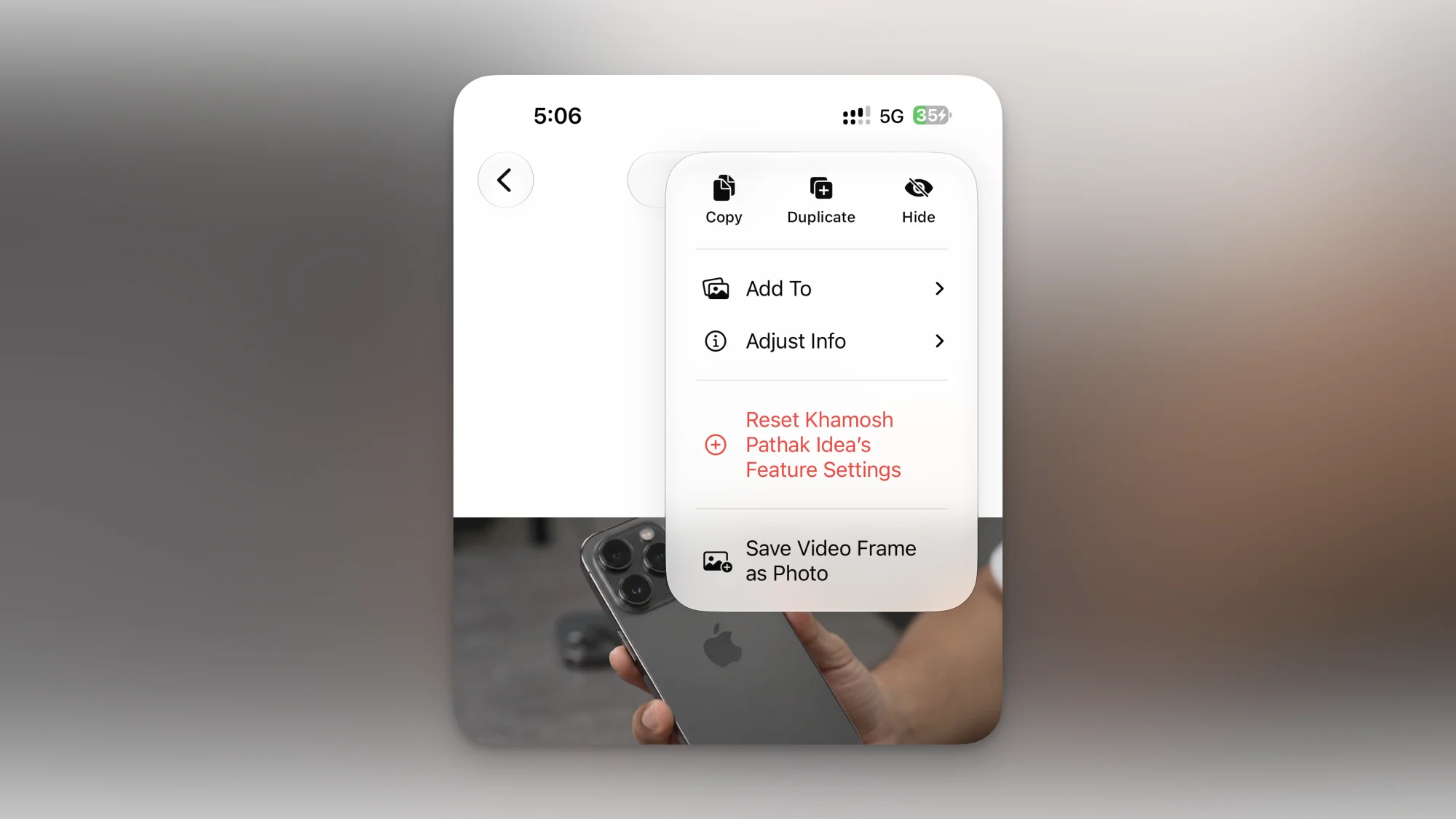
The saved image keeps proper metadata, which screenshots strip out. Better quality, better organization in your library.
Landscape Mode for Apple Music
Apple Music on iPhone now supports landscape orientation. Rotate your phone while browsing or playing music, and the interface adapts. Useful if you have your iPhone docked horizontally while working.

Timer Controls in Dynamic Island
You can now set and adjust timers directly from the Dynamic Island. Tap and hold to access a new timer interface without opening the Clock app.

Improved Location Sharing in Find My
Find My gets more granular location sharing options. You can now specify how long someone can see your location and which contacts get which level of precision.

Home Screen Clock Widget
A small analog clock widget can now sit on your Home Screen. Simple, but useful if you prefer glanceable time without the digital display.

Keyboard Paste Suggestions
The keyboard now shows paste suggestions above the keys when you've copied something. Tap to paste instantly, no long-press required.

Auto-Generated Photo Captions
The Photos app can now generate captions for your images. This helps with search and accessibility. If you've ever struggled to find a specific photo, caption generation makes keyword searches more effective.
Why Apple Buried These
WWDC 2026 had a different priority. The Siri AI announcement and Google Gemini partnership dominated the keynote. Apple needed to sell the story that Siri is finally competitive with Google Assistant and Alexa.
“By integrating Google's Gemini models at the core of our reasoning engine, we are offering the most capable assistant experience ever seen on a mobile device.”
— Craig Federighi, SVP of Software Engineering at Apple
That left little stage time for incremental features. But these incremental features are often what users notice daily. Separate volume controls affect you every morning. Siri's new reasoning engine might not.
Logicity's Take
Frequently Asked Questions
When will iOS 27 be released?
Apple typically releases new iOS versions in September, following WWDC announcements in June. Public betas usually begin in July.
How do I set separate volume levels in iOS 27?
Go to Settings > Sounds & Haptics. Disable "Match Ringtone Volume" in the alarms section to control ringtone, media, and alarm volumes independently.
Which iPhones support extra-large widgets?
Apple hasn't specified hardware requirements, but extra-large widgets appear designed for larger iPhone screens. Older SE models may not support the feature.
Does the Google Gemini partnership affect iOS 27 features?
Gemini powers Siri AI's reasoning capabilities. It doesn't directly affect features like volume controls or widgets, which run entirely on-device.
Can I save video frames from any app in iOS 27?
The feature works in the Photos app for videos stored locally. Third-party apps like YouTube or Netflix may not support it due to DRM restrictions.
If you're testing iOS 27 betas, you might also be interested in pushing hardware limits.
Need Help Implementing This?
Source: Lifehacker
Huma Shazia
Senior AI & Tech Writer
اقرأ أيضاً

رأي مغاير: كيف يؤثر اختراق الأمن الداخلي الأميركي على شركاتنا الخاصة؟
في ظل اختراق عقود الأمن الداخلي الأميركي مع شركات خاصة، نناقش تأثير هذا الاختراق على مستقبل الأمن السيبراني. نستعرض الإحصاءات الموثوقة ونناقش كيف يمكن للشركات الخاصة أن تتعامل مع هذا التهديد. استمتع بقراءة هذا التحليل العميق

الإنسان في زمن ما بعد الوجود البشري: نحو نظام للتعايش بين الإنسان والروبوت - Centre for Arab Unity Studies
في هذا المقال، سنناقش كيف يمكن للبشر والروبوتات التعايش في نظام متكامل. سنستعرض التحديات والحلول المحتملة التي تضعها شركات مثل جوجل وأمازون. كما سنلقي نظرة على التوقعات المستقبلية وفقًا لتقرير ماكنزي

إطلاق ناسا لمهمة مأهولة إلى القمر: خطوة تاريخية نحو استكشاف الفضاء
تعتبر المهمة الجديدة خطوة هامة نحو استكشاف الفضاء وتطوير التكنولوجيا. سوف تشمل المهمة إرسال رواد فضاء إلى سطح القمر لconducting تجارب علمية. ستسهم هذه المهمة في تطوير فهمنا للفضاء وتحسين التكنولوجيا المستخدمة في استكشاف الفضاء.