2 Easy Ways to Create Polls in Slack

Key Takeaways
- Emoji reactions work for simple yes/no or multiple-choice polls without installing anything
- Third-party apps like Polly and Simple Poll add voting analytics and response tracking
- Vote first on your own poll to make it easier for others to click existing emoji
Why Slack Polls Matter for Team Decisions
Teams send dozens of messages daily. Most of those messages don't need a meeting or a formal decision process. They need a quick vote. When's the best time for the standup? Should we use vendor A or B? Pizza or tacos for the offsite?
Slack polls handle these low-stakes decisions fast. You post a question, people vote, and everyone moves on. No email chains. No calendar invites. No decision fatigue from yet another unnecessary meeting.
86% of employees and executives cite poor communication and collaboration as the leading cause of workplace failure. Quick polling tools won't fix deep organizational dysfunction, but they do reduce friction on routine choices.
Method 1: Create a Poll Using Emoji Reactions
The fastest way to run a Slack poll requires zero apps, zero setup, and zero admin permissions. Just post a message with emoji options and let people react.
Here's how it works:
- Draft a Slack message with your question.
- List the available options with their relevant emoji. Use 👍 for yes and 👎 for no, or get creative with custom emoji.
- Post the message to your channel or DM.
- Team members click on any emoji to cast their vote.
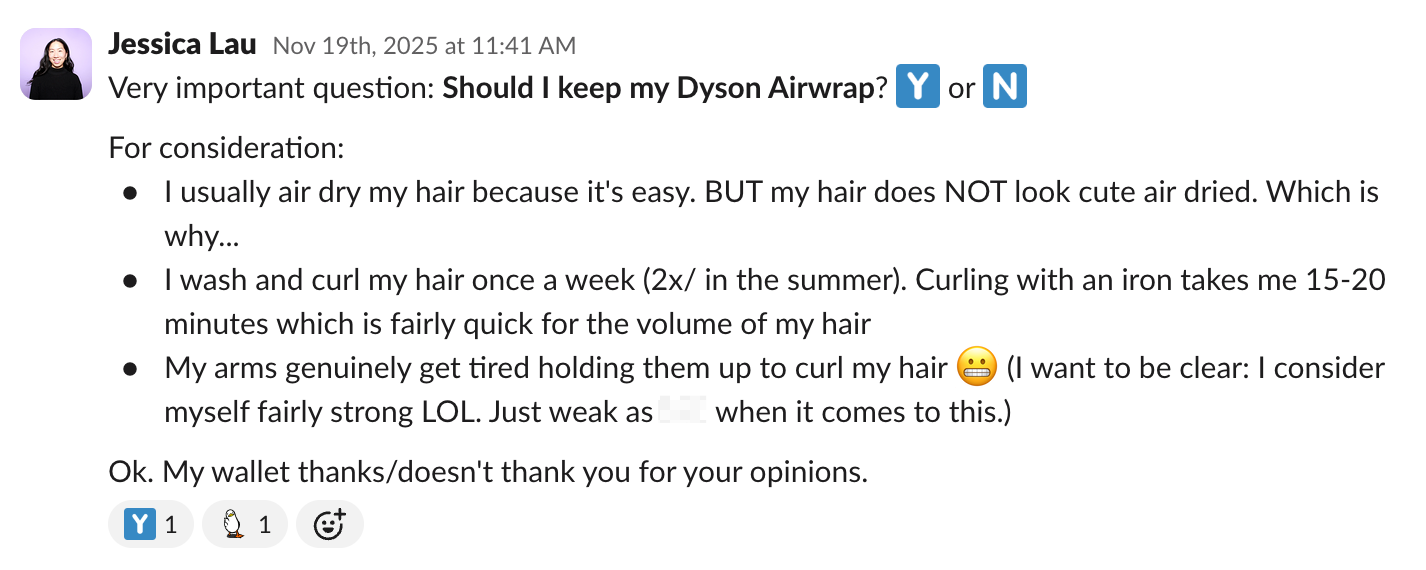
That's it. Slack calls these reactions "reacji," and they're built into every workspace. No installation required.
The limitation? You can't track who voted for what unless you count manually. If you need voting analytics or anonymous responses, you'll want a dedicated polling app.
Method 2: Use Third-Party Polling Apps
Slack's marketplace offers polling apps with more features than emoji reactions. Polly and Simple Poll are the most popular options. They add response tracking, anonymous voting, scheduled polls, and results dashboards.
Zapier uses Polly internally. Here's the setup process:
- Go to the Slack Marketplace and search for Polly.
- Follow the installation instructions to add it to your workspace.
- Open the channel or DM where you want to post the poll.
- In the message box, type /poll and click Create a polly.
- In the popup, click Poll and fill out your question and options.
- Click Create polly, then Send to share it.
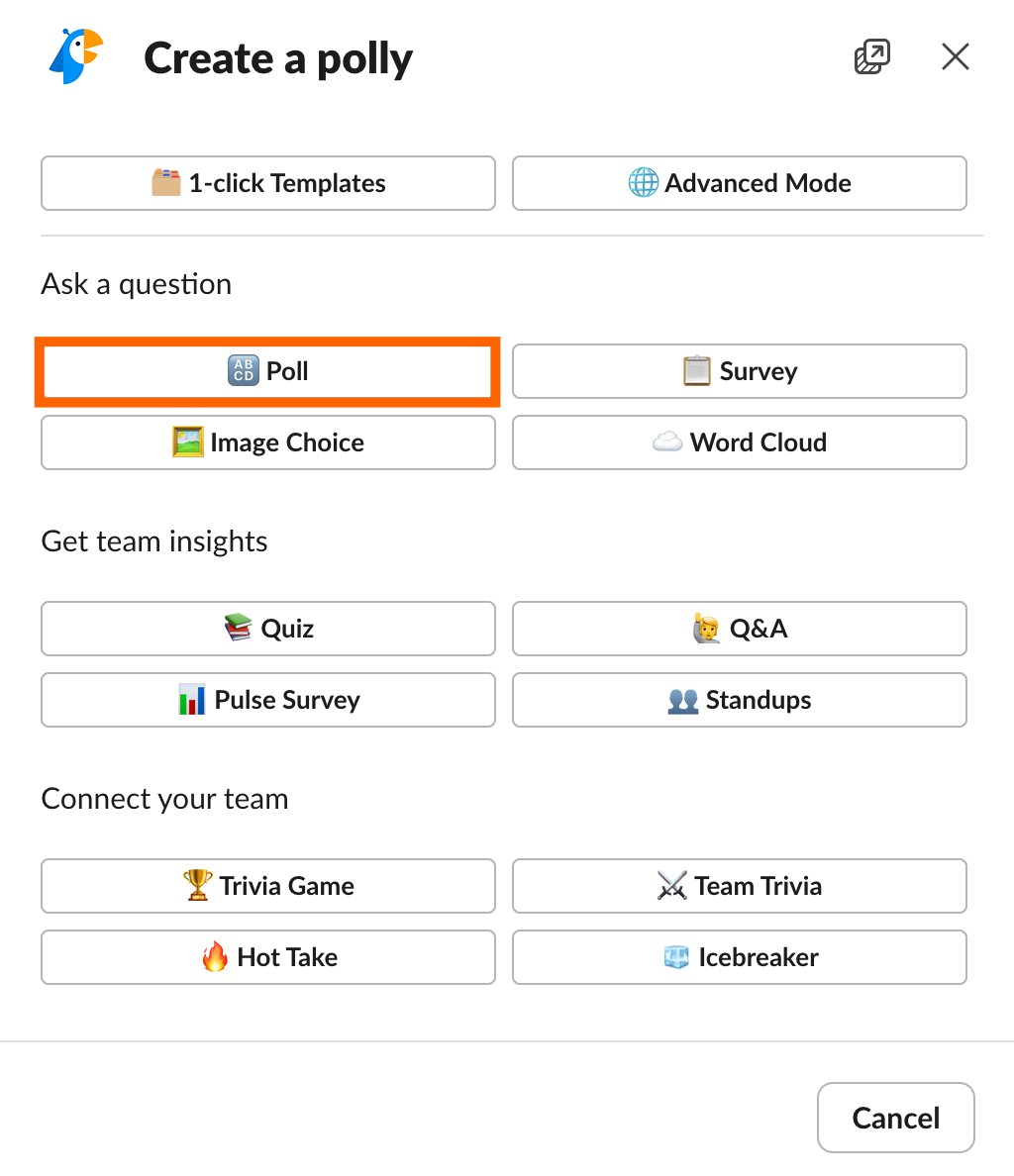
Slack auto-populates the channel name from where you initiated the poll. You can change the destination or send to multiple channels before hitting Send.
One note: if you're tempted to add multiple questions to a single poll, don't. That's a survey, not a poll. Use a dedicated survey tool instead.
Tips for Better Slack Polls
Vote First on Your Own Poll
Right after posting an emoji poll, react with each available emoji yourself. This serves two purposes. First, it makes voting easier. People just click an existing reaction instead of hunting for the right emoji. Second, it provides cover for sensitive questions. If reactions already exist, nobody can see who voted first.
Keep Options Limited
Three to five options works for most polls. More than that, and you're asking people to read a menu. If your question genuinely has seven valid answers, consider narrowing it down before posting.
Set a Deadline
State when voting closes in your poll message. "Vote by 3pm" gets faster responses than an open-ended question that sits in the channel for days.
Logicity's Take
Emoji vs. App: Which Should You Use?
| Feature | Emoji Reactions | Polly / Simple Poll |
|---|---|---|
| Setup required | None | Admin approval + install |
| Anonymous voting | No | Yes |
| Response tracking | Manual count | Dashboard with analytics |
| Scheduled polls | No | Yes |
| Cost | Free | Free tier with paid upgrades |
| Best for | Quick team votes | Recurring standups, feedback |
Community discussions on Reddit's r/Slack reflect this trade-off. Users note that emoji polls are fast but harder to track. Third-party apps give better analytics but require admin permissions to install. The consensus on HackerNews: automated polling works for routine syncs, but major strategic decisions still need real conversations.
Another look at simplifying daily work tools
Automate Polls with Zapier
If you run the same poll weekly, say a Friday feedback check or Monday standup preferences, you can automate it. Zapier connects Polly to triggers like calendar events or form submissions. The poll posts automatically at your scheduled time.
Teams that centralize communication in Slack report a 32% reduction in email volume. Adding automated polls to recurring workflows extends that efficiency gain.
Frequently Asked Questions
Can I create a Slack poll without installing an app?
Yes. Post a message with emoji options and let team members react. This works in any Slack workspace without admin approval or installation.
What's the best Slack polling app?
Polly and Simple Poll are the most popular. Polly offers more analytics and integrations. Simple Poll is lighter and faster to set up. Both have free tiers.
Can Slack polls be anonymous?
Emoji polls are not anonymous since reactions show who clicked. Polly and Simple Poll both offer anonymous voting options.
How do I see poll results in Slack?
For emoji polls, count the reactions manually. Polling apps like Polly show results in a dashboard with percentages and voter counts.
Need Help Implementing This?
Source: The Zapier Blog
Manaal Khan
Tech & Innovation Writer
اقرأ أيضاً

رأي مغاير: كيف يؤثر اختراق الأمن الداخلي الأميركي على شركاتنا الخاصة؟
في ظل اختراق عقود الأمن الداخلي الأميركي مع شركات خاصة، نناقش تأثير هذا الاختراق على مستقبل الأمن السيبراني. نستعرض الإحصاءات الموثوقة ونناقش كيف يمكن للشركات الخاصة أن تتعامل مع هذا التهديد. استمتع بقراءة هذا التحليل العميق

الإنسان في زمن ما بعد الوجود البشري: نحو نظام للتعايش بين الإنسان والروبوت - Centre for Arab Unity Studies
في هذا المقال، سنناقش كيف يمكن للبشر والروبوتات التعايش في نظام متكامل. سنستعرض التحديات والحلول المحتملة التي تضعها شركات مثل جوجل وأمازون. كما سنلقي نظرة على التوقعات المستقبلية وفقًا لتقرير ماكنزي

إطلاق ناسا لمهمة مأهولة إلى القمر: خطوة تاريخية نحو استكشاف الفضاء
تعتبر المهمة الجديدة خطوة هامة نحو استكشاف الفضاء وتطوير التكنولوجيا. سوف تشمل المهمة إرسال رواد فضاء إلى سطح القمر لconducting تجارب علمية. ستسهم هذه المهمة في تطوير فهمنا للفضاء وتحسين التكنولوجيا المستخدمة في استكشاف الفضاء.