SpaceSniffer Shows Exactly What's Eating Your SSD Storage
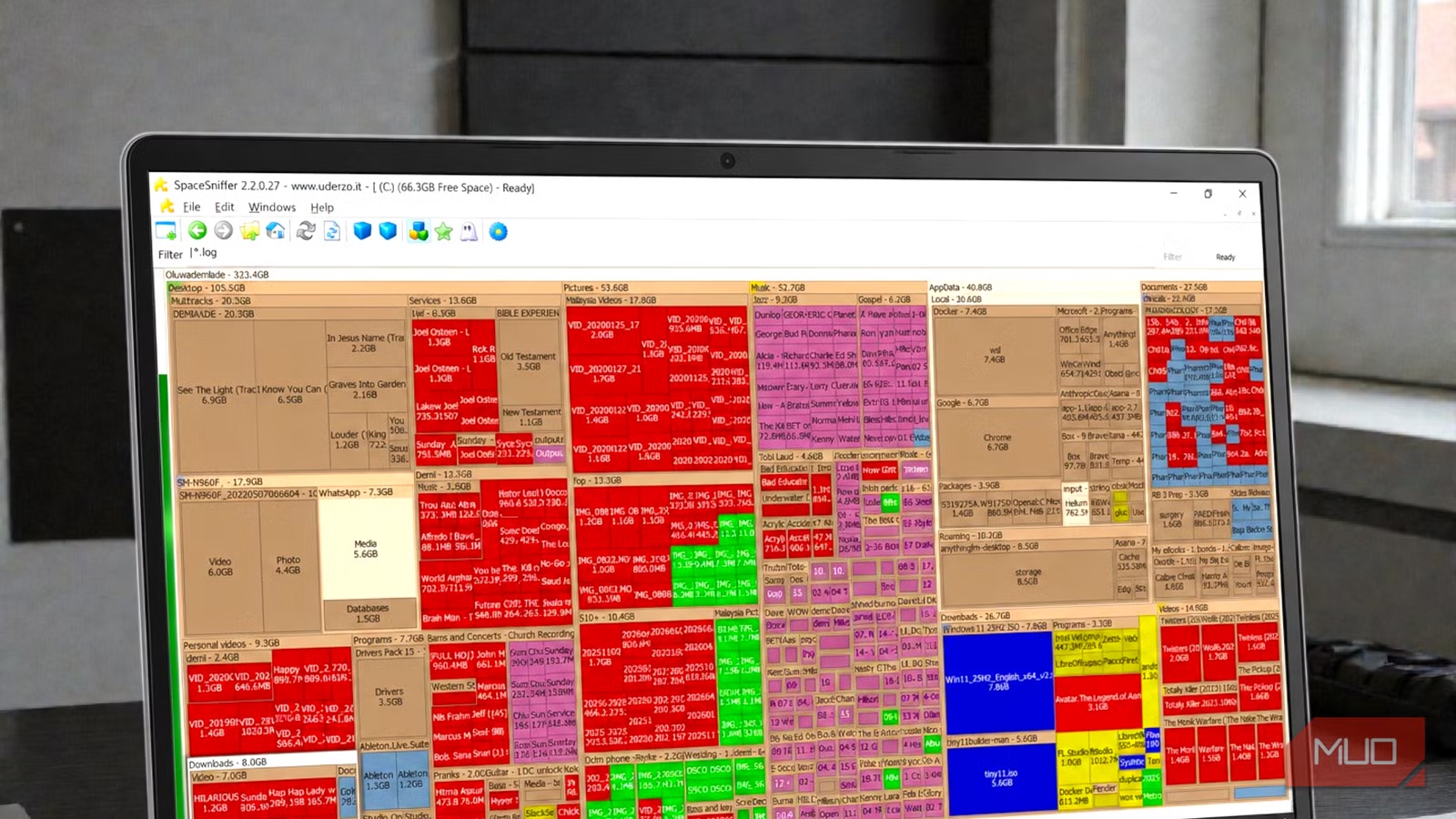
Key Takeaways
- SpaceSniffer is a portable executable that requires no installation and visualizes storage usage in seconds
- The treemap display shows files and folders as proportionally sized rectangles, making large files impossible to miss
- Alternative tool WizTree offers faster scans by reading the NTFS Master File Table directly
The Problem With Traditional Folder Browsing
Storage warnings have a way of sneaking up on you. You know the feeling: one day you have 200GB free, and a few months later Windows is complaining about low disk space. The traditional approach is to open File Explorer, right-click folders, check properties, and repeat for every directory you suspect. It works, but it's tedious and easy to miss the real culprits.
That's where SpaceSniffer comes in. This free Windows utility takes a different approach. Instead of forcing you to check folders one by one, it scans your entire drive and paints a visual map of everything on it. Large files and folders appear as large rectangles. Small ones get tiny blocks. Within 30 seconds, you're looking at exactly what's consuming your storage.
How SpaceSniffer Works
SpaceSniffer is a portable executable. No installation required. You download it, extract it, and run the .exe file directly. When you launch it, you select a drive or type a specific path, hit Start, and watch as the tool begins painting rectangles on your screen.
Each rectangle represents a file or folder. The on-screen size corresponds directly to the disk space it occupies. This visualization method is called a treemap, a concept invented by Professor Ben Shneiderman at the University of Maryland. The color coding helps distinguish file types and directory levels.
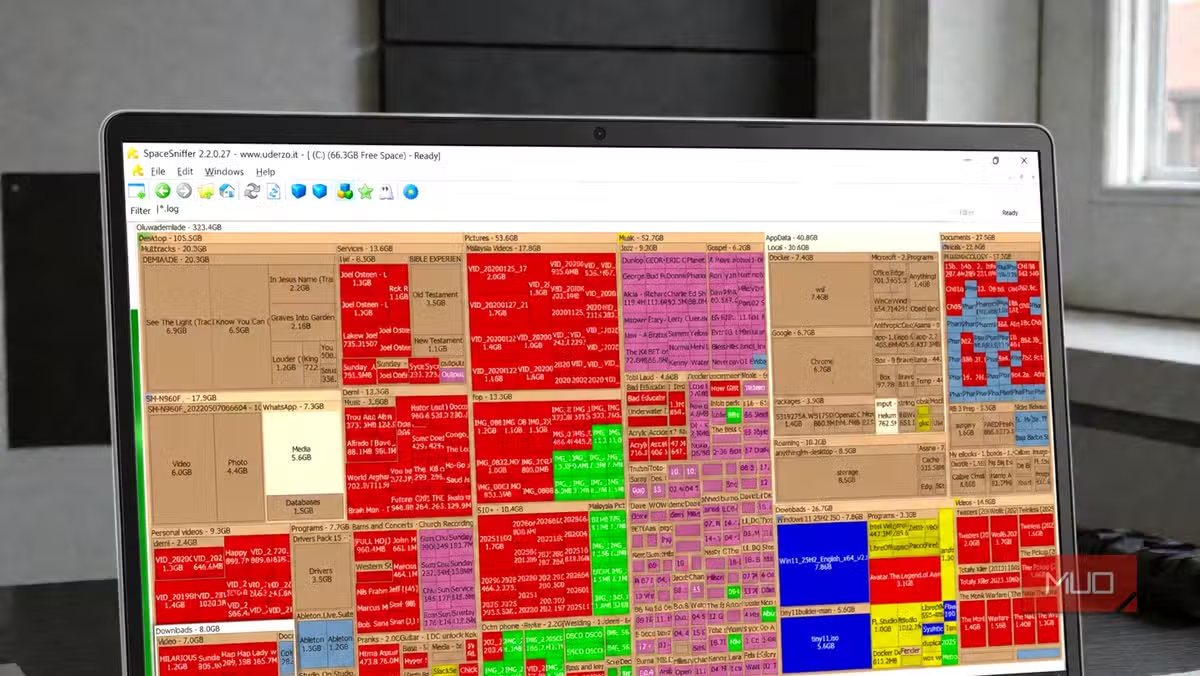
In the original test case from MakeUseOf, the user folder dominated the view at roughly 324GB. The Desktop folder alone was sitting at 105.5GB. Pictures took 53.6GB, Music consumed 52.7GB, and AppData came in at 41.5GB. Documents held 27.5GB, Downloads had 26.7GB, and Videos used 14.9GB. System-level chunks also appeared clearly.
The visual nature of the display makes it impossible to dismiss the problem. You can check folder sizes in File Explorer, but seeing them scaled proportionally against each other creates a different kind of clarity.
“The visual nature of treemaps turns the tedious task of disk cleanup into a tangible, almost gamified experience, allowing users to see their storage footprint rather than just guessing.”
— Independent Tech Analyst, Storage Optimization Sector
The Portable Advantage
SpaceSniffer's portable nature is a significant benefit. It doesn't add files to your system folders, doesn't create registry entries, and doesn't require administrator privileges to install. You can keep it on a USB drive and use it on any Windows machine. When you're done, delete the folder. No uninstallation process, no leftover files.
This matters for IT professionals who troubleshoot multiple machines, or for users who prefer to keep their systems clean. The irony of installing a disk cleanup tool that itself consumes space and creates clutter isn't lost on anyone.
The Faster Alternative: WizTree
SpaceSniffer isn't the only option. Reddit communities like r/pcmasterrace and r/DataHoarder frequently compare these tools, and WizTree comes up often as a faster alternative. The reason: WizTree reads the NTFS Master File Table directly instead of scanning files one by one.
The MFT is Windows' internal index of every file on an NTFS-formatted drive. By reading it directly, WizTree can map an entire drive in seconds rather than minutes. For drives with millions of small files, the speed difference is noticeable.
Both tools are free. SpaceSniffer gets praise for its interactive, "mesmerizing" visual feedback. WizTree wins on raw speed. Your choice depends on whether you prioritize the visual experience or just want the fastest answer.
Common Storage Culprits These Tools Reveal
Modern SSDs suffer from what some call "storage creep." Temporary files accumulate. Game caches grow. Forgotten downloads pile up. Media libraries expand. Over months and years, these invisible files consume tens or hundreds of gigabytes.
- AppData folders: Application caches, browser data, and local databases can grow to 40GB or more
- Desktop and Downloads: Files saved temporarily and never deleted
- Game installations: Modern games routinely exceed 100GB each
- System restore points: Windows maintains multiple snapshots by default
- Windows.old folder: Remains after major Windows updates, often 20GB or larger
Treemap tools make these culprits immediately visible. A 50GB game cache you forgot about appears as a massive rectangle. A Downloads folder full of old installers stands out. You don't have to guess where the space went.
Logicity's Take
More free productivity tools for your workflow
How to Get Started
- Download SpaceSniffer from the official website (it's a small ZIP file)
- Extract the contents to any folder or USB drive
- Run SpaceSniffer.exe directly (no installation needed)
- Select your target drive and click Start
- Wait 30-60 seconds for the treemap to populate
- Click on large rectangles to drill down into subfolders
- Delete unnecessary files directly from within the tool or note them for manual cleanup
Frequently Asked Questions
Is SpaceSniffer safe to use?
Yes. SpaceSniffer is a well-established, free utility that has been available for years. It's portable, doesn't require installation, and doesn't modify your files unless you explicitly delete something through its interface.
Does SpaceSniffer work on Windows 11?
Yes. SpaceSniffer works on Windows 7, 8, 10, and 11. The interface may look dated, but functionality is unaffected on modern systems.
What's the difference between SpaceSniffer and WizTree?
Both visualize disk usage, but WizTree is faster because it reads the NTFS Master File Table directly. SpaceSniffer offers a more interactive treemap experience but takes longer to scan large drives.
Can SpaceSniffer scan external drives and USB devices?
Yes. When you launch SpaceSniffer, you can select any connected drive, including external hard drives, SSDs, and USB flash drives.
Does SpaceSniffer require administrator privileges?
Running as administrator allows SpaceSniffer to access protected system folders. Without admin rights, some system directories may appear inaccessible or show incomplete data.
Need Help Implementing This?
Source: MakeUseOf
Huma Shazia
Senior AI & Tech Writer
اقرأ أيضاً

رأي مغاير: كيف يؤثر اختراق الأمن الداخلي الأميركي على شركاتنا الخاصة؟
في ظل اختراق عقود الأمن الداخلي الأميركي مع شركات خاصة، نناقش تأثير هذا الاختراق على مستقبل الأمن السيبراني. نستعرض الإحصاءات الموثوقة ونناقش كيف يمكن للشركات الخاصة أن تتعامل مع هذا التهديد. استمتع بقراءة هذا التحليل العميق

الإنسان في زمن ما بعد الوجود البشري: نحو نظام للتعايش بين الإنسان والروبوت - Centre for Arab Unity Studies
في هذا المقال، سنناقش كيف يمكن للبشر والروبوتات التعايش في نظام متكامل. سنستعرض التحديات والحلول المحتملة التي تضعها شركات مثل جوجل وأمازون. كما سنلقي نظرة على التوقعات المستقبلية وفقًا لتقرير ماكنزي

إطلاق ناسا لمهمة مأهولة إلى القمر: خطوة تاريخية نحو استكشاف الفضاء
تعتبر المهمة الجديدة خطوة هامة نحو استكشاف الفضاء وتطوير التكنولوجيا. سوف تشمل المهمة إرسال رواد فضاء إلى سطح القمر لconducting تجارب علمية. ستسهم هذه المهمة في تطوير فهمنا للفضاء وتحسين التكنولوجيا المستخدمة في استكشاف الفضاء.