Replit vs Cursor: Which AI Coding Tool Fits Your Project?

Key Takeaways
- Replit handles everything from coding to deployment in one cloud platform, ideal for rapid prototyping and non-technical founders
- Cursor is a VS Code-based editor with superior AI pair programming, but you handle your own deployment stack
- Many teams now use Replit for initial prototypes and migrate to Cursor when projects need production-grade control
Choosing between Cursor and Replit used to be simple. If you didn't code, Replit turned your idea into a published app using AI. If you did code, Cursor offered AI pair programming that fit into your existing workflow. Clean split.
That clarity is gone. Both platforms have evolved. Builders who started with Replit's "vibe coding" approach are moving to Cursor for more control over their prototypes. Developers who loved Cursor's AI completions now want to delegate entire tasks to agents. Both platforms now offer an interface to write code and an interface to talk to an AI agent.
So which one should you pick? After a year of testing AI coding tools, here's how to frame the decision.
The Fundamental Split: Platform vs Editor
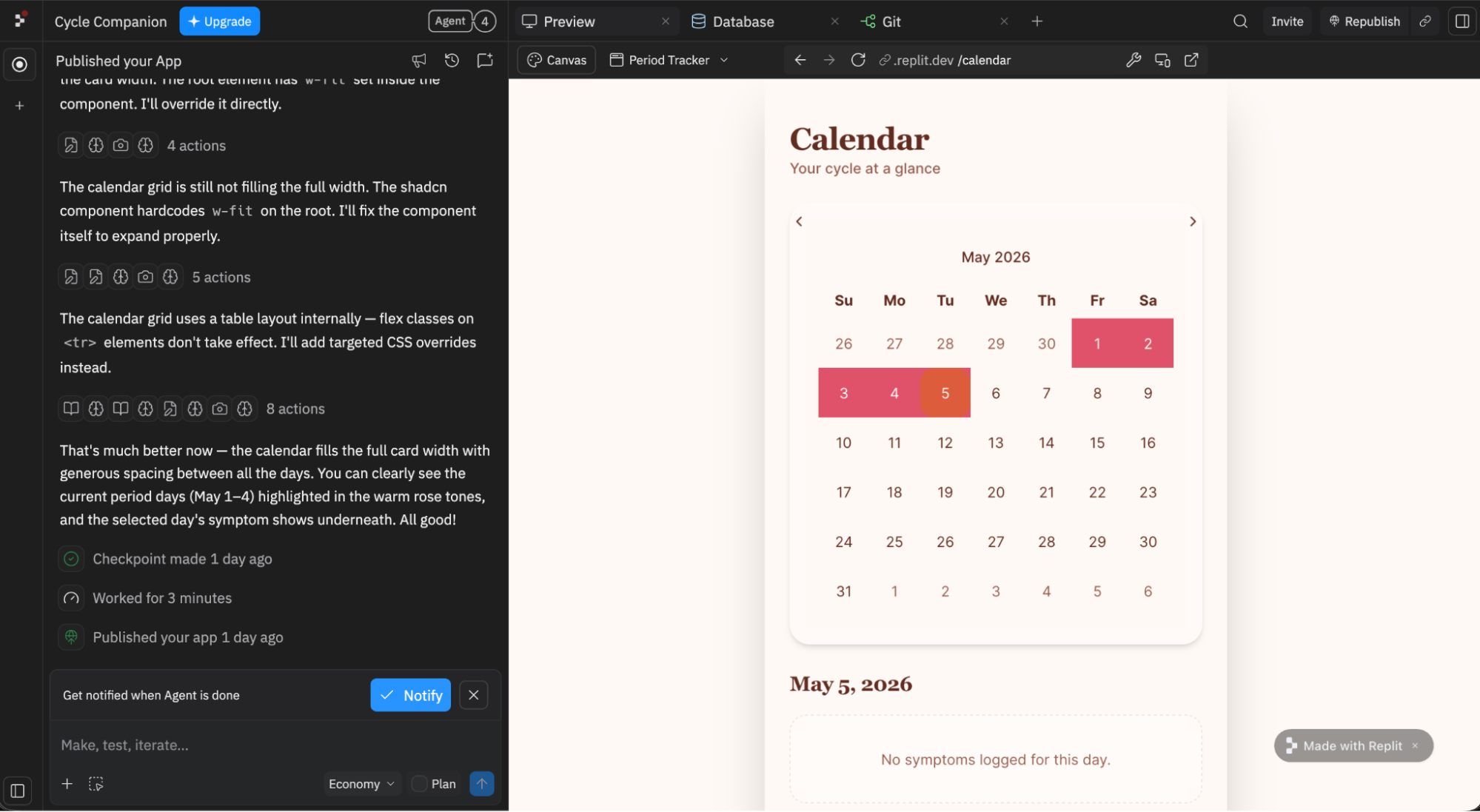
Replit is a vibe coding platform. It handles app development and infrastructure in one place. Cursor is a code editor. You write code in Cursor, but you deploy your app somewhere else.
With Replit, you sign up, describe what you want in natural language, and you can have a live URL without configuring a Vercel account, setting up a PostgreSQL database, or building a deployment pipeline. The editor, the runtime environment, the database, the hosting: all one product.
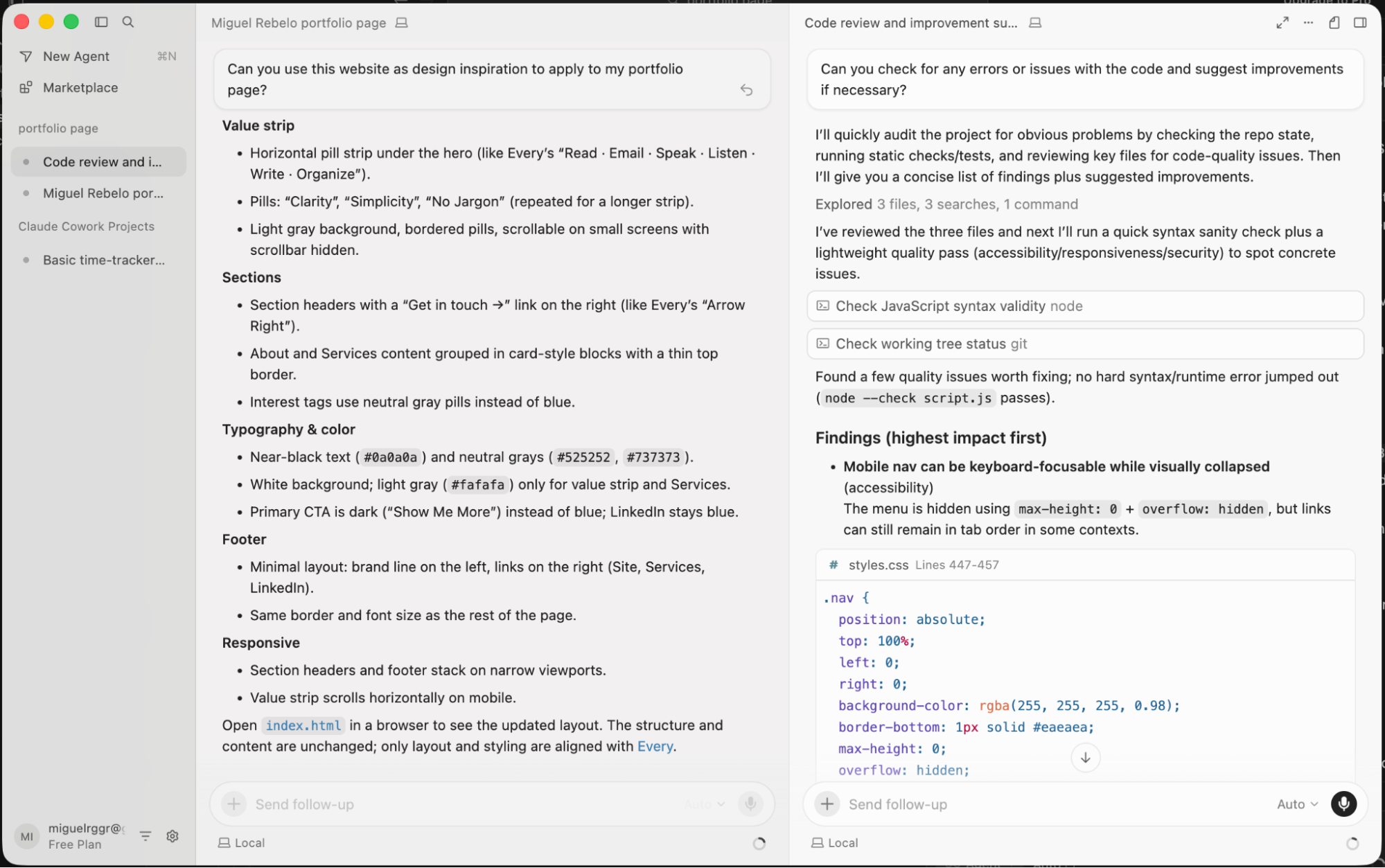
Cursor assumes you already have a development setup. It's built on VS Code, so the interface is familiar to millions of developers. You get AI-powered autocomplete, inline edits, and multi-file agents. But when you're done coding, you handle deployment yourself.
| Feature | Cursor | Replit |
|---|---|---|
| Ease of use | Requires coding knowledge. VS Code-based interface. | Cloud-based, no local setup, no coding required. |
| AI capabilities | Deep codebase context. Tab autocomplete, inline edits, multi-file agents. | Natural language to working app. Agent can struggle on complex projects. |
| Hosting and deployment | Not included. You manage your own stack. | Built-in. Prompt to live URL without leaving Replit. |
| Collaboration | Git-based. Standard for developers, steep for non-devs. | Real-time multiplayer. Like Google Docs for code. |
| Pricing | $20/month for editor only. Hosting costs extra. | $20/month includes editor, AI, hosting, and up to 5 collaborators. |
Replit Builds For You, Cursor Builds With You
The AI philosophy differs between the two platforms. Replit's agent aims to handle the entire development process autonomously. You describe what you want, and the agent writes code, configures databases, and deploys the result. Cursor's AI assists you while you remain in control. It completes your code, suggests changes, and can modify multiple files at once. But you're still the one deciding what happens.
This distinction matters most when projects get complex. Replit's approach works well for simple apps, landing pages, and MVPs. You can go from idea to deployed URL in minutes. But as projects grow, the AI can struggle to maintain context across a large codebase.
Cursor's deep codebase reasoning shines when you're working with thousands of files across dozens of modules. The AI understands how your code connects. It can make changes that respect the architecture you've built. This is why developers who start prototypes in Replit often migrate to Cursor when those prototypes need to serve real users.
“Replit is the fastest way to get to 'Hello World' in production, but Cursor is the professional's choice for building the next Facebook or Stripe.”
— Senior Engineer, Silicon Valley Startup
The Complexity Wall
Hacker News and Reddit discussions frequently warn about what developers call the "complexity wall." This is the point where an AI-generated prototype becomes too complex for the AI or the user to manage. The code turns into what critics call "AI slop." Functions duplicate. Dependencies conflict. The agent starts making changes that break other parts of the app.
Replit hits this wall faster because its approach removes the human from the loop. When everything works, it's magical. When something breaks, you need to understand the code the AI wrote. If you don't have that understanding, you're stuck asking the AI to fix its own mistakes.
Cursor delays this wall because you're involved throughout. You see every change. You approve every edit. You understand the codebase because you helped build it. The AI is your assistant, not your replacement.
Collaboration Models
Replit offers real-time collaboration. Multiple people can work on the same code simultaneously, like Google Docs for software. This works well for teams that include non-technical members. A designer and a developer can work together in the same environment.
Cursor uses Git. This is standard for professional development teams but creates friction for non-developers. You need to understand branches, commits, and merge conflicts. The workflow is more powerful but less accessible.
For startups with mixed teams, Replit's collaboration model often wins in early stages. For engineering teams building production systems, Git-based workflows provide the control and traceability that enterprise software requires.
Pricing Reality
Both tools cost $20/month at their core tier. But what you get differs significantly.
Replit's Core plan includes the editor, AI agent, hosting, and up to five collaborators. You can build and deploy an app without paying for anything else. The catch is scaling. As your app grows and needs more compute or database capacity, costs increase within Replit's platform.
Cursor's $20/month covers only the editor and AI features. You pay separately for hosting on Vercel, Railway, AWS, or wherever you deploy. This can add up quickly. But it also gives you control. You can optimize costs by choosing the right infrastructure for your specific needs.
Logicity's Take
The real question isn't which tool is better. It's where your project sits on its lifecycle. Use Replit to validate ideas fast. Move to Cursor when you're ready to build something that needs to scale. Many successful teams do exactly this: prototype in Replit, harden in Cursor.
The Market Context
Both companies have scaled dramatically. Cursor's parent company Anysphere is valued at $60 billion. Cursor itself surpassed $3 billion in annual recurring revenue in May 2026, making it one of the fastest-scaling B2B software companies in history.
Replit is valued at $9 billion following its $400 million Series D round. The platform has 50 million users as of March 2026. Much of this growth came from the "vibe coding" movement that made building apps accessible to non-developers.
The term "vibe coding" itself came from Andrej Karpathy, former OpenAI researcher, who described a style of development where you describe what you want and let AI handle the implementation details. Replit has become the primary platform for this approach.
When to Use Each Tool
Choose Replit when you want to go from idea to deployed URL in one place. When you're building an MVP to test market fit. When your team includes non-technical members who need to contribute. When you don't want to manage infrastructure.
Choose Cursor when you need deep codebase control. When you're building something that needs to scale to thousands of users. When you have specific infrastructure requirements. When your team already works with Git and VS Code.
Many teams use both. Replit for rapid prototyping and validation. Cursor for production development once the idea is proven. This isn't a failure of either tool. It's using each for what it does best.
✅ Pros
- • Replit: Idea to deployed app in minutes, no coding knowledge required
- • Replit: All-in-one pricing with hosting included at base tier
- • Cursor: Deep codebase understanding for complex multi-file projects
- • Cursor: Full control over infrastructure and deployment choices
- • Cursor: Familiar VS Code interface for professional developers
❌ Cons
- • Replit: Agent struggles with complex projects, can hit 'complexity wall'
- • Replit: Scaling costs within platform can become unpredictable
- • Cursor: Requires coding knowledge to get real value
- • Cursor: Hosting and infrastructure costs add up on top of subscription
- • Cursor: Git-based collaboration can exclude non-technical team members
The Bottom Line
The old question was: do you code? The new question is: what are you building, and who is it for?
If you're a founder validating an idea, Replit gets you to market faster. If you're a developer building production software, Cursor gives you the control you need. If you're somewhere in between, you might use both at different stages.
“The future of programming is not writing code, but steering agents that build and maintain systems on your behalf.”
— 2026 AI Infrastructure Report
That future is arriving in pieces. Replit shows what it looks like when AI handles everything. Cursor shows what it looks like when AI assists humans who remain in control. The winner depends on what you're trying to build.
Frequently Asked Questions
Can I use Replit without knowing how to code?
Yes. Replit's agent can build complete apps from natural language descriptions. You describe what you want, and the AI handles implementation, database setup, and deployment. However, complex projects may require some technical understanding to troubleshoot issues.
Does Cursor include hosting for my apps?
No. Cursor is only a code editor with AI features. You need to deploy your apps separately using platforms like Vercel, Railway, AWS, or your own servers. This adds cost but gives you full control over your infrastructure.
Which tool is better for a startup building an MVP?
Replit is typically faster for MVPs because it combines coding and deployment in one place. You can have a working prototype with a live URL in hours. Many startups later migrate to Cursor when they need more control over their codebase.
What is the 'complexity wall' in AI coding tools?
The complexity wall is the point where an AI-generated codebase becomes too complex for the AI to maintain coherently. Changes start breaking other parts of the app. This happens faster in Replit because the AI has more autonomy. Cursor delays this because developers stay involved throughout.
Can teams use both Replit and Cursor together?
Yes. A common pattern is using Replit for rapid prototyping and validation, then migrating to Cursor for production development. This combines Replit's speed with Cursor's control. You can export code from Replit and continue development in Cursor.
Before deploying your Cursor-built app, test your hosting infrastructure with these essential Linux tools
Need Help Implementing This?
Choosing between Replit and Cursor is just the first step. If you're building a product and need guidance on AI coding tools, infrastructure decisions, or the prototype-to-production journey, reach out to our team at Logicity.in. We help startups and engineering teams make these decisions.
Source: The Zapier Blog
Manaal Khan
Tech & Innovation Writer
اقرأ أيضاً

رأي مغاير: كيف يؤثر اختراق الأمن الداخلي الأميركي على شركاتنا الخاصة؟
في ظل اختراق عقود الأمن الداخلي الأميركي مع شركات خاصة، نناقش تأثير هذا الاختراق على مستقبل الأمن السيبراني. نستعرض الإحصاءات الموثوقة ونناقش كيف يمكن للشركات الخاصة أن تتعامل مع هذا التهديد. استمتع بقراءة هذا التحليل العميق

الإنسان في زمن ما بعد الوجود البشري: نحو نظام للتعايش بين الإنسان والروبوت - Centre for Arab Unity Studies
في هذا المقال، سنناقش كيف يمكن للبشر والروبوتات التعايش في نظام متكامل. سنستعرض التحديات والحلول المحتملة التي تضعها شركات مثل جوجل وأمازون. كما سنلقي نظرة على التوقعات المستقبلية وفقًا لتقرير ماكنزي

إطلاق ناسا لمهمة مأهولة إلى القمر: خطوة تاريخية نحو استكشاف الفضاء
تعتبر المهمة الجديدة خطوة هامة نحو استكشاف الفضاء وتطوير التكنولوجيا. سوف تشمل المهمة إرسال رواد فضاء إلى سطح القمر لconducting تجارب علمية. ستسهم هذه المهمة في تطوير فهمنا للفضاء وتحسين التكنولوجيا المستخدمة في استكشاف الفضاء.