RANK vs. RANK.EQ vs. RANK.AVG: Which Excel Function to Use
Key Takeaways
- The original RANK function is now a compatibility function and may disappear in future Excel versions
- RANK.EQ gives tied values the same rank, while RANK.AVG averages tied positions
- RANK.EQ is mathematically identical to the old RANK but uses clearer naming
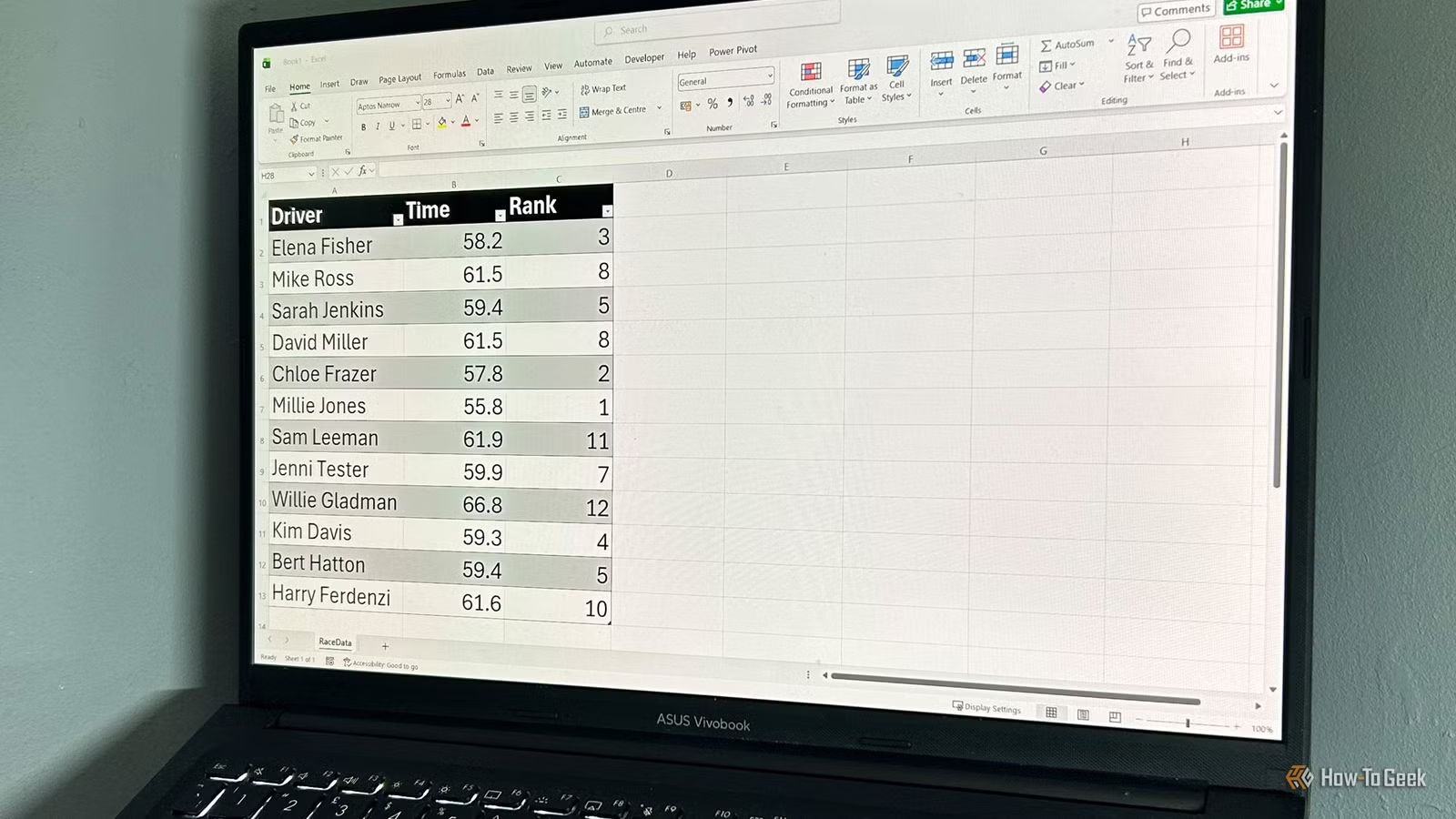
If you've ever typed RANK into Excel and watched the autocomplete suggest three different options, you're not alone in your confusion. A rank is a rank, right? Not quite. Microsoft's three ranking functions differ in how they handle ties, and picking the wrong one can quietly skew your results.
Why Microsoft Split One Function Into Three
The original RANK function was Excel's default ranking tool for decades. It returns the position of a number within a list. Simple enough. But Microsoft now classifies it as a "compatibility" function. The software keeps it around so older workbooks don't break, but it's no longer recommended. Microsoft's documentation notes it may not be available in future Excel versions.
The problem wasn't that RANK was broken. It was too vague. When two values tie for a position, what rank should they get? The old function had an answer, but its name didn't tell you what that answer was.
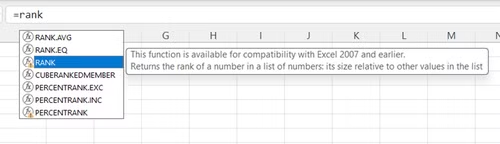
In 2010, Microsoft introduced two replacement functions with clearer names: RANK.EQ and RANK.AVG. The "EQ" stands for equal. The "AVG" stands for average. Now users know exactly what they're choosing.
How RANK.EQ Works
RANK.EQ is the direct replacement for the old RANK function. They're mathematically identical. When two values tie, both get the same rank, and the next rank is skipped.
Say you're ranking salespeople by revenue. If two people both have $50,000 in sales and tie for second place, RANK.EQ gives them both a rank of 2. The next person gets rank 4. There's no rank 3.
The syntax is straightforward:
=RANK.EQ(number, ref, [order])- number: the value you want to rank
- ref: the range of values to rank against
- order: optional. 0 or omitted for descending (largest = 1). 1 for ascending (smallest = 1).
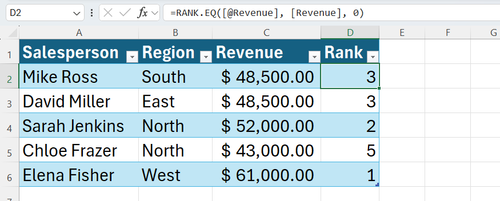
This is the function to use when you want ties to share the same position. It's common for leaderboards, sales rankings, and competition standings.
How RANK.AVG Works
RANK.AVG handles ties differently. Instead of giving tied values the same rank and skipping the next one, it averages the positions they would have occupied.
Using the same sales example: if two people tie for second and third place, RANK.AVG gives them both a rank of 2.5. The next person gets rank 4. No position is skipped, but the tied ranks aren't whole numbers.
The syntax is identical to RANK.EQ:
=RANK.AVG(number, ref, [order])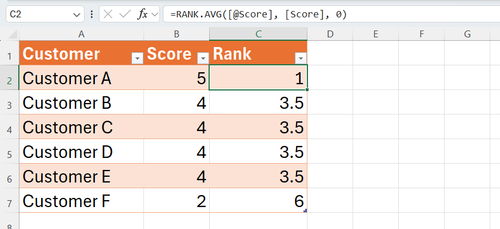
RANK.AVG is useful when you need statistical accuracy over display simplicity. It's common in academic grading, survey analysis, and anywhere fractional ranks are acceptable.
When to Use the Old RANK Function
The only reason to use RANK today is backward compatibility. If you're working on a file that will be opened in Excel 2007 or earlier, the newer functions won't work. The old RANK function is your only option.
If you're on Microsoft 365, Excel 2010, or anything newer, skip RANK entirely. Use RANK.EQ or RANK.AVG depending on how you want ties handled.
| Function | Tie Handling | Example Result (tie for 2nd/3rd) | Use Case |
|---|---|---|---|
| RANK | Same rank, skip next | Both get 2, next gets 4 | Legacy files only |
| RANK.EQ | Same rank, skip next | Both get 2, next gets 4 | Leaderboards, competitions |
| RANK.AVG | Average positions | Both get 2.5, next gets 4 | Statistical analysis, grading |
A Practical Example
Imagine you have a table with salespeople in column A, regions in column B, and revenues in column C. You want to add a rank in column D.
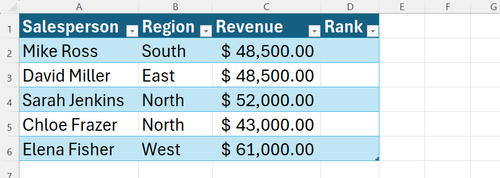
In cell D2, enter:
=RANK.EQ(C2, $C$2:$C$10, 0)The dollar signs lock the reference range so you can copy the formula down the column. The 0 means descending order, so the highest revenue gets rank 1.
If you'd prefer averaged ranks for statistical purposes, swap RANK.EQ for RANK.AVG. The syntax stays the same.
Logicity's Take
Common Mistakes to Avoid
- Forgetting to lock the reference range with dollar signs. Your ranks will be wrong when you copy the formula down.
- Using RANK.AVG when you need whole-number ranks for display. Decimal ranks confuse readers.
- Assuming RANK is the "standard" function. It's deprecated. Use RANK.EQ instead.
Frequently Asked Questions
What is the difference between RANK and RANK.EQ in Excel?
They're mathematically identical. RANK.EQ is the modern replacement with a clearer name. Both give tied values the same rank and skip the next position.
When should I use RANK.AVG instead of RANK.EQ?
Use RANK.AVG when you need statistically accurate rankings and can accept decimal values. It averages the positions that tied values would have occupied.
Is the RANK function being removed from Excel?
Microsoft classifies it as a compatibility function and notes it may not be available in future versions. For new work, use RANK.EQ or RANK.AVG.
How do I rank from lowest to highest in Excel?
Set the order argument to 1. For example: =RANK.EQ(A2, $A$2:$A$10, 1) ranks the smallest value as 1.
Why do my Excel ranks have decimal points?
You're using RANK.AVG. It averages tied positions, which can produce non-integer ranks like 2.5. Switch to RANK.EQ for whole numbers.
Need Help Implementing This?
Source: How-To Geek
Manaal Khan
Tech & Innovation Writer
اقرأ أيضاً

رأي مغاير: كيف يؤثر اختراق الأمن الداخلي الأميركي على شركاتنا الخاصة؟
في ظل اختراق عقود الأمن الداخلي الأميركي مع شركات خاصة، نناقش تأثير هذا الاختراق على مستقبل الأمن السيبراني. نستعرض الإحصاءات الموثوقة ونناقش كيف يمكن للشركات الخاصة أن تتعامل مع هذا التهديد. استمتع بقراءة هذا التحليل العميق

الإنسان في زمن ما بعد الوجود البشري: نحو نظام للتعايش بين الإنسان والروبوت - Centre for Arab Unity Studies
في هذا المقال، سنناقش كيف يمكن للبشر والروبوتات التعايش في نظام متكامل. سنستعرض التحديات والحلول المحتملة التي تضعها شركات مثل جوجل وأمازون. كما سنلقي نظرة على التوقعات المستقبلية وفقًا لتقرير ماكنزي

إطلاق ناسا لمهمة مأهولة إلى القمر: خطوة تاريخية نحو استكشاف الفضاء
تعتبر المهمة الجديدة خطوة هامة نحو استكشاف الفضاء وتطوير التكنولوجيا. سوف تشمل المهمة إرسال رواد فضاء إلى سطح القمر لconducting تجارب علمية. ستسهم هذه المهمة في تطوير فهمنا للفضاء وتحسين التكنولوجيا المستخدمة في استكشاف الفضاء.