Microsoft Releases Windows 10 KB5094127 With 200 Security Fixes
Key Takeaways
- KB5094127 patches 200 vulnerabilities including three publicly disclosed zero-day flaws
- The update adds Secure Boot certificate monitoring as existing certificates expire in June 2026
- A known issue may trigger BitLocker recovery prompts on some systems after installation
What's in KB5094127
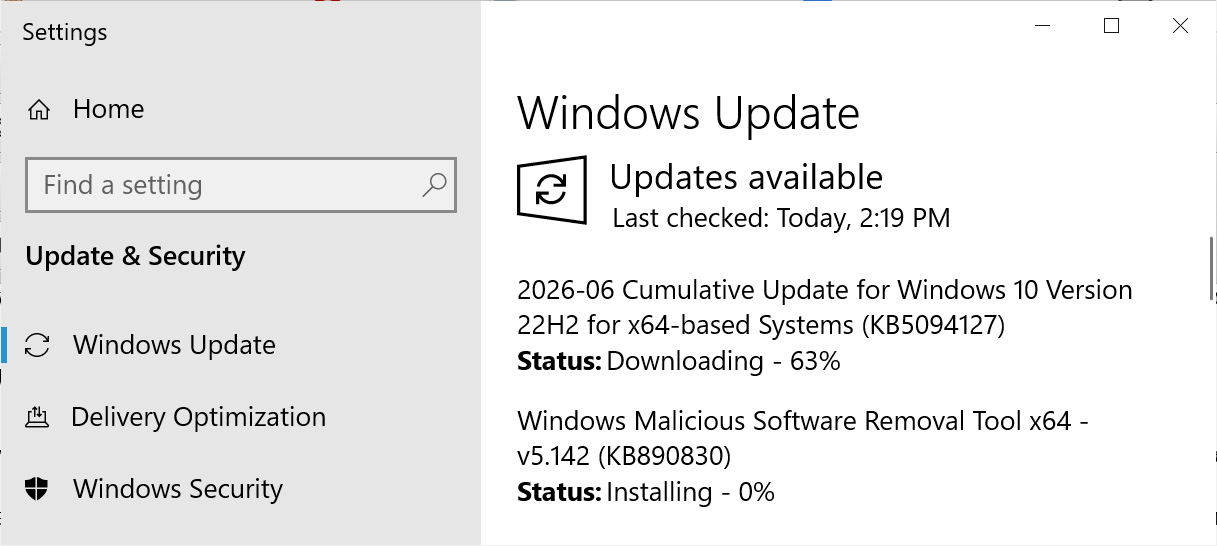
Microsoft has released KB5094127, the June 2026 cumulative update for Windows 10 systems enrolled in the Extended Security Update program. The update patches 200 vulnerabilities disclosed in this month's Patch Tuesday, including three publicly known zero-day flaws.
After installation, Windows 10 (version 22H2) updates to build 19045.7417. Windows 10 Enterprise LTSC 2021 updates to build 19044.7417.
The update is available through the standard Windows Update channel. ESU subscribers and Windows 10 Enterprise LTSC users can install it by opening Settings, navigating to Windows Update, and clicking Check for Updates.
Secure Boot Certificate Changes
The headline feature in KB5094127 is new infrastructure for Secure Boot certificate management. Microsoft's current Secure Boot certificates expire this month, and this update adds monitoring tools for the rollout of replacement certificates.
Key Secure Boot changes include dynamic status reporting in the Windows Security App and a new Group Policy setting called LimitSecureBootRequiredServiceData. This policy lets administrators suppress Secure Boot telemetry sent to Microsoft.
The policy is located under Computer Configuration > Administrative Templates > Windows Components > Secure Boot. Microsoft has also included it in the Windows Restricted Traffic Limited Functionality Baseline package for organizations that limit Windows telemetry.
Windows quality updates now include additional device targeting data to identify systems eligible for automatic Secure Boot certificate updates. Microsoft says devices receive new certificates only after demonstrating successful update signals, ensuring a phased rollout.
File Explorer Search Improvements
KB5094127 includes improvements to File Explorer search. The update adds better support for Chinese text and UTF-8 encoded files without a byte order mark. Text display is now more consistent across search results, Content view, and tooltips.
Known Issue: BitLocker Recovery Prompts
Microsoft has acknowledged a known issue that may trigger BitLocker recovery prompts after installing recent updates. The problem primarily affects devices with a specific BitLocker Group Policy that explicitly includes PCR7 in the TPM validation profile.
Systems with certain Secure Boot and Windows Boot Manager configurations related to the Windows UEFI CA 2023 certificate are also affected. Organizations running BitLocker should test the update before broad deployment and ensure recovery keys are accessible.
“This update is mandatory for systems remaining on Windows 10 under the Extended Security Update program to maintain a secure posture against actively exploited zero-day threats.”
— Lawrence Abrams, Senior Security News Reporter at BleepingComputer
Who Needs This Update
Microsoft ended mainstream support for Windows 10 in October 2025. Consumer users no longer receive security updates unless they pay for ESU access. This update targets two groups: organizations enrolled in the paid ESU program and users running Windows 10 Enterprise LTSC editions.
The ESU program extends Windows 10 security patches until 2028. For organizations still running Windows 10 in production, particularly those with hardware that cannot run Windows 11, ESU is the only path to continued security support.
System administrators on Reddit's r/sysadmin community have noted the complexity of maintaining Windows 10 environments with the new Secure Boot requirements. The potential for BitLocker recovery prompts adds another layer of testing before deployment.
Logicity's Take
Frequently Asked Questions
How do I install Windows 10 KB5094127?
Open Settings, go to Windows Update, and click Check for Updates. The update appears automatically for ESU subscribers and Enterprise LTSC users.
Is Windows 10 KB5094127 free?
No. Unless you run Windows 10 Enterprise LTSC, you need an active Extended Security Update subscription to receive this update. Microsoft ended free Windows 10 updates in October 2025.
What build number does KB5094127 install?
Windows 10 version 22H2 updates to build 19045.7417. Windows 10 Enterprise LTSC 2021 updates to build 19044.7417.
Will KB5094127 cause BitLocker recovery prompts?
Possibly. Microsoft has confirmed a known issue affecting systems with specific BitLocker Group Policy configurations that include PCR7 in TPM validation. Have recovery keys ready before installing.
How long will Windows 10 receive security updates?
Through the paid ESU program, Windows 10 receives security updates until 2028. Without ESU, there are no security patches available.
Need Help Implementing This?
Source: BleepingComputer
Huma Shazia
Senior AI & Tech Writer
اقرأ أيضاً

رأي مغاير: كيف يؤثر اختراق الأمن الداخلي الأميركي على شركاتنا الخاصة؟
في ظل اختراق عقود الأمن الداخلي الأميركي مع شركات خاصة، نناقش تأثير هذا الاختراق على مستقبل الأمن السيبراني. نستعرض الإحصاءات الموثوقة ونناقش كيف يمكن للشركات الخاصة أن تتعامل مع هذا التهديد. استمتع بقراءة هذا التحليل العميق

الإنسان في زمن ما بعد الوجود البشري: نحو نظام للتعايش بين الإنسان والروبوت - Centre for Arab Unity Studies
في هذا المقال، سنناقش كيف يمكن للبشر والروبوتات التعايش في نظام متكامل. سنستعرض التحديات والحلول المحتملة التي تضعها شركات مثل جوجل وأمازون. كما سنلقي نظرة على التوقعات المستقبلية وفقًا لتقرير ماكنزي

إطلاق ناسا لمهمة مأهولة إلى القمر: خطوة تاريخية نحو استكشاف الفضاء
تعتبر المهمة الجديدة خطوة هامة نحو استكشاف الفضاء وتطوير التكنولوجيا. سوف تشمل المهمة إرسال رواد فضاء إلى سطح القمر لconducting تجارب علمية. ستسهم هذه المهمة في تطوير فهمنا للفضاء وتحسين التكنولوجيا المستخدمة في استكشاف الفضاء.