Local Kubernetes Clusters: Cut Dev Costs Before Cloud
Key Takeaways
- Local Kubernetes testing eliminates $500-2000/month in cloud dev environment costs
- Teams can validate container architecture before committing to managed Kubernetes services
- Minikube profiles let developers run multiple cluster configurations on a single machine
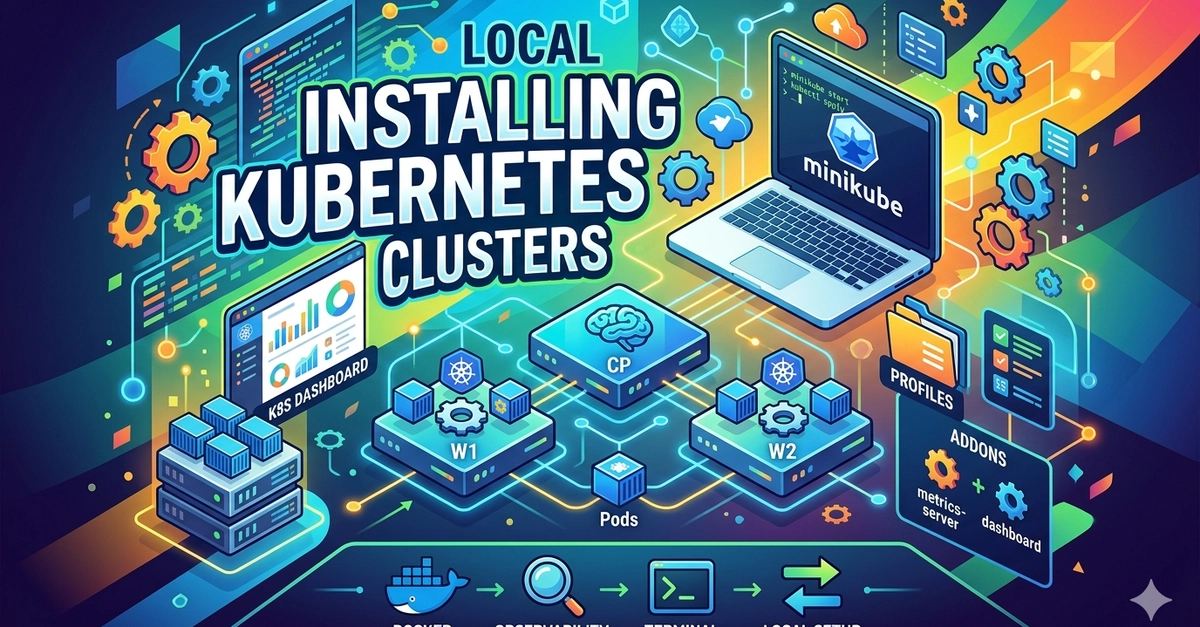
According to [DEV Community's Kubernetes Mastery series](https://dev.to/rahimah_dev/my-kubernetes-mastery-journey-installing-local-kubernetes-clusters-176), running local Kubernetes clusters with Minikube provides a production-equivalent testing environment on a developer's laptop, complete with configurable profiles for different project requirements.
Here's what most cloud vendors won't tell you: your team doesn't need to spend $2,000/month on managed Kubernetes to learn container orchestration. Local Kubernetes clusters deliver 90% of the learning value at zero infrastructure cost. For CTOs evaluating container strategies, that's the difference between a costly experiment and a calculated investment.
Why Run Local Kubernetes Clusters for Business Testing?
The Kubernetes learning curve costs companies more in wasted cloud credits than they realize. A single misconfigured deployment running overnight can burn through hundreds of dollars. Engineering teams often spin up resources they forget to tear down. Development clusters sit idle 70% of the time while billing continues.
Local Kubernetes clusters solve this problem at the source. Tools like Minikube create a single-node Kubernetes environment that mirrors production behavior without the production bill. Your team learns node management, pod scheduling, and service networking on their MacBooks instead of your AWS account.
Executive Summary
Local Kubernetes clusters let teams validate container architecture, train on orchestration patterns, and test deployments before committing cloud budget. Minikube provisions a complete cluster in under 5 minutes with 2 CPUs, 6GB RAM, and 20GB disk—resources most developer laptops already have available.
How Much Does Local Kubernetes Cost Compared to Cloud?
Let's run the numbers that matter for budget planning. A development team of five engineers using local Kubernetes clusters versus cloud-based development environments shows significant cost differences over a 12-month period.
| Cost Factor | Local Kubernetes (Minikube) | Cloud Kubernetes (Dev Cluster) |
|---|---|---|
| Infrastructure | $0 | $400-800/month |
| Compute costs | $0 (uses existing hardware) | $200-500/month |
| Data transfer | $0 | $50-150/month |
| Storage | $0 (local disk) | $30-100/month |
| Annual total | $0 | $8,160-18,600 |
| Setup time | 5-10 minutes | 30-60 minutes |
| Teardown risk | None (local) | Forgotten resources billing |
The real savings compound when you factor in mistakes. Every junior developer who accidentally provisions oversized nodes or forgets to delete a test cluster costs money in the cloud. Locally, those same mistakes cost nothing but disk space.
What Technical Requirements Does Minikube Need?
Minikube runs on hardware most development teams already own. The default configuration requests 2 CPUs, 6GB of RAM, and 20GB of disk space. Any laptop purchased in the last four years handles these requirements comfortably.
- Driver options: Docker (containerized), VirtualBox (virtualized), or HyperKit (macOS native)
- Automatic Kubernetes version management—always pulls the latest stable release
- Single command provisioning: cluster ready in under 5 minutes
- Profile system for managing multiple cluster configurations
- Pause and resume functionality preserves work without consuming resources
The profile feature deserves special attention for engineering managers. Teams working on multiple projects can maintain separate cluster configurations—different Kubernetes versions, different resource allocations, different add-ons—all managed from a single command line. Switch between projects without reconfiguring or reprovisioning.
Is Local Kubernetes Worth It for Production-Bound Teams?
Some CTOs worry that local testing won't prepare teams for production realities. That concern is valid but overblown. Local Kubernetes clusters use identical APIs, identical kubectl commands, and identical deployment patterns. The networking differs, but the orchestration logic transfers directly.
✅ Pros
- • Zero infrastructure cost during learning phase
- • Instant provisioning without cloud console navigation
- • Safe environment for destructive testing and experimentation
- • Offline development capability for travel or connectivity issues
- • No security exposure—cluster never touches the internet
❌ Cons
- • Single-node only—can't test true distributed behavior
- • Networking differs from cloud load balancers
- • Resource limits constrained by laptop hardware
- • No persistent storage testing for stateful workloads
The smart approach combines both. Use local Kubernetes for daily development and initial testing. Reserve cloud clusters for integration testing, load testing, and pre-production validation. This hybrid model typically reduces cloud Kubernetes spending by 60-80% while maintaining production readiness. Teams building microservices architectures benefit particularly, similar to how [SQL skills remain essential for hiring decisions](sql-skills-for-tech-hiring-why-ctos-value-database-fluency) even as NoSQL options expand.
How Long Does Kubernetes Cluster Setup Take?
Time-to-productivity matters for engineering managers tracking sprint velocity. Local Kubernetes setup times compare favorably to cloud alternatives.
Compare this to cloud Kubernetes setup: navigating console interfaces, configuring IAM permissions, setting up VPCs, provisioning node pools, and waiting for health checks. A new cloud cluster often takes 20-45 minutes even for experienced operators. For teams iterating quickly, that time difference compounds across every developer, every day.
What Commands Should Engineering Teams Know?
Engineering managers evaluating Kubernetes readiness should look for familiarity with these core operations. All work identically between local and cloud environments.
# Start cluster with Docker driver
minikube start --driver=docker

# Check cluster status
minikube status

# List cluster profiles
minikube profile list

# Verify nodes are ready
kubectl get nodes

# Pause cluster (preserves state, frees resources)
minikube pause

# Stop cluster completely
minikube stop
The profile list command outputs a table showing cluster name, driver type, container runtime, Kubernetes version, node count, and control plane IP address. This visibility helps teams track which configurations they're running—critical when testing across multiple Kubernetes versions.
When Should Companies Move Beyond Local Kubernetes?
Local Kubernetes has clear boundaries. Knowing when to graduate to cloud infrastructure saves teams from hitting walls mid-project.
- Multi-node testing: When you need to test pod scheduling across nodes, replication behavior, or node failure scenarios
- Load testing: When your application needs to handle traffic volumes that exceed laptop resources
- Persistent storage: When you're building stateful applications that need cloud storage backends
- External integrations: When your services need to connect with cloud-native services like managed databases or message queues
- Team collaboration: When multiple developers need to access shared test environments
Most teams reach these boundaries 2-4 months into Kubernetes adoption. By then, the cost of cloud infrastructure buys capability you actually need rather than learning environment overhead. The security considerations also change as systems move to production, much like the [insider threat lessons](insider-threats-what-one-government-hack-teaches-ctos) that apply once real data enters the picture.
Logicity's Take
We've used Minikube extensively for client projects involving containerized deployments, particularly when building Next.js applications that need backend microservices. From our experience shipping production systems, local Kubernetes serves a specific purpose: validating deployment configurations and teaching teams orchestration patterns before cloud costs kick in. The real value isn't the technology itself—it's the reduced blast radius for mistakes. Junior developers experimenting with pod configurations on their laptops can't accidentally spin up expensive node pools. For Indian startups watching burn rate carefully, this matters. We've seen early-stage companies waste thousands on cloud dev environments that local tooling would have handled fine. That said, local Kubernetes won't help you test distributed systems behavior or cloud-specific integrations. Know its limits. Use it for learning and development, then graduate to managed Kubernetes when you actually need multi-node capabilities. The cost savings compound most during the first 6-12 months of container adoption when teams make the most configuration mistakes.
Frequently Asked Questions
How much does Minikube cost for enterprise use?
Minikube is completely free and open source under the Apache 2.0 license. There are no enterprise tiers, no per-seat licensing, and no usage limits. The only cost is the developer hardware it runs on, which most teams already own.
Can local Kubernetes clusters connect to cloud services?
Yes, but with limitations. Minikube can connect to external APIs, databases, and services over the internet. However, it can't integrate with cloud-native service meshes or VPC networking. For hybrid testing, many teams use local Kubernetes for application logic and mock external services.
How many developers can share a local Kubernetes cluster?
Local clusters run on individual machines, so each developer gets their own isolated environment. This is actually an advantage—no shared state conflicts, no waiting for resources, no stepping on each other's deployments. For shared environments, cloud Kubernetes remains necessary.
Is Minikube suitable for CI/CD pipelines?
Minikube works for CI pipelines running on machines with sufficient resources, but most teams prefer lightweight alternatives like kind (Kubernetes in Docker) or k3d for automated testing. These tools spin up faster and consume fewer resources in ephemeral CI environments.
How long should teams use local Kubernetes before moving to cloud?
Most teams benefit from 2-4 months of local Kubernetes development before committing cloud budget. This timeframe allows teams to learn orchestration patterns, validate architecture decisions, and build deployment automation—all before incurring ongoing infrastructure costs.
Container orchestration skills matter, but database fundamentals remain critical for full-stack hiring decisions
Security considerations for teams moving from local development to production Kubernetes environments
Need Help Implementing This?
Logicity helps startups and growing companies implement containerized architectures that scale. Whether you're evaluating Kubernetes adoption or optimizing existing deployments, our team brings hands-on experience with production container orchestration. Reach out to discuss your infrastructure strategy.
Source: DEV Community
Huma Shazia
Senior AI & Tech Writer
اقرأ أيضاً

رأي مغاير: كيف يؤثر اختراق الأمن الداخلي الأميركي على شركاتنا الخاصة؟
في ظل اختراق عقود الأمن الداخلي الأميركي مع شركات خاصة، نناقش تأثير هذا الاختراق على مستقبل الأمن السيبراني. نستعرض الإحصاءات الموثوقة ونناقش كيف يمكن للشركات الخاصة أن تتعامل مع هذا التهديد. استمتع بقراءة هذا التحليل العميق

الإنسان في زمن ما بعد الوجود البشري: نحو نظام للتعايش بين الإنسان والروبوت - Centre for Arab Unity Studies
في هذا المقال، سنناقش كيف يمكن للبشر والروبوتات التعايش في نظام متكامل. سنستعرض التحديات والحلول المحتملة التي تضعها شركات مثل جوجل وأمازون. كما سنلقي نظرة على التوقعات المستقبلية وفقًا لتقرير ماكنزي

إطلاق ناسا لمهمة مأهولة إلى القمر: خطوة تاريخية نحو استكشاف الفضاء
تعتبر المهمة الجديدة خطوة هامة نحو استكشاف الفضاء وتطوير التكنولوجيا. سوف تشمل المهمة إرسال رواد فضاء إلى سطح القمر لconducting تجارب علمية. ستسهم هذه المهمة في تطوير فهمنا للفضاء وتحسين التكنولوجيا المستخدمة في استكشاف الفضاء.