HyperDroid Turns Your Android Into a Windows 11 Desktop
Key Takeaways
- HyperDroid is a free launcher that makes Android look and function like Windows 11
- It uses your existing apps and hardware without virtualization or remote desktop tricks
- Desktop-style launchers work best on tablets or foldables with keyboard and mouse attached
Your Android phone has always been a computer. It has a processor, RAM, storage, and runs apps. The only thing stopping it from feeling like a PC was the interface. A launcher called HyperDroid fixes that by slapping a full Windows 11 skin on top of Android.
This isn't emulation, a virtual machine, or some remote desktop trick. HyperDroid is just a launcher. It reorganizes your existing apps around a desktop metaphor: taskbar at the bottom, Start menu on the left, system tray on the right. Your phone's hardware stays the same. The software just presents it differently.
How HyperDroid Actually Works
Installation is boring in the best way. Download HyperDroid from the Play Store like any other app. Then go to Settings, Apps, Choose default apps, Home app, and select HyperDroid as your default launcher.
If it doesn't appear in that list, open HyperDroid itself and navigate to Settings or Control Panel. From there, go to System, Default Launcher, and toggle on the Enable as launcher option. Tap your home button, and your phone suddenly looks like it booted into Windows 11.
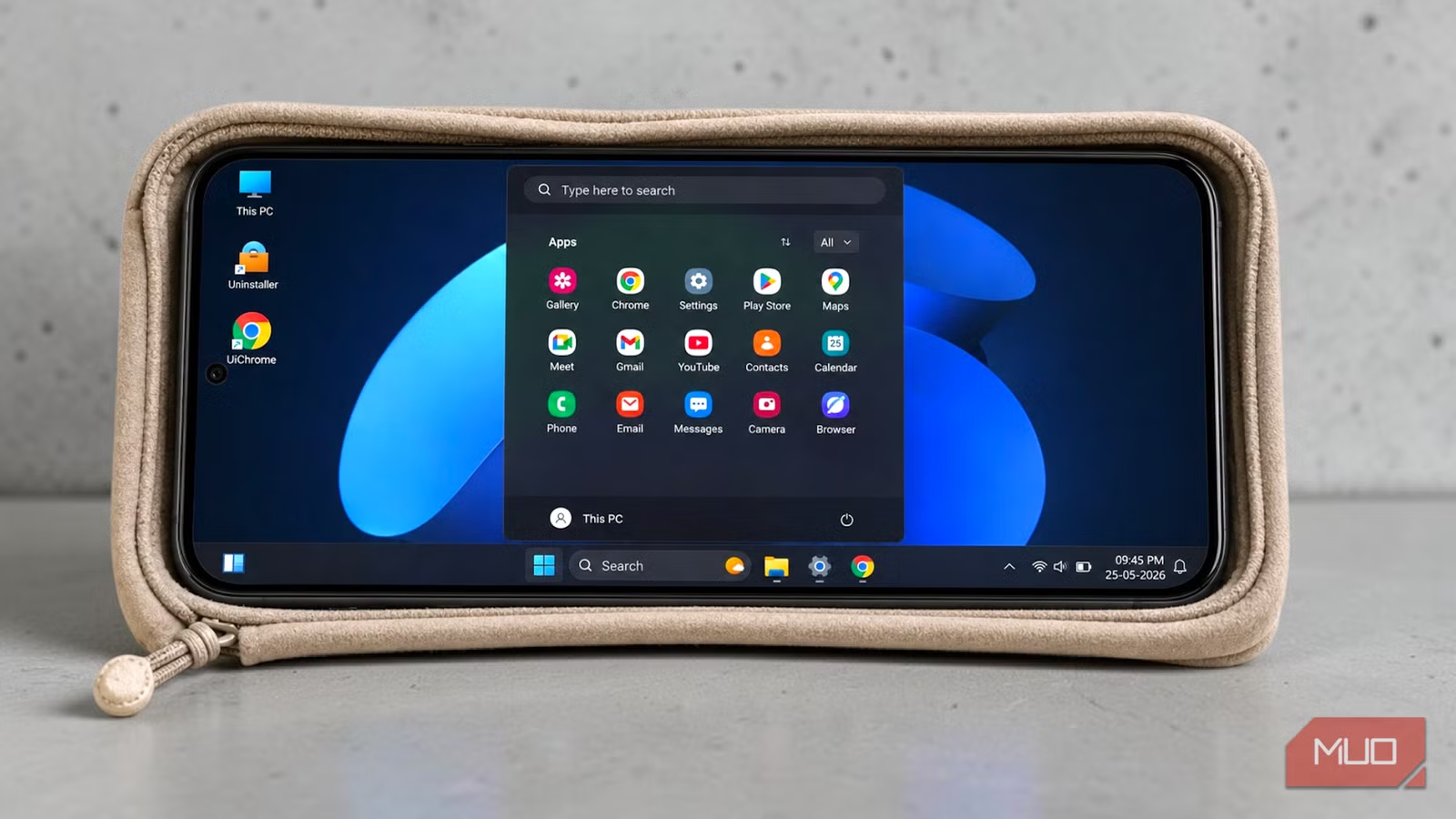
The desktop loads with a taskbar pinned to the bottom. The Start button sits on the left. Wi-Fi, battery, and clock indicators appear in the system tray on the right. A blue Windows 11 wallpaper fills the screen. Desktop icons for This PC, UiInstaller, and UiChrome sit in the top-left corner.
Opening the Start menu displays all your installed Android apps in a familiar grid. A search bar sits at the top. A power button lives in the bottom-right corner. The visual detail is impressive. The author of the original review describes it as "disturbingly" accurate to Windows 11.
Why This Matters for Productivity
Android has included a hidden desktop mode for developers for years. But it's buried in developer settings and requires manual configuration that most users never bother with. Third-party launchers like HyperDroid make that functionality accessible without digging through obscure menus.
“The gap between a pocket-sized computer and a desktop isn't hardware anymore; it's the interface. Third-party launchers are essentially bridging that UX divide for power users who want a familiar taskbar environment.”
— Sarah Jenkins, Lead Android UI Analyst at MobileUX Research
The numbers back up the demand. Win 11x Launcher, one of the most popular PC-style interfaces on the Play Store, has over 500,000 downloads. Computer Launcher 2026 has over 80,000. An estimated 38.9 million Android users will run third-party launchers in 2026, though that's down from 42.2 million in 2025 as native Android features improve.
The Catch: When Desktop Mode Actually Makes Sense
On Reddit's r/Android, the consensus is mixed. Users generally view PC launchers as a fun novelty for tablets or foldables. But many complain about excessive battery drain and conflicts with Android's gesture navigation system.
There's a vocal minority, though, who swear by these launchers for specific workflows. The common thread: they connect a mouse and keyboard. A desktop interface makes sense when you have desktop input devices. On a phone held in your hand, it's more of a party trick.
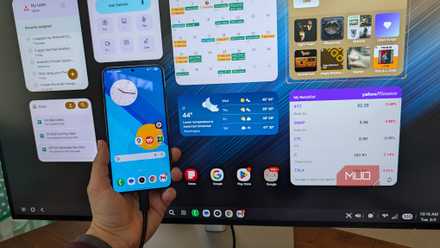
Samsung users have an official alternative: DeX. When you connect a Samsung phone to an external monitor, DeX provides a desktop-style interface with windowed apps and mouse support. HyperDroid offers something similar without needing Samsung hardware or an external display.
Who Should Try This
HyperDroid works best in three scenarios. First, tablet users who want a more traditional desktop layout. Second, foldable phone owners who can take advantage of the larger inner screen. Third, anyone who connects their phone to a monitor, keyboard, and mouse for occasional desktop work.
If you use your phone primarily as a phone, with touch input and gesture navigation, HyperDroid will feel like a step backward. The Windows 11 interface was designed for mouse cursors, not fingertips.
Context on Microsoft's software strategy and how it shapes third-party development
Logicity's Take
Frequently Asked Questions
Is HyperDroid free?
Yes. HyperDroid is available as a free download on the Google Play Store.
Does HyperDroid run Windows apps?
No. HyperDroid is a visual launcher that makes Android look like Windows 11. It still runs Android apps. It does not emulate Windows or run .exe files.
Will HyperDroid slow down my phone?
Launchers add some overhead. Reddit users report increased battery drain compared to stock Android launchers. Performance impact varies by device.
Can I switch back to my normal launcher?
Yes. Go to Settings, Apps, Choose default apps, Home app, and select a different launcher. Your phone returns to normal immediately.
Does HyperDroid work with gesture navigation?
Users report conflicts with Android's gesture navigation. The desktop interface works better with traditional three-button navigation or a connected mouse.
Need Help Implementing This?
Source: MakeUseOf
Huma Shazia
Senior AI & Tech Writer
اقرأ أيضاً

رأي مغاير: كيف يؤثر اختراق الأمن الداخلي الأميركي على شركاتنا الخاصة؟
في ظل اختراق عقود الأمن الداخلي الأميركي مع شركات خاصة، نناقش تأثير هذا الاختراق على مستقبل الأمن السيبراني. نستعرض الإحصاءات الموثوقة ونناقش كيف يمكن للشركات الخاصة أن تتعامل مع هذا التهديد. استمتع بقراءة هذا التحليل العميق

الإنسان في زمن ما بعد الوجود البشري: نحو نظام للتعايش بين الإنسان والروبوت - Centre for Arab Unity Studies
في هذا المقال، سنناقش كيف يمكن للبشر والروبوتات التعايش في نظام متكامل. سنستعرض التحديات والحلول المحتملة التي تضعها شركات مثل جوجل وأمازون. كما سنلقي نظرة على التوقعات المستقبلية وفقًا لتقرير ماكنزي

إطلاق ناسا لمهمة مأهولة إلى القمر: خطوة تاريخية نحو استكشاف الفضاء
تعتبر المهمة الجديدة خطوة هامة نحو استكشاف الفضاء وتطوير التكنولوجيا. سوف تشمل المهمة إرسال رواد فضاء إلى سطح القمر لconducting تجارب علمية. ستسهم هذه المهمة في تطوير فهمنا للفضاء وتحسين التكنولوجيا المستخدمة في استكشاف الفضاء.