Calendly vs Acuity: Which Scheduling App Wins in 2026

Key Takeaways
- Calendly is ideal for virtual meetings, sales teams, and consultants who need frictionless booking
- Acuity excels for service businesses requiring payment processing, deposits, and client intake forms
- Calendly starts free and charges per user; Acuity has no free plan but offers unlimited team members
Nobody schedules meetings by phone anymore. If you can't book online, you're losing appointments. The two giants of scheduling software, Calendly and Acuity, both solve this problem. But they've grown into very different tools.
Calendly, now valued at $3 billion with over 20 million users globally, has become a productivity hub focused on virtual meetings. Acuity, owned by Squarespace and used by more than 105,270 companies, has doubled down on service-based businesses. The choice between them depends less on scheduling capability and more on whether you coordinate external meetings or manage internal client operations.
The Core Difference: Meetings vs Services
Think of Calendly as a meeting coordinator. Think of Acuity as a digital front desk. Both sync calendars and automate booking. But the similarities end there.
Calendly streamlines the process of getting strangers onto your calendar. Sales reps send links. Prospects pick times. Meetings happen. The platform integrates tightly with video conferencing tools and CRMs. It's built for speed and minimal friction.
Acuity manages ongoing client relationships. Salon owners track repeat customers. Coaches sell multi-session packages. Studios handle class registrations. The platform processes payments, collects deposits, and manages staff schedules across multiple locations.
“The future of scheduling isn't just about picking a time slot; it's about automating the context, the prep, and the follow-through of every interaction.”
— Tope Awotona, CEO and Founder of Calendly
Calendly: Built for Virtual Meetings
Calendly's strength is simplicity. The interface is clean. Setup takes minutes. Share a link, and people book. The platform excels at removing scheduling friction from your workflow.
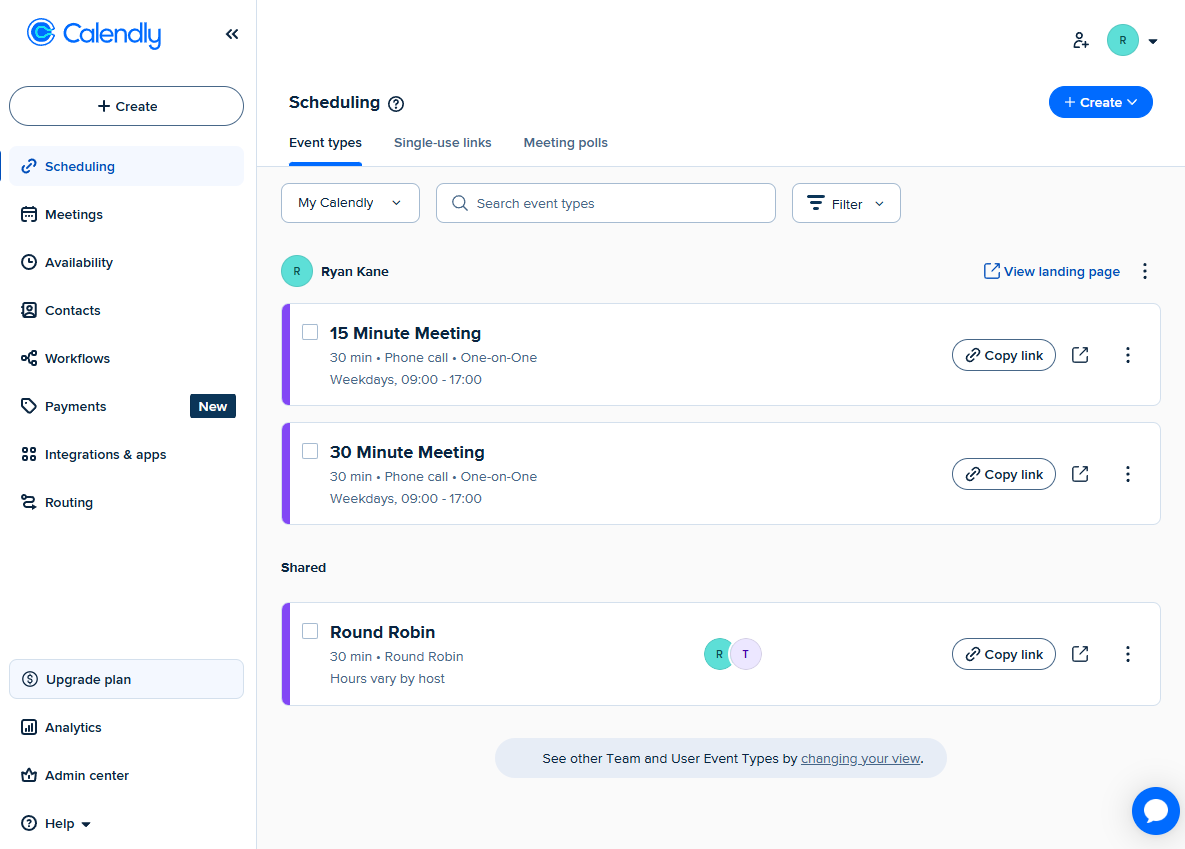
The 2026 version includes an AI-powered Notetaker feature and a unified meeting dashboard. These additions automate pre-meeting prep and post-meeting follow-up, which matters for teams running dozens of calls weekly.
Calendly connects natively to more third-party tools than Acuity. If your workflow depends on Salesforce, HubSpot, or similar CRMs, Calendly's integrations are deeper. The platform also supports routing forms that qualify leads before they book, which sales teams find valuable.
- Ideal for: Sales teams, consultants, freelancers, recruiters
- Best feature: Collaborative scheduling and team routing
- Integration strength: CRMs and video conferencing tools
- Learning curve: Minimal, about 15 minutes to full setup
Acuity: Built for Service Businesses
Acuity treats scheduling as one piece of a larger business operation. The platform handles what happens before, during, and after appointments. It's less about getting meetings on calendars and more about running a service business.
Payment processing stands out. Acuity handles deposits, coupons, gift certificates, tipping, invoicing, and memberships. The platform connects to Square for in-person payments. A salon can sell a 10-session package, collect a 50% deposit upfront, and apply gift certificate credit at checkout. Calendly can't match this without workarounds.
Client intake forms are more sophisticated. Acuity collects detailed information before appointments. Healthcare providers gather medical histories. Coaches complete assessments. This data stays attached to client records for future reference.
- Ideal for: Spas, salons, coaches, studios, healthcare providers
- Best feature: Built-in payment processing with deposits and packages
- Integration strength: Squarespace and payment platforms
- Learning curve: Moderate, about 1-2 hours for full configuration
Payment Processing: Where Acuity Pulls Ahead
Calendly accepts payments. Acuity runs a payment operation. The difference matters for service businesses.
Calendly supports upfront payments, multi-session packages, and custom payment links. It covers the basics. But it can't handle subscriptions, memberships, or flexible deposit structures. If a customer wants to pay 25% now and 75% at the appointment, Calendly won't help.
Acuity handles all of that. Set percentage-based deposits. Create membership tiers with recurring billing. Issue gift certificates with custom amounts. Apply coupon codes at checkout. Accept tips. Connect Square to process card-present transactions at your location.
“For service-based businesses, a scheduling app is the digital front desk—if it doesn't handle payments and intake as smoothly as it handles calendar syncs, it isn't doing its job.”
— Industry Analyst, SaaS Operations Review
Pricing: Per-User vs Flat Fee
Calendly charges per user. Acuity charges per account with unlimited collaborators. This creates very different cost structures at scale.
Calendly offers a free plan with basic features. Paid plans start at $12 per user per month. A five-person team pays $60 monthly. A 20-person sales team pays $240 monthly. Costs scale linearly with headcount.
Acuity has no free plan. Paid tiers start at $20 per month, but you get unlimited team members. A salon with eight stylists pays the same as a solo practitioner on the same tier. For teams, this math often favors Acuity.
| Feature | Calendly | Acuity |
|---|---|---|
| Ease of use | 5/5 — Extremely straightforward | 4/5 — More complex features |
| Free plan | Yes | No |
| Starting price | $12/user/month | $20/month flat |
| Team pricing model | Per-user | Unlimited collaborators |
| Payment processing | Basic (upfront, packages) | Full (deposits, tips, memberships, invoicing) |
| Native integrations | More extensive | Fewer, but deep Squarespace tie-in |
| Best for | Virtual meetings, sales | Service businesses, appointments |
Integration Capabilities
Calendly connects to more tools out of the box. If your tech stack includes Salesforce, HubSpot, Zoom, Teams, or similar enterprise tools, Calendly's native integrations are stronger.
Acuity integrates deeply with Squarespace, its parent company. If you already run a Squarespace site, Acuity embeds seamlessly. The platform also connects to payment processors like Stripe, Square, and PayPal.
Both platforms work with Zapier. This means you can connect either tool to thousands of apps through automated workflows. If a native integration doesn't exist, Zapier usually bridges the gap.
What Real Users Say
Reddit discussions in r/smallbusiness and r/freelance show a clear split. Consultants and sales professionals consistently recommend Calendly for its frictionless experience. They value the clean links and quick setup.
Salon owners, coaches, and studio managers prefer Acuity. They cite native payment handling, deposit collection, and multi-session packages as features they can't replicate on Calendly without cumbersome workarounds.
The pattern is consistent: if you primarily book external meetings, Calendly wins. If you manage ongoing client services with payments, Acuity wins.
How to Decide
Ask yourself two questions. First, what's the primary purpose of your scheduling? Second, how many people need access?
- Choose Calendly if you run virtual meetings, need CRM integrations, work in sales or consulting, and want the fastest setup possible
- Choose Acuity if you take payments, sell packages or memberships, manage multiple staff members, and need detailed client intake forms
- Consider team size: Calendly's per-user pricing favors solo operators and small teams; Acuity's flat pricing favors larger service teams
✅ Pros
- • Calendly: Simpler interface, faster setup, better CRM integrations, free plan available
- • Acuity: Superior payment processing, unlimited team members, better for service businesses
❌ Cons
- • Calendly: Limited payment features, costs scale with team size
- • Acuity: No free plan, steeper learning curve, fewer native integrations
The Bottom Line
Calendly and Acuity aren't really competing anymore. They've specialized. Calendly is a meeting machine for knowledge workers. Acuity is an appointment engine for service providers.
Pick Calendly if you spend your days on Zoom calls with prospects and clients. Pick Acuity if you spend your days delivering services, collecting payments, and managing client relationships. The right choice is obvious once you identify which category describes your work.
Logicity's Take
Frequently Asked Questions
Can I use Calendly and Acuity together?
Technically yes, but it creates confusion. Most businesses benefit from picking one and committing. If you have distinct use cases (sales meetings AND service appointments), running both is manageable but adds complexity.
Does Calendly work for service businesses?
It can handle basic appointment booking. But without native deposit collection, membership management, and detailed intake forms, you'll need workarounds. Most service businesses find Acuity a better fit.
Is Acuity really worth paying for without a free plan?
For service businesses, yes. The payment processing features alone often justify the cost. If you're just booking simple meetings without payments, Calendly's free plan works fine.
Which has better customer support?
Both offer solid documentation and email support. Calendly's higher-tier plans include priority support. Acuity's support comes through Squarespace, which has mixed reviews for response times.
Can either tool handle multiple locations?
Acuity handles multi-location businesses more gracefully, with staff assignments and location-specific availability built in. Calendly can manage this but requires more manual configuration.
If you're evaluating payment tools alongside scheduling, this guide covers optimizing digital payment security
Need Help Implementing This?
Source: The Zapier Blog
Huma Shazia
Senior AI & Tech Writer
اقرأ أيضاً

رأي مغاير: كيف يؤثر اختراق الأمن الداخلي الأميركي على شركاتنا الخاصة؟
في ظل اختراق عقود الأمن الداخلي الأميركي مع شركات خاصة، نناقش تأثير هذا الاختراق على مستقبل الأمن السيبراني. نستعرض الإحصاءات الموثوقة ونناقش كيف يمكن للشركات الخاصة أن تتعامل مع هذا التهديد. استمتع بقراءة هذا التحليل العميق

الإنسان في زمن ما بعد الوجود البشري: نحو نظام للتعايش بين الإنسان والروبوت - Centre for Arab Unity Studies
في هذا المقال، سنناقش كيف يمكن للبشر والروبوتات التعايش في نظام متكامل. سنستعرض التحديات والحلول المحتملة التي تضعها شركات مثل جوجل وأمازون. كما سنلقي نظرة على التوقعات المستقبلية وفقًا لتقرير ماكنزي

إطلاق ناسا لمهمة مأهولة إلى القمر: خطوة تاريخية نحو استكشاف الفضاء
تعتبر المهمة الجديدة خطوة هامة نحو استكشاف الفضاء وتطوير التكنولوجيا. سوف تشمل المهمة إرسال رواد فضاء إلى سطح القمر لconducting تجارب علمية. ستسهم هذه المهمة في تطوير فهمنا للفضاء وتحسين التكنولوجيا المستخدمة في استكشاف الفضاء.