7 WordPress SEO Plugins That Actually Work in 2026
Key Takeaways
- Yoast SEO leads with 13 million+ installations for its beginner-friendly interface and content analysis
- Rank Math's 3 million+ users prefer its free advanced features, including built-in rank tracking
- Lightweight options like The SEO Framework and Slim SEO suit performance-focused sites avoiding plugin bloat
WordPress SEO plugins used to be about stuffing keywords into meta descriptions. That era ended. In 2026, these tools manage the infrastructure that determines whether AI crawlers and search engines can read your content at all.
With WordPress powering 43.5% of all websites globally, the plugin you choose affects more than rankings. It shapes how your content appears in AI overviews, whether your schema data feeds rich snippets, and how your Core Web Vitals perform under Google's page experience signals.
After testing dozens of options, these seven plugins stand out. Each serves a different use case, from agencies managing multiple sites to solo bloggers who want a set-it-and-forget-it solution.
The 7 Best WordPress SEO Plugins
1. Yoast SEO: Best for Content Analysis and On-Page Optimization
Yoast SEO remains the most installed WordPress SEO plugin, with over 13 million active installations worldwide. Its traffic-light system, green for good, red for problems, orange for warnings, makes SEO accessible to anyone who can write a blog post.
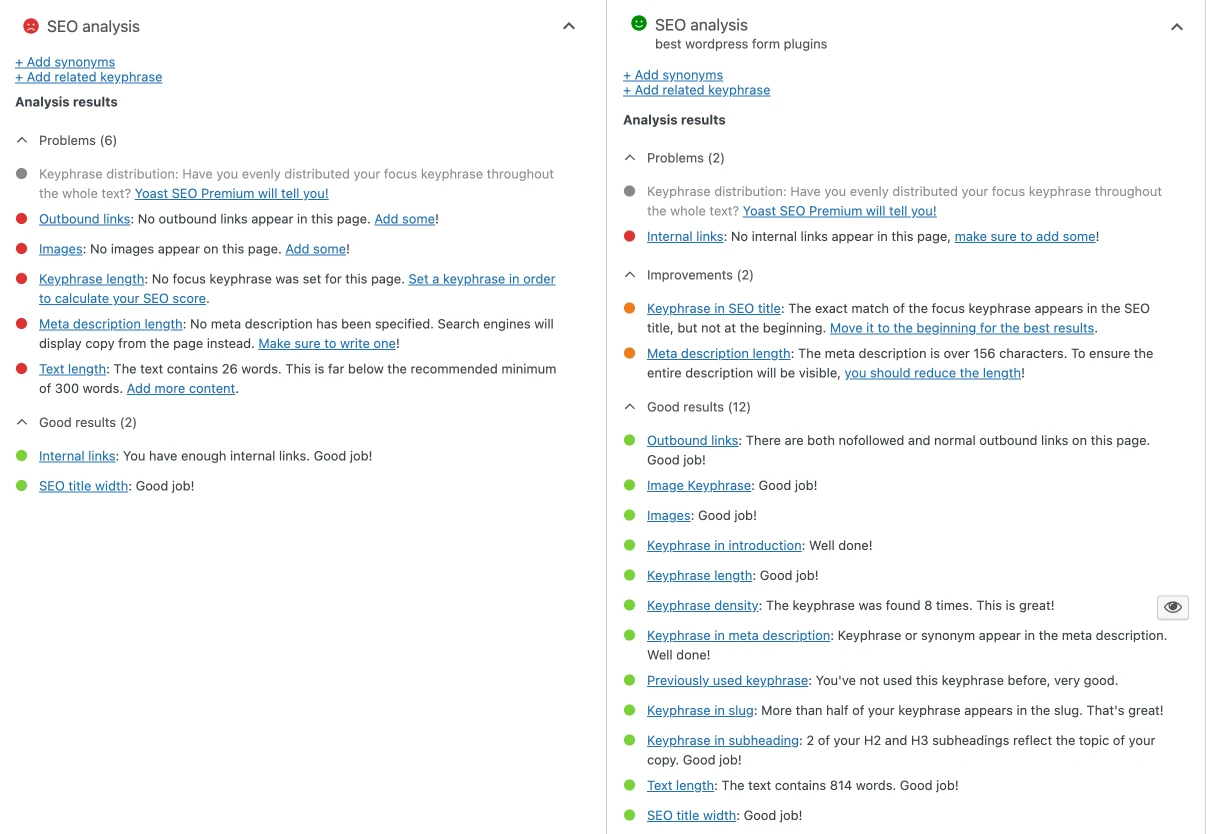
The plugin's readability analysis catches passive voice, long sentences, and transition word density. For teams producing content at scale, this consistency check prevents common mistakes before publication.
“The future of SEO isn't just about keywords; it's about making your content 'readable' for the AI agents that are now building the search results.”
— Marieke van de Rakt, Head of Strategy at Yoast
Yoast's 2026 updates focus on E-E-A-T readiness, helping WordPress sites signal experience, expertise, authoritativeness, and trustworthiness to search algorithms. The free version covers essentials. Premium adds internal linking suggestions, redirect management, and multiple focus keywords per post.
2. Rank Math: Best for Rank Tracking and Reporting
Rank Math has grown to 3 million+ active installations by offering premium-tier features for free. Built-in rank tracking, Google Search Console integration, and advanced schema options come standard.
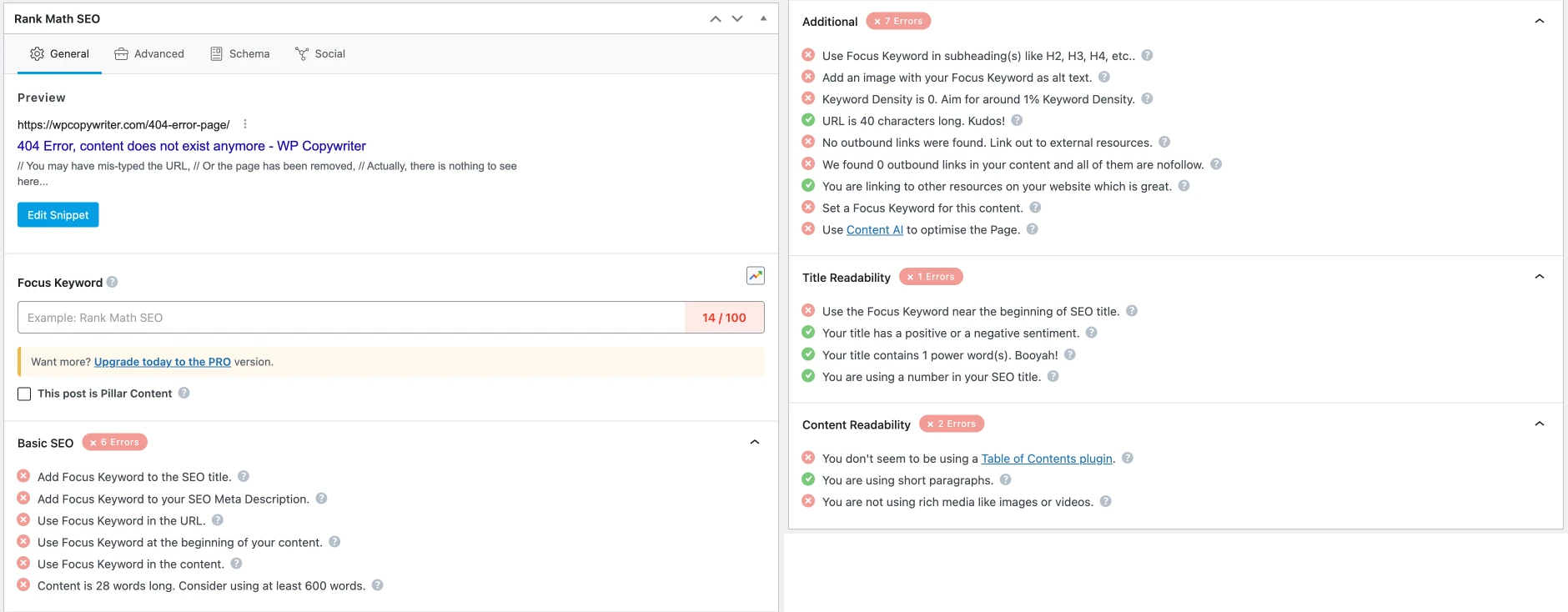
Power users and developers gravitate toward Rank Math's modular architecture. Enable only the features you need. Disable everything else. This approach reduces bloat compared to all-in-one competitors.
“In 2026, if your data isn't structured, AI agents might not see your content at all. Schema is the new essential plumbing of the web.”
— Bhanu Ahluwalia, Lead Developer at Rank Math
Rank Math's AI-driven schema features now support 2026 search requirements, including FAQ, HowTo, and Article schemas that feed directly into AI overviews and rich results.
3. AIOSEO: Best for All-Around SEO Assistance
All in One SEO (AIOSEO) positions itself as the middle ground. It's more feature-rich than basic plugins but less overwhelming than Rank Math's full toolkit.
The setup wizard walks new users through site type selection, social profiles, and basic schema configuration in under five minutes. For agencies, the local SEO add-on handles multi-location businesses with separate schema markup per location.
4. Squirrly SEO: Best for AI-Powered Keyword Research
Squirrly SEO takes a different approach. Instead of analyzing content after you write it, the plugin provides real-time suggestions as you type. Its AI assistant recommends keywords, content length, and structure based on what's currently ranking.
The ranking projections feature estimates how long it will take to rank for specific keywords based on your site's authority. This helps prioritize effort toward winnable searches rather than chasing competitive terms.
5. SmartCrawl: Best for Balancing Features with Simplicity
SmartCrawl, from the team behind WPMU DEV, offers a streamlined interface that doesn't sacrifice capability. The automatic sitemap generation updates as you publish. Schema types cover most common use cases without requiring manual JSON-LD editing.
For multisite installations, SmartCrawl handles network-wide settings while allowing individual site customization. This makes it practical for agencies managing WordPress networks.
6. The SEO Framework: Best for Speed and Automation
The SEO Framework markets itself on what it doesn't do: no upsells, no ads in the dashboard, no bloated feature sets. The plugin generates meta titles and descriptions automatically based on your content, requiring zero configuration for basic functionality.
Performance-focused developers recommend The SEO Framework for high-traffic sites where every millisecond matters. The codebase is lean, and the plugin plays well with caching solutions and CDNs.
Reddit's r/WordPress community consistently points to The SEO Framework as the "anti-bloat" alternative to larger suites. If your primary concern is page speed and you don't need rank tracking built into WordPress, this plugin delivers.
7. Slim SEO: Best for Beginners Who Want Minimal Configuration
Slim SEO targets users who find even Yoast's setup wizard overwhelming. Install it, activate it, and you're done. The plugin automatically generates meta tags, creates sitemaps, and handles Open Graph tags for social sharing.
There's no settings page to configure because there are almost no settings. For personal blogs or small business sites that just need the basics, Slim SEO removes decision fatigue entirely.
Yoast SEO vs Rank Math: The Real Differences
The most common question in WordPress SEO circles: should I use Yoast or Rank Math? The answer depends on your technical comfort level and specific needs.
| Feature | Yoast SEO (Free) | Rank Math (Free) |
|---|---|---|
| Active Installations | 13 million+ | 3 million+ |
| Focus Keywords per Post | 1 | 5 |
| Built-in Rank Tracking | No (Premium) | Yes |
| Schema Types | Basic | 15+ |
| Google Search Console Integration | Limited | Full |
| Content Analysis | Traffic Light System | Score-based |
| Learning Curve | Low | Medium |
Yoast wins on simplicity and stability. The plugin has been around since 2010, and its documentation covers nearly every edge case. Support forums are active, and most WordPress developers know how to troubleshoot Yoast issues.
Rank Math wins on value. Features that require Yoast Premium, like redirect management, multiple focus keywords, and internal link suggestions, come free with Rank Math. For budget-conscious site owners who want advanced features, Rank Math delivers more out of the box.
Why Schema Markup Matters More Than Ever
The shift to AI-driven search results has elevated schema markup from "nice to have" to essential infrastructure. When Google's AI Overview pulls information for a search query, it reads structured data first. Sites without proper schema may not appear in these summaries at all.
All seven plugins handle basic schema. The differences appear in complexity and customization. Rank Math and AIOSEO offer the widest range of schema types. The SEO Framework and Slim SEO handle common schemas automatically but don't support advanced types without extensions.
For e-commerce sites, product schema directly affects whether your items appear in Google Shopping results. For publishers, Article and FAQ schemas determine rich snippet eligibility. Choose your plugin based on which schema types your content actually needs.
What the Community Says
Reddit's r/SEO and r/WordPress communities reveal a clear pattern. Beginners and agency managers stick with Yoast for its stability and widespread familiarity. Power users migrate to Rank Math for its feature density and modular design.
A growing contingent recommends avoiding both for performance-critical sites. The SEO Framework and SEOPress attract developers who consider the major plugins unnecessarily heavy. This "lightweight" camp prioritizes page speed over convenience features.
Logicity's Take
Making Your Choice
- Choose Yoast SEO if you want proven stability, extensive documentation, and the easiest learning curve
- Choose Rank Math if you want premium features for free and don't mind a steeper initial setup
- Choose AIOSEO if you need local SEO features or manage multiple business locations
- Choose Squirrly SEO if you want AI-driven content suggestions while writing
- Choose SmartCrawl if you run WordPress multisite networks
- Choose The SEO Framework if page speed is your top priority
- Choose Slim SEO if you want zero configuration and basic functionality
All seven plugins offer free versions sufficient for most sites. Start with the free tier, learn its interface, and upgrade only when you hit a specific limitation. Premium features often solve problems most sites don't have.
Frequently Asked Questions
Can I switch from Yoast to Rank Math without losing my SEO settings?
Yes. Rank Math includes a built-in migration tool that imports your Yoast settings, including meta titles, descriptions, and focus keywords. The process takes a few minutes and preserves your existing optimization work.
Do I need multiple SEO plugins for WordPress?
No. Running multiple SEO plugins causes conflicts and can generate duplicate meta tags. Choose one plugin and deactivate or delete the others. All seven plugins covered here provide complete SEO functionality on their own.
Which WordPress SEO plugin is best for e-commerce?
Rank Math and AIOSEO offer the most comprehensive product schema support. Both integrate with WooCommerce and generate structured data for product listings, reviews, and pricing that appear in Google Shopping results.
Is Yoast SEO Premium worth the cost?
For most sites, no. The free version handles on-page optimization, readability analysis, and basic schema. Premium adds internal linking suggestions, redirect management, and multiple focus keywords. If you need those specific features, it's worth it. Otherwise, the free version suffices.
How do SEO plugins affect WordPress site speed?
Larger plugins like Yoast and Rank Math add measurable load time, typically 50-200ms depending on configuration. Lightweight alternatives like The SEO Framework and Slim SEO add minimal overhead. For speed-critical sites, test your actual load times before and after plugin installation.
Need Help Implementing This?
Source: The Zapier Blog
Huma Shazia
Senior AI & Tech Writer
اقرأ أيضاً

رأي مغاير: كيف يؤثر اختراق الأمن الداخلي الأميركي على شركاتنا الخاصة؟
في ظل اختراق عقود الأمن الداخلي الأميركي مع شركات خاصة، نناقش تأثير هذا الاختراق على مستقبل الأمن السيبراني. نستعرض الإحصاءات الموثوقة ونناقش كيف يمكن للشركات الخاصة أن تتعامل مع هذا التهديد. استمتع بقراءة هذا التحليل العميق

الإنسان في زمن ما بعد الوجود البشري: نحو نظام للتعايش بين الإنسان والروبوت - Centre for Arab Unity Studies
في هذا المقال، سنناقش كيف يمكن للبشر والروبوتات التعايش في نظام متكامل. سنستعرض التحديات والحلول المحتملة التي تضعها شركات مثل جوجل وأمازون. كما سنلقي نظرة على التوقعات المستقبلية وفقًا لتقرير ماكنزي

إطلاق ناسا لمهمة مأهولة إلى القمر: خطوة تاريخية نحو استكشاف الفضاء
تعتبر المهمة الجديدة خطوة هامة نحو استكشاف الفضاء وتطوير التكنولوجيا. سوف تشمل المهمة إرسال رواد فضاء إلى سطح القمر لconducting تجارب علمية. ستسهم هذه المهمة في تطوير فهمنا للفضاء وتحسين التكنولوجيا المستخدمة في استكشاف الفضاء.