6 Linux Pipelines You Can Replace With Simpler Commands

Key Takeaways
- grep's -c flag counts matches without needing wc -l
- File redirection (<) replaces most uses of cat in pipelines
- ls has built-in sorting options that eliminate the need for piping to sort
Pipes are one of Linux's most powerful features. By chaining small programs together, you can accomplish complex tasks without writing custom code. But this flexibility creates a trap: many shell users reach for pipes when simpler alternatives exist.
The problem isn't just aesthetics. Unnecessary pipes spawn extra processes, increase memory usage, and make scripts harder to read. Knowing when not to pipe is as important as knowing how.
grep | wc -l: The Classic Overkill
This pattern shows up constantly in tutorials and production scripts alike. You want to count how many lines match a pattern, so you pipe grep's output to wc:
grep -E "^.+() {$" funcs.sh | wc -lThe fix is simple. grep has a built-in counting option that has existed since the command's earliest versions:
grep --count -E "^.+() {$" funcs.shThe -c flag (or --count) outputs the number of matching lines directly. No pipe, no second process, same result.
cat file | command: The "Useless Use of Cat"
This pattern is so common it has its own name in Unix folklore: the "useless use of cat." The cat command concatenates files and writes them to standard output. When you only have one file, piping cat seems natural:
cat file | wc -lBut most commands that accept piped input also accept file arguments directly:
Code sample: wc -l file
What about commands that don't support file arguments? Linux's file redirection operator handles that case without spawning an extra process:
Code sample: tr ' ' '\n' <filename
The < operator redirects a file's contents to a command's standard input. It takes some adjustment if piping cat is in your muscle memory, but file redirection is both faster and more idiomatic.
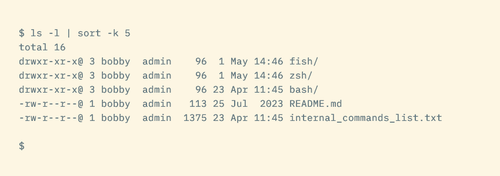
ls | sort: When ls Already Sorts
Sorting directory listings by piping ls to sort seems logical. After all, sort is the sorting tool. But ls has extensive built-in sorting capabilities:
- ls -S sorts by file size (largest first)
- ls -t sorts by modification time (newest first)
- ls -X sorts by extension alphabetically
- ls -v sorts version numbers naturally (file1, file2, file10 instead of file1, file10, file2)
Add -r to any of these for reverse order. These flags eliminate most reasons to pipe ls output through sort.
Why This Matters Beyond Pedantry
Each pipe in a command spawns a subshell and an additional process. For one-off commands, the overhead is negligible. But in scripts that run thousands of times, in loops that process large datasets, or on resource-constrained systems, these small inefficiencies compound.
There's also the readability argument. Shorter commands are easier to debug. When you revisit a script six months later, grep -c is clearer than grep | wc -l because it expresses intent directly: count matches.
Logicity's Take
When Pipes Are Still the Right Choice
None of this means pipes are bad. They're essential when you genuinely need to chain operations that no single tool handles. The key is recognizing when a pipe adds value versus when it adds complexity for no gain.
If you're filtering output, then transforming it, then counting it, pipes are the right tool. If you're just counting matches, check whether the first command has a counting flag.
Frequently Asked Questions
Does using fewer pipes actually improve performance?
Yes, but the impact varies. Each pipe spawns an extra process. For one-off commands the difference is milliseconds. In loops or high-volume scripts, it can add up to noticeable delays.
How do I find built-in options for Linux commands?
Run 'man command' or 'command --help' in your terminal. Man pages list all options with explanations. For quick reference, tldr pages (tldr.sh) provide common usage examples.
Is the 'useless use of cat' ever useful?
Sometimes. When building pipelines interactively, starting with cat makes it easy to add filters incrementally. Some argue it aids readability by making data flow explicit. But for finished scripts, removing unnecessary cat is good practice.
Do these optimizations matter in bash scripts?
They matter most in scripts that run frequently or process large files. For scripts that run once a day, readability usually matters more than shaving milliseconds. Use judgment based on context.
Another guide to getting more from tools you already have
Need Help Implementing This?
Source: How-To Geek
Huma Shazia
Senior AI & Tech Writer
اقرأ أيضاً

رأي مغاير: كيف يؤثر اختراق الأمن الداخلي الأميركي على شركاتنا الخاصة؟
في ظل اختراق عقود الأمن الداخلي الأميركي مع شركات خاصة، نناقش تأثير هذا الاختراق على مستقبل الأمن السيبراني. نستعرض الإحصاءات الموثوقة ونناقش كيف يمكن للشركات الخاصة أن تتعامل مع هذا التهديد. استمتع بقراءة هذا التحليل العميق

الإنسان في زمن ما بعد الوجود البشري: نحو نظام للتعايش بين الإنسان والروبوت - Centre for Arab Unity Studies
في هذا المقال، سنناقش كيف يمكن للبشر والروبوتات التعايش في نظام متكامل. سنستعرض التحديات والحلول المحتملة التي تضعها شركات مثل جوجل وأمازون. كما سنلقي نظرة على التوقعات المستقبلية وفقًا لتقرير ماكنزي

إطلاق ناسا لمهمة مأهولة إلى القمر: خطوة تاريخية نحو استكشاف الفضاء
تعتبر المهمة الجديدة خطوة هامة نحو استكشاف الفضاء وتطوير التكنولوجيا. سوف تشمل المهمة إرسال رواد فضاء إلى سطح القمر لconducting تجارب علمية. ستسهم هذه المهمة في تطوير فهمنا للفضاء وتحسين التكنولوجيا المستخدمة في استكشاف الفضاء.