6 Excel Myths That Slow Down Your Spreadsheets

Key Takeaways
- Center Across Selection gives merged-cell appearance without breaking sorting or filtering
- Hiding rows and columns provides zero security since anyone can unhide them in seconds
- Excel's Very Hidden worksheet setting can still be exposed by anyone who knows how to access workbook structure
Myth 1: Merging Cells Is the Best Way to Clean Up Your Layout
Merging cells makes headers look tidy. It also breaks Excel's underlying data logic. Once you merge a block, sorting or filtering data becomes difficult. The merge introduces structural issues that disrupt normal spreadsheet behavior.
The fix is simple: use Center Across Selection instead. Access it through Ctrl+1, then navigate to Alignment and select Horizontal. You get the same clean, centered appearance without altering the actual grid structure. Because the cells remain independent, sorting, copying, and filtering continue to work normally.
Myth 2: Hiding Rows, Columns, and Worksheets Secures Sensitive Data
Right-clicking a column and selecting Hide seems like a reasonable way to protect client information or sensitive calculations. It is not. Anyone with access to the file can unhide rows, columns, or entire worksheets in seconds.
Even Excel's Very Hidden worksheet setting offers no real safeguard. Anyone who understands how to access the workbook structure can expose it. Hidden content can also leak in indirect ways. Copying data into a new workbook or exporting to formats like CSV can re-expose information you thought was protected.
For actual security, protect at the file level. Use encryption and password protection on the workbook itself. If certain people should not see certain data, they should not have access to the file at all.
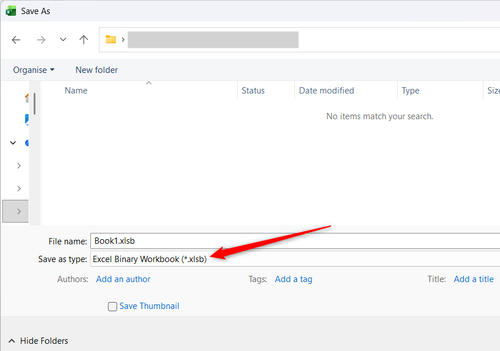
Myth 3: XLSB Files Are Always Faster
The Excel Binary Workbook format (XLSB) does reduce file size and can improve performance for very large spreadsheets. But it comes with tradeoffs that many users do not consider.
XLSB files are harder to recover if corrupted. They do not work as well with version control systems. Some third-party tools cannot read them. And for most workbooks, the performance gain is negligible.
Unless you are working with massive datasets where load time is a genuine problem, stick with the standard XLSX format. The compatibility benefits outweigh minor speed improvements.
Myth 4: More Formulas Mean More Problems
Some users avoid formulas in favor of manual calculations or pasted values, believing formulas slow everything down. This creates the opposite problem: manual work that must be repeated every time data changes.
Modern Excel handles formulas efficiently. A well-structured formula that updates automatically is almost always better than static values that require manual refreshes. The key is writing efficient formulas, not avoiding them entirely.
Volatile functions like INDIRECT, OFFSET, and NOW do recalculate constantly and can slow large workbooks. But standard functions like VLOOKUP, INDEX-MATCH, and SUMIFS are optimized for performance.
Myth 5: One Big Worksheet Is Easier to Manage
Keeping everything on one sheet seems simpler. No switching between tabs. No linking formulas across worksheets. In practice, single-sheet workbooks become unwieldy fast.
Separate worksheets let you organize data logically. Raw data on one tab, calculations on another, summaries on a third. This structure makes workbooks easier to audit, easier to update, and easier for others to understand.
Cross-sheet references are not as complicated as they seem. A formula like =Data!A1 clearly shows where the value comes from. That transparency makes debugging faster than scrolling through thousands of rows on a single sheet.
Myth 6: Conditional Formatting Slows Everything Down
Conditional formatting can cause performance issues, but only when applied carelessly. Applying 50 different rules to an entire column of 100,000 rows will slow things down. Applying a few rules to the data you actually need to highlight works fine.
The real problem is redundant rules that accumulate over time. When you copy and paste formatted cells, the conditional formatting rules often duplicate. A worksheet that started with three rules might have 300 after months of editing.
Check your conditional formatting rules periodically. Delete duplicates. Apply rules to specific ranges rather than entire columns. These small adjustments keep formatting useful without killing performance.
What Actually Slows Down Excel
If your workbook feels sluggish, these are the usual culprits:
- Volatile functions (INDIRECT, OFFSET, NOW) that recalculate constantly
- Array formulas applied to massive ranges
- External links to files that are slow to access or no longer exist
- Embedded objects like images and charts that balloon file size
- Accumulated conditional formatting rules
Fixing these issues will do more for performance than avoiding formulas or switching file formats.
Logicity's Take
Frequently Asked Questions
Does merging cells break Excel formulas?
Merging cells can break formulas that reference the merged range. It also prevents sorting and filtering from working correctly. Use Center Across Selection for the same visual effect without these problems.
Is hiding Excel worksheets a security feature?
No. Hidden worksheets can be unhidden in seconds by anyone with file access. Even Very Hidden worksheets can be exposed. For actual security, use file-level encryption or restrict file access entirely.
Should I save Excel files as XLSB?
Only if you have very large files where load time is a problem. XLSB files are harder to recover if corrupted and have compatibility issues with some tools. Standard XLSX works better for most use cases.
Do Excel formulas slow down spreadsheets?
Standard formulas like VLOOKUP and SUMIFS are optimized for performance. Volatile functions like INDIRECT and OFFSET recalculate constantly and can slow large workbooks. The solution is using efficient formulas, not avoiding them.
Why is my Excel conditional formatting slow?
Redundant rules accumulate when you copy formatted cells. Check your conditional formatting rules periodically and delete duplicates. Apply rules to specific ranges rather than entire columns.
Need Help Implementing This?
Source: How-To Geek
Huma Shazia
Senior AI & Tech Writer
اقرأ أيضاً

رأي مغاير: كيف يؤثر اختراق الأمن الداخلي الأميركي على شركاتنا الخاصة؟
في ظل اختراق عقود الأمن الداخلي الأميركي مع شركات خاصة، نناقش تأثير هذا الاختراق على مستقبل الأمن السيبراني. نستعرض الإحصاءات الموثوقة ونناقش كيف يمكن للشركات الخاصة أن تتعامل مع هذا التهديد. استمتع بقراءة هذا التحليل العميق

الإنسان في زمن ما بعد الوجود البشري: نحو نظام للتعايش بين الإنسان والروبوت - Centre for Arab Unity Studies
في هذا المقال، سنناقش كيف يمكن للبشر والروبوتات التعايش في نظام متكامل. سنستعرض التحديات والحلول المحتملة التي تضعها شركات مثل جوجل وأمازون. كما سنلقي نظرة على التوقعات المستقبلية وفقًا لتقرير ماكنزي

إطلاق ناسا لمهمة مأهولة إلى القمر: خطوة تاريخية نحو استكشاف الفضاء
تعتبر المهمة الجديدة خطوة هامة نحو استكشاف الفضاء وتطوير التكنولوجيا. سوف تشمل المهمة إرسال رواد فضاء إلى سطح القمر لconducting تجارب علمية. ستسهم هذه المهمة في تطوير فهمنا للفضاء وتحسين التكنولوجيا المستخدمة في استكشاف الفضاء.