3 Linux CLI Tools That Fix Archive, Update, and Systemd Hassles

Key Takeaways
- Ouch extracts and compresses any archive format with a single command, no syntax memorization required
- Topgrade runs updates across apt, snap, flatpak, cargo, pip, and more in one pass
- ISD turns systemd management into a button-press interface instead of arcane systemctl commands
The Problem: Too Many Commands for Simple Tasks
Linux power users know the feeling. You download an archive and pause to remember whether it's tar -xvf, unzip, 7z e, or something else entirely. You want to update your system but forget that you have packages installed via apt, snap, flatpak, cargo, and pip, each requiring separate commands. You need to restart a service but can't recall whether it's systemctl restart or systemctl reload or some other incantation.
These aren't hard problems. They're friction problems. Each one costs you 30 seconds and a trip to your search engine. Multiply that across a workday, and it adds up.
Three Rust-based utilities have emerged to address exactly this kind of daily terminal annoyance: Ouch for archives, Topgrade for updates, and ISD for systemd. None of them add raw capability. All of them reduce cognitive load.
Ouch: One Command for Every Archive Format
Ouch is a unified archiving tool. It extracts zip, tar, tar.gz, tar.xz, 7z, rar, zst, and about a dozen other formats with identical syntax: ouch decompress filename. No flags to remember. No format-specific tools to install separately.
Compression works the same way. Run ouch compress file.txt file.tar.gz and it figures out the format from the extension. Want to compress the same file into multiple formats? A simple loop handles it.
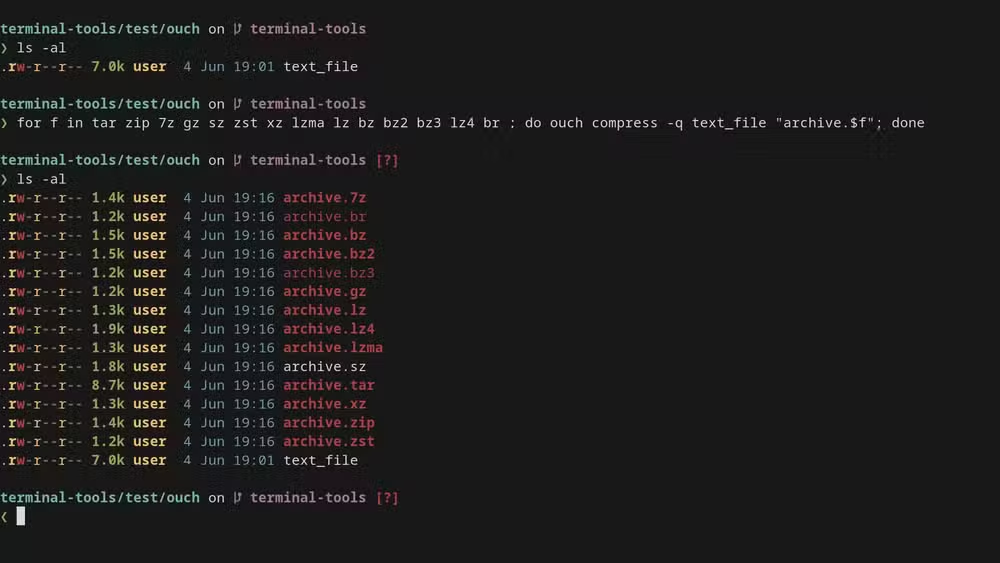
The tool isn't faster than native utilities. If you're processing gigabytes of data or thousands of archives, stick with tar or 7z directly. But for everyday use, where you just want to extract something and move on, Ouch removes the mental overhead.
With 3,600 GitHub stars, Ouch has found a solid community. Installation is straightforward via cargo install ouch or through package managers on major distributions.
Topgrade: Update Everything at Once
Modern Linux systems accumulate package managers like dust. You've got apt for system packages, snap for sandboxed apps, flatpak for other sandboxed apps, pip for Python, cargo for Rust, npm for Node.js, and maybe brew if you came from macOS. Each has its own update command.
Topgrade runs them all with a single command. It detects which package managers are installed, runs their update routines in sequence, and reports results in a unified format. It handles its own self-update first, then moves through system packages, user-installed tools, and even firmware updates if you've got fwupd configured.
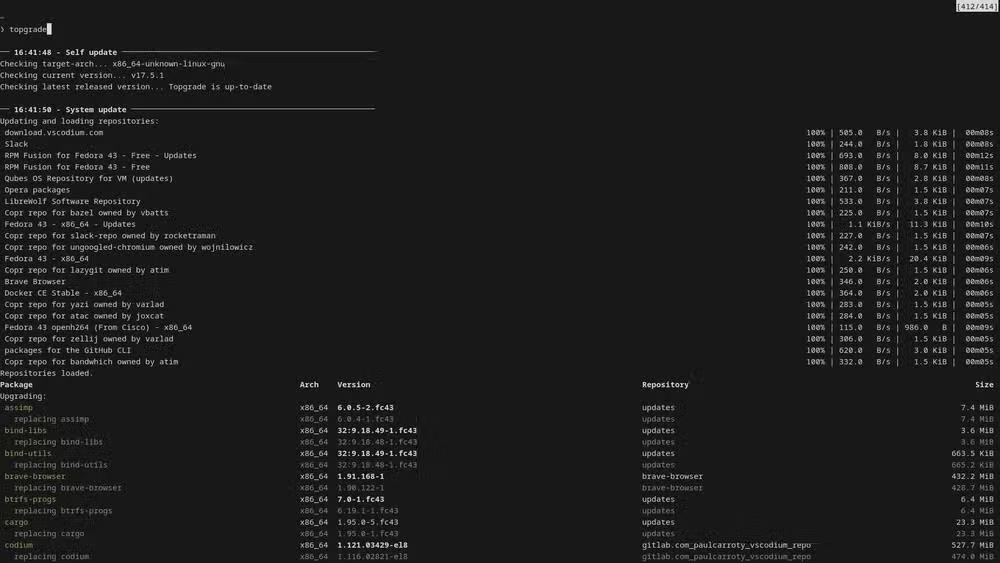
The tool has accumulated 4,200 GitHub stars and become something of a standard utility for Linux enthusiasts who maintain complex environments. It's particularly useful on developer machines where you might have a half-dozen language-specific package managers installed.
“Complexity in the terminal is often just a relic of legacy design; modern tools like Topgrade prove that automation doesn't have to be rigid.”
— Tech Analyst
Topgrade is configurable. You can skip specific package managers, add custom pre-update or post-update commands, and define your own update targets. But out of the box, it works without configuration.
ISD: Making Systemd Almost Pleasant
Systemd manages services on most modern Linux distributions. It's powerful. It's also notorious for its dense syntax. Checking service status, starting, stopping, enabling, disabling, viewing logs, all require different systemctl subcommands with varying flag combinations.
ISD (Interactive Systemd) provides a terminal-based interface for these operations. Instead of typing systemctl status nginx, you navigate to the service in a list and press a key. Enable, disable, restart, view logs, all from the same interface.
This won't replace systemctl for scripts or automation. But for interactive troubleshooting, where you're checking which services are running and maybe restarting one or two, ISD cuts the friction substantially.
The Broader Trend: Abstraction Over Raw Power
These tools share a philosophy. They don't add capabilities that weren't already available. tar can do everything Ouch does. Your package managers already have update commands. systemctl already manages services. What Ouch, Topgrade, and ISD provide is a consistent interface that reduces the number of things you need to remember.
This reflects a broader shift in Linux tooling. Rust-based utilities like ripgrep, fd, bat, and exa have been replacing traditional Unix tools not because they're faster (though some are) but because they're easier to use. Sensible defaults, readable output, consistent syntax.
“The best Linux tool is one that makes you forget you are managing a complex system, and instead, just lets you do your work.”
— Graeme Peacock, Linux Expert and Author at How-To Geek
Community reaction to these tools is mixed. On Reddit's r/linux and r/commandline, enthusiastic adopters praise the improved experience. Minimalists argue that shell aliases solve the same problems with less overhead. The consensus lands somewhere in the middle: these tools aren't essential, but they make terminal work noticeably more pleasant.
Installation and Getting Started
All three tools install via cargo, Rust's package manager. If you don't have Rust installed, that's a prerequisite. Once you do:
cargo install ouch
cargo install topgrade
cargo install isd
Ouch and Topgrade are also available through some distribution package managers. Check your distribution's repositories before compiling from source.
Logicity's Take
Frequently Asked Questions
Are these tools faster than native Linux utilities?
No. Ouch isn't faster than tar, and Topgrade just runs your existing package managers. The benefit is reduced cognitive load, not speed.
Do I need to know Rust to use these tools?
No. You need Rust installed to compile them via cargo, but you don't need to write any Rust code. Pre-built packages are also available on some distributions.
Will Topgrade break my system by updating everything at once?
Topgrade runs the same update commands you would run manually. It doesn't modify the update process itself, just automates running multiple package managers in sequence.
Can I use ISD in scripts or only interactively?
ISD is designed for interactive use. For scripting, stick with systemctl directly.
Another tool that simplifies a traditionally complex Linux workflow
Need Help Implementing This?
Source: How-To Geek
Huma Shazia
Senior AI & Tech Writer
اقرأ أيضاً

رأي مغاير: كيف يؤثر اختراق الأمن الداخلي الأميركي على شركاتنا الخاصة؟
في ظل اختراق عقود الأمن الداخلي الأميركي مع شركات خاصة، نناقش تأثير هذا الاختراق على مستقبل الأمن السيبراني. نستعرض الإحصاءات الموثوقة ونناقش كيف يمكن للشركات الخاصة أن تتعامل مع هذا التهديد. استمتع بقراءة هذا التحليل العميق

الإنسان في زمن ما بعد الوجود البشري: نحو نظام للتعايش بين الإنسان والروبوت - Centre for Arab Unity Studies
في هذا المقال، سنناقش كيف يمكن للبشر والروبوتات التعايش في نظام متكامل. سنستعرض التحديات والحلول المحتملة التي تضعها شركات مثل جوجل وأمازون. كما سنلقي نظرة على التوقعات المستقبلية وفقًا لتقرير ماكنزي

إطلاق ناسا لمهمة مأهولة إلى القمر: خطوة تاريخية نحو استكشاف الفضاء
تعتبر المهمة الجديدة خطوة هامة نحو استكشاف الفضاء وتطوير التكنولوجيا. سوف تشمل المهمة إرسال رواد فضاء إلى سطح القمر لconducting تجارب علمية. ستسهم هذه المهمة في تطوير فهمنا للفضاء وتحسين التكنولوجيا المستخدمة في استكشاف الفضاء.