2 Linux Distros That Let You Skip the Terminal Entirely
Key Takeaways
- Zorin OS mimics Windows closely and can run Windows applications, making it ideal for users migrating from Microsoft's ecosystem.
- Nobara Project, built by the creator of Proton-GE, comes pre-configured for gaming with all drivers and codecs ready out of the box.
- Both distros handle driver management, software installation, and system updates through point-and-click interfaces.
The Terminal-Free Promise
The Linux terminal has a reputation problem. For decades, switching to Linux meant learning cryptic commands, editing configuration files, and troubleshooting dependency errors. That reputation persists even as modern distributions have quietly eliminated the need for command-line work in everyday use.
Two distributions now stand out for users who want Linux's benefits without the steep learning curve: Zorin OS and the Nobara Project. Both target specific user groups. Zorin is built for Windows refugees who need their familiar interface and apps. Nobara is built for gamers who want Linux to just work with their Steam library.
Zorin OS: Windows Without Microsoft
Zorin OS is an Ubuntu-based distribution built specifically for people leaving Windows. Its desktop looks and feels like Windows 10 or 11, with a start menu, taskbar, and system tray in the expected locations. The goal is to eliminate the disorientation that comes with switching operating systems.
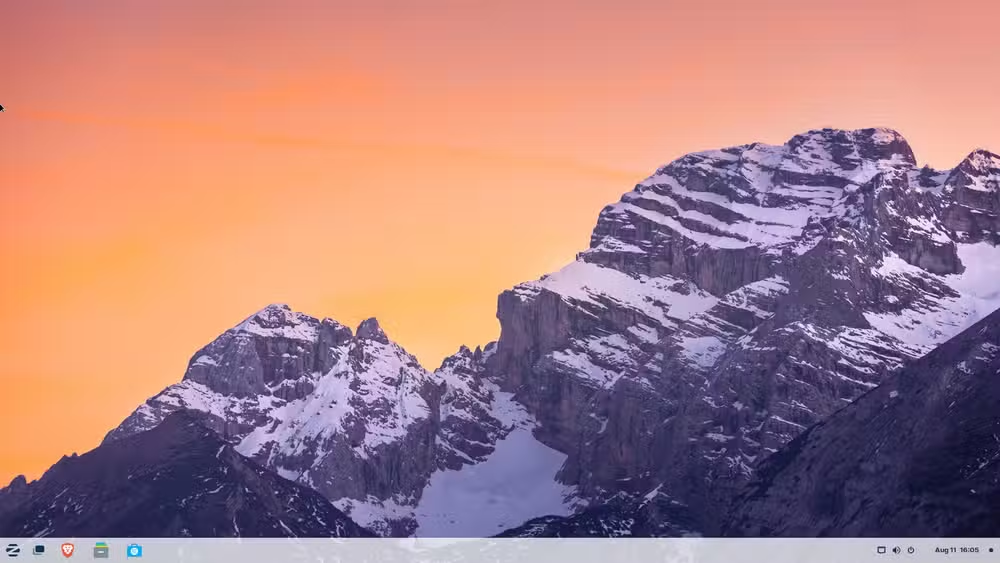
“Even something as simple as muscle memory—like the start menu and the taskbar not being in the right place—was already a big enough hurdle... Zorin OS respects that.”
— Artyom Zorin, Co-founder of Zorin OS
The installation process is entirely graphical. No terminal required. After installation, Zorin automatically sets up drivers for your graphics card, Wi-Fi adapter, and other hardware. If something doesn't work, you can manage drivers through Ubuntu's Software & Updates app, a point-and-click interface.
Zorin OS 18 hit 2 million downloads within its first three months. According to the company, 75% of those users migrated directly from Windows or macOS. The distribution includes a compatibility layer that can run many Windows applications, which helps users who aren't ready to abandon their existing software.
What You Get Without the Terminal
- Software installation through a graphical app store
- System updates via a visual update manager
- Driver management through the Software & Updates GUI
- Windows application support through built-in compatibility tools
- Appearance customization without editing config files
Nobara Project: Linux Gaming Without the Headaches
The Nobara Project takes a different approach. Built by Thomas Crider, the developer behind Proton-GE (a popular compatibility layer for running Windows games on Linux), Nobara targets gamers specifically. It's a Fedora-based distribution that comes pre-configured with everything needed to game on day one.
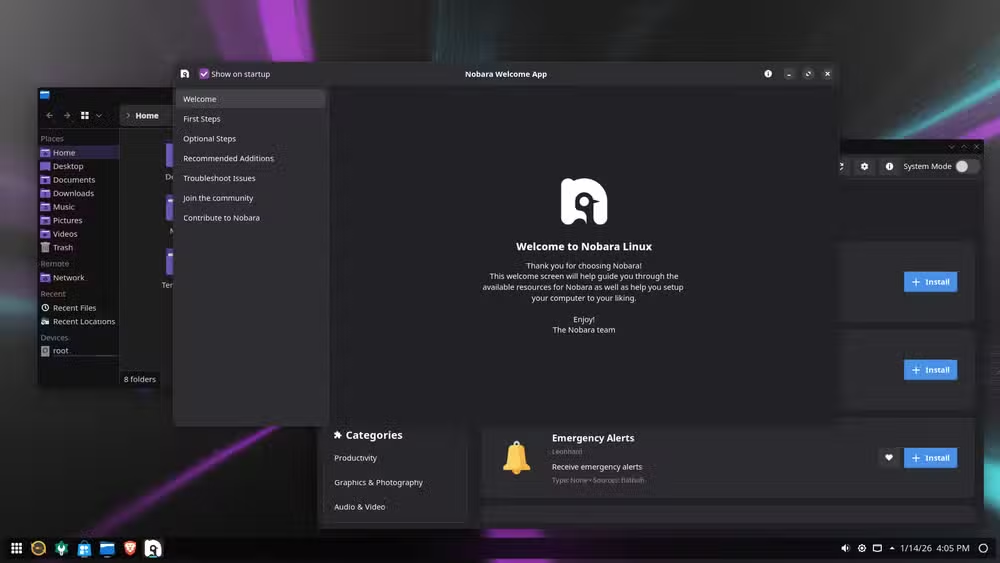
“More importantly, we want to be more point-and-click friendly, and avoid the basic user from having to open the terminal.”
— Thomas Crider, Creator of Nobara Project
On a typical Linux installation, getting games to run requires installing graphics drivers, adding Steam, configuring Proton, installing media codecs, and tweaking various settings. Nobara handles all of this during installation. Graphics drivers, gaming utilities, and multimedia codecs are all included and configured.
The distribution's target audience is clear when you look at Linux gaming statistics. By late 2025, Linux usage among Steam gamers reached 3.05%, driven largely by the Steam Deck and "Deck-like" distributions. Nobara positions itself as a desktop version of that experience.
Gaming Features Out of the Box
- AMD, NVIDIA, and Intel graphics drivers pre-installed
- Proton-GE and other compatibility layers ready to use
- Steam, Lutris, and gaming utilities included
- Multimedia codecs for streaming and video playback
- OBS Studio and other content creation tools pre-configured
Comparing the Two Approaches
Zorin and Nobara solve different problems. Zorin prioritizes familiarity and Windows compatibility. Nobara prioritizes gaming performance and out-of-box functionality. Your choice depends on what you need Linux to do.
| Feature | Zorin OS | Nobara Project |
|---|---|---|
| Base Distribution | Ubuntu LTS | Fedora (rolling) |
| Primary Target | Windows migrants | Gamers |
| Desktop Environment | GNOME (Windows-style) | KDE or GNOME |
| Windows App Support | Built-in via WINE/Bottles | Available but not focus |
| Gaming Pre-configuration | Minimal | Extensive |
| Update Frequency | LTS cycle (stable) | Rolling (frequent) |
Both distributions offer graphical tools for package management, system updates, and driver installation. Neither requires the terminal for daily use. The difference is in what they optimize for.
Why Now? The Windows 10 Factor
Windows 10 reached end-of-life in October 2025. Microsoft's strict hardware requirements for Windows 11, particularly the TPM 2.0 mandate, left millions of functional PCs unable to upgrade. Many of those users now face a choice: buy new hardware, run an unsupported operating system, or try something else.
Linux has positioned itself as that "something else." The historic 5.03% desktop market share reflects this migration. Distributions like Zorin OS are designed specifically to catch these users, offering a Windows-like experience on hardware that Microsoft no longer supports.
More on Microsoft's current security and support challenges
The Reality Check
"Terminal-free" doesn't mean "never touch the terminal." Edge cases exist. Some software isn't in the graphical app stores. Some troubleshooting is easier with a command or two. But for routine use, browsing, office work, media consumption, and gaming, these distributions genuinely deliver on the promise.
The terminal remains available for users who want it. But the key difference from a decade ago is that you no longer need it to have a functional, secure, and updated system.
✅ Pros
- • Both distros handle drivers, updates, and software through GUIs
- • Zorin offers genuine Windows-like familiarity and app compatibility
- • Nobara eliminates the gaming setup headaches that plague other distros
- • Neither requires terminal knowledge for daily use
❌ Cons
- • Niche software or advanced customization may still require terminal
- • Community troubleshooting advice often assumes terminal familiarity
- • Rolling releases (Nobara) can occasionally break with updates
- • Some Windows applications still don't work even with compatibility layers
Getting Started
Both distributions offer straightforward installation. Download the ISO from the official website, create a bootable USB drive using a tool like Rufus or Balena Etcher, and boot from it. The graphical installers guide you through the process.
For users leaving Windows, Zorin OS is the safer first step. The interface is familiar, and the learning curve is gentle. For gamers who primarily want to play their Steam library, Nobara removes the friction that usually comes with Linux gaming setup.
Logicity's Take
Frequently Asked Questions
Can I run Microsoft Office on Zorin OS?
Zorin OS includes compatibility tools that can run some versions of Microsoft Office. However, most users find LibreOffice (included by default) or the web-based Microsoft 365 sufficient alternatives.
Will my Steam games work on Nobara without configuration?
Most Steam games work out of the box on Nobara thanks to pre-installed Proton compatibility layers. Check ProtonDB for compatibility ratings on specific titles.
Is Zorin OS free?
Zorin OS offers a free Core edition and a paid Pro edition. The Pro version includes additional desktop layouts and pre-installed software, but the Core edition covers most users' needs.
How often does Nobara receive updates?
Nobara is based on Fedora and follows a rolling release model. Updates are frequent, sometimes weekly, which means newer software but occasional instability.
Can I dual-boot these distributions with Windows?
Yes, both Zorin OS and Nobara support dual-boot configurations. Their installers can detect existing Windows installations and set up a boot menu.
Need Help Implementing This?
Source: How-To Geek
Huma Shazia
Senior AI & Tech Writer
اقرأ أيضاً

رأي مغاير: كيف يؤثر اختراق الأمن الداخلي الأميركي على شركاتنا الخاصة؟
في ظل اختراق عقود الأمن الداخلي الأميركي مع شركات خاصة، نناقش تأثير هذا الاختراق على مستقبل الأمن السيبراني. نستعرض الإحصاءات الموثوقة ونناقش كيف يمكن للشركات الخاصة أن تتعامل مع هذا التهديد. استمتع بقراءة هذا التحليل العميق

الإنسان في زمن ما بعد الوجود البشري: نحو نظام للتعايش بين الإنسان والروبوت - Centre for Arab Unity Studies
في هذا المقال، سنناقش كيف يمكن للبشر والروبوتات التعايش في نظام متكامل. سنستعرض التحديات والحلول المحتملة التي تضعها شركات مثل جوجل وأمازون. كما سنلقي نظرة على التوقعات المستقبلية وفقًا لتقرير ماكنزي

إطلاق ناسا لمهمة مأهولة إلى القمر: خطوة تاريخية نحو استكشاف الفضاء
تعتبر المهمة الجديدة خطوة هامة نحو استكشاف الفضاء وتطوير التكنولوجيا. سوف تشمل المهمة إرسال رواد فضاء إلى سطح القمر لconducting تجارب علمية. ستسهم هذه المهمة في تطوير فهمنا للفضاء وتحسين التكنولوجيا المستخدمة في استكشاف الفضاء.